Best Project Planning Tools for US Teams: 2026 Shortlist

The best project planning tools for most US teams are Seven, monday.com, and ClickUp — with Seven as the recommended pick for privacy-conscious teams that want straightforward task management without data mining or vendor lock-in. monday.com wins for cross-functional workflow automation, and ClickUp for teams consolidating multiple tools into one workspace.
Here’s where to start:
- Try Seven if your team handles sensitive project data and wants transparent pricing with no hidden AI add-ons. Start a 7-day free trial and import your existing spreadsheet on day one.
- Try monday.com if you run cross-department workflows and need highly configurable automation.
- Try ClickUp if you’re currently paying for three separate tools (tasks, docs, time tracking) and want to consolidate.
Pro Tip: Before signing up for anything, export one real project from your current tool as a CSV or Excel file. If the new platform can’t import it cleanly in under five minutes, that’s your answer.
Key Takeaways
The best project planning tool is the one that matches your workflow type, respects your data, and your team will actually use six months from now.
| Point | Details |
|---|---|
| Match tool to workflow type | Software teams need Jira; spreadsheet PMOs need Smartsheet; small teams need Seven or Asana. |
| Test free tiers carefully | Check upload limits, user caps, and integration allowances — not just the feature list. |
| Data export is non-negotiable | Confirm CSV or Excel export is available on your plan before committing to any tool. |
| Seven for privacy-first teams | Excel import, open data export, and no data mining make it the top pick for small teams and PMOs handling sensitive work. |
| Run a pilot on a real project | Two weeks with live data reveals friction points that a demo never will. |
Table of Contents
- How do the best project planning tools compare side by side?
- Expert reviews: what each tool actually does best
- How to choose the right project planning tool for your team
- How we evaluated these tools
- Why Seven is our recommended pick
- When I choose Seven vs. another tool
- Seven: get started in under 10 minutes
- Sources
How do the best project planning tools compare side by side?
The table below covers the eight most-evaluated tools across the dimensions that actually drive buying decisions. Pricing notes follow underneath.
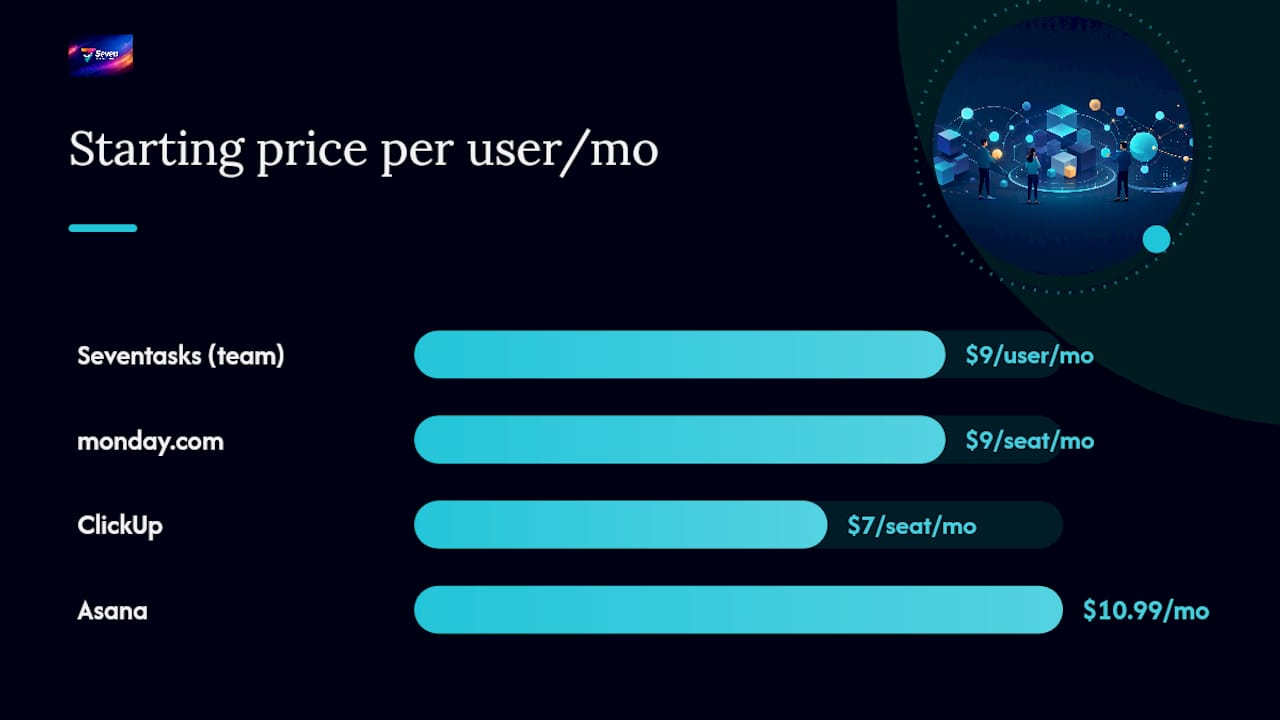
| Tool | Best for | Starting price / free tier | Standout feature | Ease of setup | Key views | Integrations & automation | Reporting / resource mgmt | Ideal team size |
|---|---|---|---|---|---|---|---|---|
| monday.com | Cross-department workflow automation | Free tier (2 seats); paid from ~$9/seat/mo | Configurable boards and cross-team automation | Low–medium | Kanban, Gantt, Timeline, Calendar | 200+ integrations, native automation | Workload and portfolio views | Mid to large teams |
| ClickUp | Consolidating multiple tools into one | Free tier; paid from ~$7/seat/mo | All-in-one: tasks, docs, Gantt, time tracking | Medium | Kanban, Gantt, Timeline, List, Whiteboard | 1,000+ integrations, AI add-on | Goals, dashboards, time reports | Small to enterprise |
| Asana | Quick adoption and individual task ownership | Free tier (up to 15 users); paid from ~$10.99/seat/mo | My Tasks view and simple task ownership model | Very low | List, Board, Timeline, Calendar | 200+ integrations | Workload view (paid) | Small to mid-size |
| Trello | Visual Kanban for individuals and small teams | Free tier; paid from ~$5/seat/mo | Minimal setup, visual Kanban boards | Lowest | Kanban (Butler automation) | Power-Ups, Slack, Google | Basic card activity | Individuals to small teams |
| Jira | Software development and Agile workflows | Free tier (up to 10 users); paid from ~$7.75/seat/mo | Native Scrum/Kanban, backlog, sprint management | Medium–high | Scrum board, Kanban, Roadmap | 3,000+ Atlassian Marketplace apps | Velocity, burndown, release | Dev teams, mid to large |
| Smartsheet | Spreadsheet-native PMOs and budget tracking | Free tier (30-day trial); paid from ~$9/seat/mo | Formula-driven sheets and Control Center | Low–medium | Grid, Gantt, Card, Calendar | 1,000+ integrations, growing AI features | Resource management, dashboards | Mid-size to enterprise PMOs |
| Wrike | Portfolio governance and enterprise reporting | Free tier; paid from ~$9.80/seat/mo | Portfolio lifecycle management and AI risk engine | Medium–high | List, Board, Gantt, Analytics | 400+ integrations, AI automation | BI dashboards, resource capacity | Large teams and PMOs |
Pricing and free-tier caveats: Free tiers vary widely in what they actually allow. Zapier’s roundup of free project management software flags that upload limits, user caps, and integration allowances are the three most common gotchas — a “free” plan that caps you at two seats or blocks Slack integration isn’t really free for a working team. AI features on ClickUp, Wrike, and monday.com are typically add-ons, not included in base pricing. Seven publishes its pricing flat: $5/month for individuals, a flat monthly rate for teams, with no feature tiers or AI upsells.
Enterprise vs. small teams: Wrike and Smartsheet are purpose-built for larger PMOs that need portfolio-level governance and formula-driven reporting. Celoxis ranks Wrike and Smartsheet among the strongest options for enterprise PPM depth. For teams under 20 people, Seven, Asana, or Trello will cover 90% of real project needs without the configuration overhead.
Expert reviews: what each tool actually does best
Seven
Seven is built around one premise most platforms ignore: your project data belongs to you. There’s no analytics resale, no AI training on your tasks, and no vendor lock-in. You can export everything in open formats at any time.
Best for: Privacy-minded small teams, freelancers, and PMOs that want clean task and project tracking without complexity.
- Flexible workspaces and boards with task and subtask management
- Built-in messaging and file attachments keep communication in context
- Excel import means you can migrate from a spreadsheet in minutes, not days
Cons: Fewer native integrations than ClickUp or monday.com; reporting is task-focused rather than portfolio-level.
Standout: The combination of Excel import, open data export, and a no-data-mining policy is genuinely rare at this price point.

monday.com
monday.com is the most configurable board-centric platform on this list. Different departments can build entirely different workflows on the same account, which is its biggest strength and its biggest governance risk. TechnologyAdvice’s hands-on testing found it excels at cross-functional workflow automation — marketing, ops, and product can each run their own board structure while sharing dashboards.
Best for: Mid-to-large teams where multiple departments need different workflows but shared visibility.
- Highly configurable boards with 200+ integrations
- Native automation builder requires no coding
- Strong workload and portfolio views on paid plans
Cons: Can become disorganized quickly without governance rules; pricing scales steeply per seat.
ClickUp
ClickUp is the platform you choose when you’re tired of paying for Asana, Notion, Harvest, and a Gantt tool separately. Tasks, docs, time tracking, Gantt charts, and whiteboards live in one workspace. That breadth is also its learning curve: new users often spend the first week just deciding how to set up their hierarchy.
Best for: Teams consolidating multiple point tools into a single workspace.
- All-in-one feature set covers tasks, docs, sprints, and time tracking
- 1,000+ integrations and a growing AI feature set
- Generous free tier for small teams
Cons: Feature density can overwhelm new users; AI features cost extra.
Pro Tip: If you’re migrating to ClickUp from multiple tools, map your existing workflow on paper first. Trying to replicate three different tool structures inside ClickUp without a plan is how teams end up with 47 unused views.
Asana
Asana is the easiest platform on this list to get a team using on day one. The My Tasks view gives every team member a personal task inbox, which cuts the “I didn’t know that was assigned to me” problem immediately. It’s not the deepest tool for complex project dependencies, but for recurring operational workflows and cross-functional handoffs, it’s hard to beat for adoption speed.
Best for: Teams that prioritize fast onboarding and clear individual task ownership.
- My Tasks view and simple assignment model
- 200+ integrations including Slack and Google Workspace
- Clean mobile app
Cons: Workload view and timeline are paid-only; limited formula/reporting depth.
Trello
Trello is the simplest tool on this list, and that’s the point. A Kanban board, cards, and a few Power-Ups. ICAgile’s hands-on review of personal project management tools highlights Trello’s minimal setup as its core advantage for individuals and very small teams. If your project fits on a board with three columns, Trello is faster than anything else here.
Best for: Individuals and small teams that want visual Kanban planning with zero configuration.
- Lowest learning curve on the list
- Free tier is genuinely usable for small teams
- Butler automation handles basic repetitive card actions
Cons: No native Gantt or timeline; limited reporting; scales poorly past 10 users.
Jira
Jira is the standard for software development teams running Scrum or Kanban. Backlog management, sprint planning, velocity charts, and release tracking are native — not bolted on. The Atlassian Marketplace offers 3,000+ integrations, including deep connections to GitHub, Bitbucket, and Confluence. Celoxis confirms Jira as the recommended choice for dev teams that need Agile workflow depth.
Best for: Engineering teams practicing Scrum or Kanban with backlog and release management needs.
- Native Agile workflows: Scrum boards, Kanban, roadmaps
- Deep developer-tool integrations (GitHub, Bitbucket, CI/CD pipelines)
- Strong velocity and burndown reporting
Cons: Steep learning curve for non-technical users; configuration complexity grows fast.
Smartsheet
Smartsheet keeps formula-based processes native, which is exactly why PMOs that live in Excel love it. You don’t have to abandon your budget model or your resource-tracking sheet — you just move it into a platform with collaboration, automation, and dashboards built on top. TechnologyAdvice’s review calls it the strongest pick for spreadsheet-native teams.
Best for: Spreadsheet-first PMOs that rely on formulas for budgeting and reporting.
- Formula-driven sheets with Excel-like syntax
- Control Center for process automation across multiple projects
- Resource management and portfolio dashboards
Cons: Less intuitive for teams unfamiliar with spreadsheet logic; pricing jumps significantly at enterprise tiers.
Wrike
Wrike is built for organizations managing large project portfolios where risk visibility and governance matter as much as task tracking. Its AI risk engine flags stalled projects before they become problems, and its BI dashboards connect to external data sources. Project-management consistently place Wrike among the top options for enterprise-scale PMOs.
Best for: Larger teams and PMOs that need portfolio governance, AI risk signals, and BI dashboards.
- Portfolio lifecycle management with AI risk flagging
- 400+ integrations and enterprise-grade security
- BI dashboards with external data connectivity
Cons: Overkill for teams under 25 people; pricing reflects enterprise positioning.
How to choose the right project planning tool for your team
The decision comes down to four questions. Answer them honestly before you start a trial.
1. What’s your team’s actual workflow type? Software sprints need Jira. Spreadsheet-heavy budgets need Smartsheet. Visual task tracking for a small team needs Trello or Seven. Cross-department automation needs monday.com. Matching the tool to the workflow type eliminates half the list immediately.
2. How much configuration can your team realistically maintain? ClickUp and monday.com can do almost anything — but someone has to set them up and keep them organized. If you don’t have a dedicated ops person or project admin, a simpler tool used consistently beats a powerful tool used inconsistently.
3. What does your data need to do after you leave? This is the question most teams skip. If you can’t export your tasks, attachments, and history in a standard format, you’re locked in. Seven exports everything in open formats. Check every tool’s export policy before you commit.
4. What’s the real per-user cost at your team’s size? A $7/seat/month tool for 30 users is $2,520/year. Add AI features, premium support, and SSO, and that number often doubles. Run the math at your actual team size, not the entry-level tier.
Must-have vs. nice-to-have features
Must-have for most teams:
- Task assignment with due dates and status tracking
- At least one visual view (Kanban or Gantt)
- Slack or Google Workspace integration
- Mobile app with full task editing
- Data export in CSV or Excel format
Nice-to-have (evaluate during trial):
- Time tracking
- Portfolio or workload dashboards
- Formula-based reporting
- AI automation
Red flags to watch during a trial
- No CSV/Excel export, or export is locked behind a higher tier
- Pricing page requires a sales call to get actual numbers
- Mobile app is read-only or missing key features
- Free tier blocks integrations entirely
- Support is email-only with no live chat or documentation
Zapier’s evaluation guide specifically recommends testing upload limits, user caps, and integration allowances during any free trial — these are the features vendors most commonly restrict to push upgrades.
Pro Tip: Run a two-week pilot with one real project, not a test project. Fake data never reveals the friction points that matter.
How we evaluated these tools
Every tool on this list was assessed across eight categories, weighted by how much each factor drives real buying decisions for US teams.
Testing steps:
- Hands-on demo and free-trial activation for each platform
- Sample project import using a real Excel task list (20 tasks, 3 assignees, due dates)
- Integration test: Slack notification on task completion; Google Calendar sync
- Mobile testing on iOS for task creation, assignment, and status update
- Pricing verification against published vendor pages
- Cross-referenced against TechnologyAdvice’s editorial review, Celoxis’s PMO guide, and Project-Management.com’s expert rankings
Testing was conducted in early 2026 against each platform’s current production version.
Why Seven is our recommended pick
Seven earns the top recommendation for one reason most comparison articles overlook: it’s the only platform on this list that explicitly commits to not mining your project data, not training AI on your tasks, and not selling analytics derived from your work.
For freelancers, small business owners, and PMOs handling client work or sensitive internal data, that’s not a minor footnote. It’s a material difference.
What you get with Seven:
- Flexible workspaces and boards with task and subtask management
- Built-in messaging and file attachments, so conversations stay attached to work
- Excel import for migrating from spreadsheets in minutes
- Open data export with no vendor lock-in
- Due date tracking and overdue alerts
- Security and compliance commitments that cover data handling, privacy, and user independence
Pricing: $5/month for individuals, a flat monthly rate for teams, with a 7-day free trial. No feature tiers, no AI upsell, no hidden per-seat minimums. See the full pricing breakdown here.
Who should choose Seven:
- Freelancers and consultants managing client projects who can’t afford a data breach or data-sharing clause
- Small business owners who want a clean task system without enterprise complexity
- Remote teams that need built-in messaging and file sharing without adding another tool
- PMOs that want straightforward project tracking and the ability to export everything to Excel at any time
Pro Tip: On your first day, import your existing project spreadsheet using the Excel import feature. You’ll have a working board in under 10 minutes — and you’ll immediately see whether the tool fits your workflow before the trial ends.
When I choose Seven vs. another tool
The honest answer is that tool choice depends on what the project actually demands, not brand loyalty.
For a client project with sensitive deliverables, a small team, and a need to hand off clean data at the end of an engagement, Seven is the clear choice. The privacy posture, the Excel import, and the flat pricing make it the lowest-friction option for that scenario.
For a PMO managing a 50-person portfolio with earned value tracking and resource capacity planning, Wrike or Smartsheet is the more honest recommendation. Seven doesn’t yet offer portfolio-level BI dashboards or formula-driven budget sheets at that scale.
For a software development team running two-week sprints with GitHub integration and velocity charts, Jira is the right tool. No other platform on this list handles Agile developer workflows as natively.
The heuristic: if your primary concern is data ownership, simplicity, and cost, Seven wins. If your primary concern is a specific workflow type (Agile dev, spreadsheet budgeting, enterprise portfolio), match the tool to that workflow first, then evaluate privacy and pricing second.
Seven: get started in under 10 minutes
Most teams spend more time evaluating project tools than it takes to actually start using one. Seven is built to close that gap.

Here’s how to run a real pilot in one week: sign up at Seven, import your current project spreadsheet on day one, invite three to five teammates, and assign one live project. By day three, you’ll know whether the board structure fits your workflow. By day seven, you’ll have tested mobile task updates, built-in messaging, and the Slack integration.
The privacy-first positioning, flat transparent team pricing, and open data export mean you’re not making a long-term commitment to find out. Check the pricing and trial terms before you start — everything is published, no sales call required.
Sources
The following sources were used to cross-check product claims, validate pricing, and build the shortlist:
- 7 Best Project Planning Tools in 2026: The PMO & Portfolio Manager’s Definitive Guide - Celoxis®
- 6 Best Project Management Software I Reviewed for 2026
- The best free project management software in 2026 - Zapier
- Best Project Management Software Reviewed by Experts