30–60 Day Pilot to Choose Project Management Software That Sticks

Choose project management software by defining your outcomes first, picking the right platform type for how your team works, scoring vendors with a weighted scorecard, then piloting the top two or three with real projects before you sign anything. Usability beats feature count almost every time. If you want a privacy-first option to include in that pilot, Seven is worth a look.
TL;DR:
- Usability and quick adoption are critical; a tool that team members open daily is more valuable than one with endless features that remain unused.
- Shortlisting should focus on platform type matching your needs, with evaluating only two to four top candidates through a structured pilot process.
- Pilots must involve real projects and diverse users over 30 to 60 days, with measurable success criteria like task creation speed and reporting accuracy.
- Pricing transparency and long-term cost modeling are essential; consider total ownership costs including seats, migration, training, and potential add-ons.
- Seven offers a simple, privacy-first option at $5 to $9 per user with straightforward import, export, and no hidden analytics, ideal for small teams or freelancers.
Table of Contents
- What to prioritise when you choose project management software
- Which platform type fits your team, and how do you score vendors?
- How do you pilot shortlisted tools before you commit?
- Pricing and total cost of ownership: what will this actually cost?
- What should you ask vendors in a demo to verify their claims?
- What selection traps cause teams to abandon their new tool?
- An expert perspective on usability and privacy in software selection
- Why usability, not feature count, decides this
- Try Seven during your pilot
- Sources
What to prioritise when you choose project management software
Most teams start the wrong way. They open a spreadsheet, list every feature they can imagine, and start ticking boxes on a dozen vendor websites. That approach produces a long list of tools that all look roughly the same, because most project management software now offers task views, some form of automation, and a reporting dashboard. The list doesn’t tell you which one your team will actually open every morning.
The better starting point is outcomes, not features. What does “successful” look like in three months? Fewer missed deadlines? Faster client reporting? One place instead of four spreadsheets and a shared inbox? Write that down before you look at a single vendor page. Everything else in your evaluation should trace back to that sentence.
Core capability categories worth ranking, in rough order of impact:
- Task and view flexibility — boards, lists, calendars, and timelines that match how your team actually plans work, not just how the vendor’s marketing screenshots look.
- Automation — recurring tasks, status triggers, and notification rules that remove manual admin without needing a specialist to configure them.
- Reporting — dashboards that a manager can read in under a minute, not custom report builders that need a training session.
- Resource management — workload views that show who’s overloaded before a deadline, not after.
- Collaboration and messaging — comments, file attachments, and built-in chat that keep context attached to the task instead of scattered across email threads.
Adoption is the criterion that decides whether any of the above matters. A tool with brilliant reporting that nobody opens produces zero reports. Look specifically at time-to-adopt: how long does a new team member need before they can create and update a task without asking for help? Vendors with ready-made templates for common workflows (a marketing campaign board, a client onboarding checklist) cut that time dramatically compared with a blank workspace. Admin burden matters just as much. Ask who configures permissions, who manages user licences, and how much ongoing maintenance the platform needs. A tool that requires a part-time administrator to keep running is a different total investment than the sticker price suggests.
If you work in a regulated industry, run a quick security and compliance check before you go further: data residency options, access controls, audit logs, and whether the vendor trains any AI model on your data. This deserves its own short review with IT or legal, not a single tick box buried in a feature comparison. Note it now and come back to it properly once you’ve narrowed your shortlist.
The reason long feature lists make poor selection tools is straightforward. Feature parity across mainstream project management software is now common. What separates the tools that get used from the tools that get abandoned after six weeks is almost always usability, not capability. Experts researching evaluation criteria consistently find that usability gets deprioritised in favour of feature checklists, and that’s precisely the pattern behind most failed rollouts.
Pro Tip: Before comparing a single vendor, get three team members to write down their current workaround for the biggest project management headache. If their answers involve spreadsheets, sticky notes, or a shared inbox, that’s your actual requirement, not “advanced Gantt charts.”
Which platform type fits your team, and how do you score vendors?
Project management software splits into a handful of platform types, and matching your team to the right type matters more than comparing individual features across all of them. Trying to evaluate a lightweight team tool against an enterprise portfolio platform on the same scorecard wastes time, because they solve different problems.
1. Team work management tools. Built for small to mid-sized teams running day-to-day projects: marketing campaigns, product launches, client work. They prioritise simple boards, task assignment, and fast onboarding over deep reporting. This is where most small businesses and remote teams belong.
2. PMO and portfolio platforms. Designed for organisations running many projects at once under a central management office. They add resource forecasting across projects, budget tracking, and executive roll-up reporting, at the cost of a steeper learning curve and higher licence cost.
3. Engineering and product platforms. Built around sprints, backlogs, and issue tracking, with tight integration into code repositories and release pipelines. Wrong fit for a marketing team, essential for a software team.
4. Agency and client-services platforms. Focused on time tracking, billable hours, client-facing views, and retainer management. If your revenue model runs on billable time, this category solves problems the other three don’t.
Editorial reviews and buyer guides consistently point to the same starting move: classify your need by platform type first, then shortlist within it, rather than comparing software features across categories that were never built to solve the same problem.
Once you know your type, build a weighted scorecard. Keep it to between three and five criteria. Evaluation fatigue is real when a scorecard balloons past that, and longer criteria lists tend to produce worse decisions, not better ones, because every stakeholder starts weighting different things and nobody agrees on the winner.
A workable weight distribution for a typical team work management search looks like this:
| Criterion | Weight | What you’re actually scoring |
|---|---|---|
| Adoption and usability | 30% | Time for a new user to become productive unassisted |
| Core workflow fit | 25% | Does the tool match how your team actually plans and tracks work |
| Reporting and visibility | 15% | Can a manager get a status update without asking someone to build a report |
| Integrations | 15% | Does it connect to the tools you already run without custom development |
| Price and total cost | 15% | Per-user cost at your actual headcount, including add-ons |
Score each shortlisted vendor from one to five on each criterion, multiply by the weight, and total it. When two vendors land within a point of each other, don’t agonise. Use adoption speed as the tiebreaker every time. A tool your team opens without friction beats a marginally more capable tool they resent using.
Reducing a long list to a shortlist:
- Cut anything that doesn’t match your platform type, regardless of how good the reviews are.
- Cut anything priced well outside your budget band before you demo it, not after.
- Score the remaining vendors against your weighted criteria using publicly available information and one sales call.
- Keep only the top two to four scorers for a full pilot. Evaluating more than four in parallel is where most selection processes stall.
That last point matters more than it looks. Buyers who finish their evaluation within roughly three months tend to make better decisions than those who drag it out, according to PMI’s guidance on software selection. Extended timelines don’t produce more certainty. They produce stakeholder fatigue and a default to whatever tool is easiest to agree on, which is rarely the best fit.
How do you pilot shortlisted tools before you commit?
A demo tells you what a vendor wants you to see. A pilot tells you what actually happens when your team uses the tool on real work. Run one for every finalist before you sign a contract, no exceptions.
- Pick two real, live projects, not a fake sandbox project built purely for testing. One should be simple and short, one should be complex enough to stress workflows, permissions, and reporting.
- Select representative users, not just your most tech-confident team member. Include at least one person who resists new tools. If they can adopt it without hand-holding, most people can.
- Set measurable outcomes before you start, not after. Decide in advance what “this worked” looks like: for example, zero reversion to spreadsheets after two weeks, and an executive summary report generated without support tickets.
- Test workflow fit directly, using the actual task types, approval chains, and naming conventions your team uses today.
- Test integrations under real load, connecting at least one or two of the tools you can’t do without (email, file storage, calendar) and running an automated workflow through them, not just checking a box that says “integrates with X.”
- Track admin burden throughout, logging every time someone needs to contact support, watch a tutorial, or ask a colleague how to do something basic.
- Time the onboarding, from account creation to a new user creating their first task unassisted.
Run this over 30 to 60 days. Shorter and you won’t see what happens once the novelty wears off; longer and you risk losing momentum, according to the decision framework PMWorld 360 lays out for structured software pilots.
Set minimum success criteria upfront: adoption holding steady without reversion to old habits, reporting that a manager can generate without help, and no integration failures on your critical connections. If a tool fails any one of those three during the pilot, it fails the pilot, regardless of how impressive the sales demo was.
The most common pilot mistake is running it with a fake project. The second most common is skipping representative users and testing only with the people who requested the tool in the first place, which guarantees an artificially positive result.
Pro Tip: Assign one person to log every support ticket, tutorial, and “can you show me how to” question during the pilot. That list becomes your real admin-burden score, and it’s usually far more revealing than anything in the sales deck.
Pricing and total cost of ownership: what will this actually cost?
Sticker price is the least useful number in any project management software decision. What matters is the fully loaded cost across an 18 to 36 month window, once you factor in seat growth, add-ons, migration, and training.
Pricing structures generally fall into three shapes. Per-user, per-month pricing is the most common, and it directly gates your cost to headcount, so a tool that looks cheap at ten users can get expensive fast at fifty. Tiered pricing gates by feature: automations, reporting depth, and storage are commonly locked behind higher tiers, so the “starter” price you see advertised often isn’t the price you’ll actually pay once you need real reporting. Flat organisation-wide pricing removes the per-seat penalty but usually comes with a higher entry cost and less flexibility to scale down.
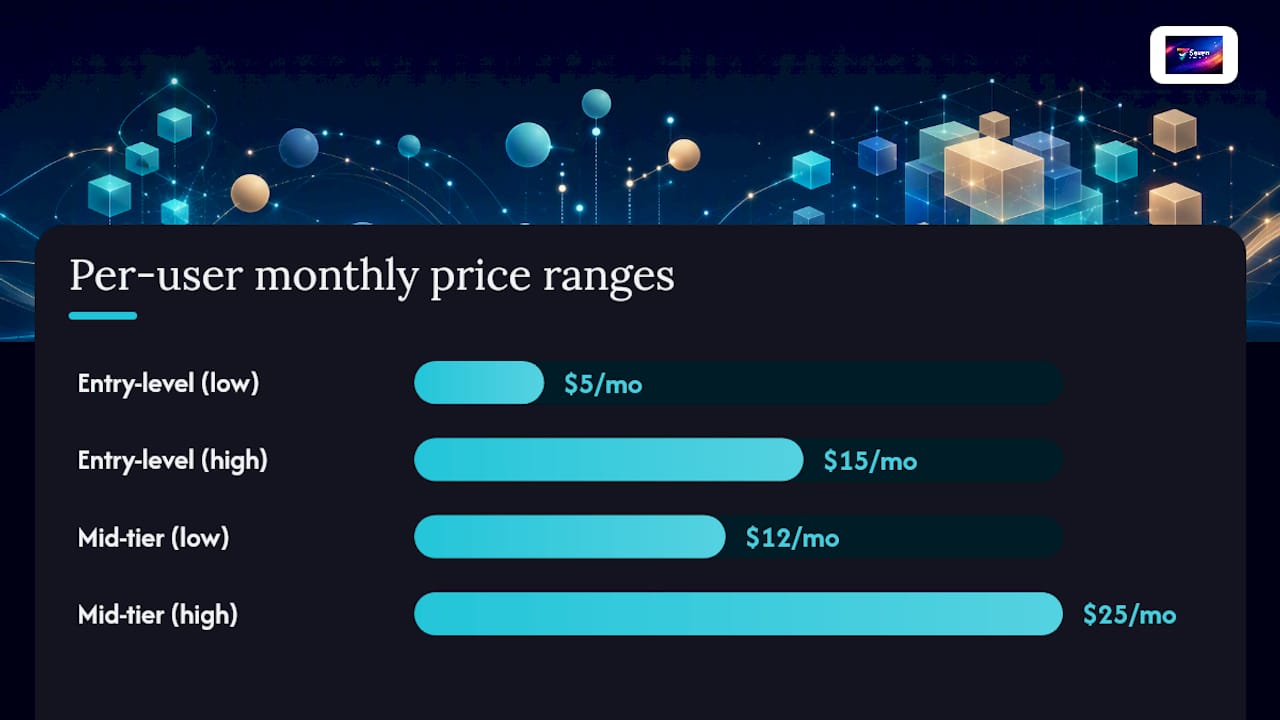
Typical figures worth anchoring your budget against: entry-level paid tiers generally sit around $5 to $15 per user per month, while mid-tier plans with automation and proper reporting run roughly $12 to $25 per user per month. Enterprise tiers are almost always quote-based, which means you negotiate rather than read a price off a page.
Questions worth asking every vendor before you sign:
- What exactly is gated behind each pricing tier, and will we hit that ceiling within a year?
- Is there a minimum seat count or annual commitment, and what’s the cost of adding or removing seats mid-term?
- What does data export look like if we leave, and is there a fee attached to it?
- Are integrations, storage, or advanced permissions extra, or included?
- What does onboarding and training cost beyond the subscription itself?
Free tiers are viable for solo users or very small teams with light needs. They become a false economy the moment your team needs automation, proper reporting, or more than a handful of users, because you’ll end up migrating mid-project anyway, and migration under time pressure is far more expensive than planning for the paid tier from the start.
Pro Tip: Model your cost at your headcount today, and again at your projected headcount in two years. If the vendor’s pricing page doesn’t make that easy to calculate, that’s itself a data point about how transparent they’ll be later.
What should you ask vendors in a demo to verify their claims?
A generic demo shows you the vendor’s best-case scenario. Bring your own scenario instead and make them build it live.
Ask the sales engineer to construct a workflow using your actual project structure, not their template. Then ask for an executive roll-up report generated from that workflow, on the spot. Finally, ask them to change a user’s permission level and show you exactly what that user can and can’t see afterwards. These three tasks expose more about a platform’s real usability than an hour of scripted screens.
Questions that reveal the costs a glossy demo won’t show:
- How many clicks does it take to create a recurring task with a custom approval chain?
- What does user administration look like when someone leaves the team? Is data reassigned automatically or manually?
- Which integrations are native, and which require a third-party connector or custom development?
- Can we export all our data, in full, in an open format, with no fee and no delay?
- What happens to our data if we cancel? Is it deleted immediately, retained, or held hostage behind a support ticket?
- Score every vendor’s demo answers on the spot using the same weighted scorecard from your shortlist stage, not a separate “gut feeling” rating.
- Note any question the vendor couldn’t answer directly. A dodge on data export or permissions is a red flag worth more weight than any feature they showed you.
- Compare notes with every attendee within 24 hours, before memory of the demo fades and everyone’s impressions blur into vague positivity.
What selection traps cause teams to abandon their new tool?
Most failed rollouts don’t fail because the software was bad. They fail because of how it was introduced.
Designate one owner for the rollout, someone with authority to make configuration decisions and settle naming disputes. Without an owner, every team member configures things their own way and the platform fragments within weeks. Limit your must-have requirements to three to five items, tied directly to the outcomes you defined at the start. Anything beyond that becomes negotiable during setup, not a blocker to launch. Standardise templates and naming conventions before anyone starts creating projects freely, because retrofitting consistency onto a system that’s already messy is far harder than setting the standard on day one.
Governance essentials worth setting from the outset:
- A single owner for permissions and licence management.
- An agreed naming convention for projects, boards, and tags.
- A review point at 90 days to check adoption against your original success criteria.
- A rule for archiving completed projects so the active workspace doesn’t get cluttered.
Switching costs are real and worth taking seriously before you commit, not after. Migrating years of task history, file attachments, and workflow configurations between platforms is genuinely painful, and it’s a major reason teams stay with underperforming tools far longer than they should. Start migration planning during the pilot stage, not after signing a contract. Ask vendors exactly how import and export work while you still have leverage to choose someone else. If you’re weighing hosting and infrastructure considerations for how your PM platform connects to other systems, this cloud hosting comparison guide covers the factors worth checking before you commit to an integration-heavy setup.
Pro Tip: Write your naming convention and archiving rule down in a single shared document before launch day, not during it. Teams that skip this step almost always end up with three different names for the same project within a month.
An expert perspective on usability and privacy in software selection
Seven was built around the same conclusion that keeps surfacing across selection research: a tool people actually open beats a tool with more features sitting unused. Seven strips the workspace back to boards, tasks, subtasks, built-in messaging, and file attachments, with Excel import so existing project data doesn’t need re-entry from scratch.
Seven’s pricing sits at $5 for individuals and $9 per user for teams, transparent from the start with no hidden tiers gating basic reporting or automation. It runs with no analytics or AI model training on user data and no vendor lock-in, meaning you can export everything you put in at any point.
What to test on Seven during your pilot:
- Import an existing spreadsheet of tasks and time how long it takes to get a working board.
- Time how long a new team member needs before creating and assigning their first task unassisted.
- Test the export function early, before you’re relying on the platform for live projects, to confirm data portability holds up under the switching-cost concerns raised earlier.
- Check whether built-in messaging genuinely reduces the number of side conversations happening in email or chat apps outside the platform.
Seven suits small businesses, freelancers, and remote teams running team work management workloads well. It’s not built as a PMO portfolio platform with cross-project budget forecasting, and it doesn’t try to be. If your organisation runs dozens of concurrent projects under a central management office, or your team lives inside sprint backlogs tied to a code repository, a platform purpose-built for that category is the more honest fit.
Why usability, not feature count, decides this
The research keeps landing on the same point from different directions: the tool that wins isn’t the one with the longest feature list, it’s the one your least enthusiastic team member opens without complaint. That’s not a soft, feel-good observation. It’s a measurable predictor of whether a rollout survives past the six-week mark.
Where conventional advice falls short is the obsession with feature-matrix comparisons. Every mainstream tool now does boards, automation, and reporting at some level. Comparing those checkboxes wastes weeks on distinctions that don’t determine outcomes. What actually predicts success is time-to-adopt, admin burden, and whether a pilot survives contact with a genuinely reluctant user.
If you take one thing from this framework, take this: run the pilot before you believe the demo. Vendors are good at demos. They’re less consistent at handling a messy, real project with an impatient team member who just wants to log a task and move on. That gap between the pitch and the pilot is where the real decision gets made, and it’s the part most buyers skip.
— Greg
Try Seven during your pilot
If you’ve been comparing platform types and running the numbers on per-user pricing, add one more option to your shortlist: Seven gives you flexible workspaces, built-in messaging, file attachments, and Excel import at $5 for individuals or $9 per user for teams, with no vendor lock-in and no analytics running behind the scenes on your project data.

Use your 30 to 60 day pilot window to genuinely stress-test it. Start with a 7-day trial, import your existing task spreadsheet, assign a real project to a representative user, including your most tool-resistant team member, and check how long it takes them to create and update a task without help. Then test the export function, because a platform that lets you leave freely is one you can trust to stay with. Head to Seven’s product page to start the trial and run those tasks against your own scorecard before you commit to anything longer term.
Sources
A few resources are worth bookmarking as you work through your own evaluation. The PMWorld 360 decision framework lays out the pilot structure referenced throughout this guide, including how to design measurable success criteria. Rework’s evaluation criteria guide is a solid reference for building your own weighted scorecard without overloading it. PMI’s selection guidance is useful for keeping your evaluation timeline realistic. For a deeper look at how small businesses map their own requirements before shortlisting, this guide on picking the right tool walks through the same outcome-first approach applied to a smaller team context.
- Project management software evaluation criteria
- How Teams Choose Project Management Software (Decision Framework) – PMWorld 360 Magazine
- Project management software evaluation criteria (Rework resources)
- How to choose project management software (PMI article)