File storage in project management: a lock-in-free checklist

Yes, an in-app, privacy-first project management platform can store your files without trapping you. The catch is that “can” depends entirely on contract terms and technical guarantees, not on marketing copy about privacy.
File storage in project management only stays safe from vendor lock-in when four things are true at once: you hold explicit export rights, the platform uses standard formats, the API keeps working during a transition, and migration assistance is written into the contract, not promised verbally. A few concrete checks back this up:
- Your contract names CSV, JSON or XML as guaranteed export formats.
- API access continues, unthrottled, for a defined transition window.
- Metadata (owners, timestamps, folder structure) survives the export intact.
- You’ve actually run a test export, not just read a features page.
If you haven’t done that last one yet, do it this week. Request a sample export from any vendor you’re evaluating before you sign anything.
Key Takeaways
File storage in project management only avoids vendor lock-in when export rights, open formats, working APIs and migration assistance are all guaranteed in writing, not implied by a features list.
| Point | Details |
|---|---|
| Contract clauses come first | Lock in ownership, export formats (CSV/JSON/XML), a 30 to 90 day post-termination window, and migration assistance before signing. |
| Test exports during the trial | Run an API export, a manual bulk export, and a re-import test to confirm metadata and file mapping survive intact. |
| Build habits, not one-off checks | Keep an external file inventory, run quarterly export drills, and audit permissions on a fixed schedule. |
| Security and portability are linked | Encryption, role-based access and audit logs matter alongside export rights, not instead of them. |
| Seven bakes this in | Seven combines in-app attachments, open export, and a published security page, with plans from $5/month and a 7-day free trial to test it yourself. |
Table of Contents
- What should file storage in project management actually do?
- Contract checklist: clauses that prevent vendor lock-in
- How do you verify export claims before you sign?
- What daily habits keep your files portable?
- What security and privacy checks matter for in-app files?
- Where does Seven fit in a lock-in-free file storage strategy?
- Frequently asked questions
- Sources
What should file storage in project management actually do?
Attachments dropped into a task should behave like proper documents, not disposable clutter. That means stable links back to the originating task, metadata that survives edits, and a version history you can actually recover, not just a “last modified” timestamp.
A cluttered flat list of files with no folders and no version control is a known failure mode, which is why many professional studios rely on wedding planning templates for organising client files to maintain order and consistency. Native attachments in tools like Jira are often just that: flat lists with no folder structure and no built-in versioning, which forces teams to bolt on separate document systems just to stay organised, according to ikuTeam’s analysis of Jira file management. A privacy-first platform doing in-app storage properly should avoid that trap from day one.
Look for:
- Attachments tied to tasks and subtasks with permanent ownership links.
- Version history you can export or reconstruct, not just view.
- Full-text search plus tags and custom fields, carried through into exports.
- Role-based permissions and an audit trail showing who touched what file and when.
- Bulk export via API in non-proprietary formats.
- Clear storage quotas and documented limits on file size so large uploads don’t choke project workflows.
Centralising documents inside the platform genuinely reduces context switching between five different apps, but that only pays off if metadata and version history survive the move, a point Cartularius’s research on centralised file access makes clearly.
Pro Tip: Before you commit to a platform, upload a file, rename it, edit it twice, then export it. If the version history and the new name both show up cleanly in the export, the platform passed its first real test.
Contract checklist: clauses that prevent vendor lock-in
Features matter, but a contract is what actually protects you when the relationship sours or the vendor changes direction. Most SaaS agreements say nothing about data portability unless you push for it, and by then you’re negotiating from a weaker position.
Five clauses should sit in every project management contract before you sign:
- Ownership: you retain ownership of uploaded content and its metadata, full stop.
- Export formats and frequency: CSV, JSON or XML, available on demand, not just at renewal.
- Post-termination export window: a reasonable period to pull everything out after you cancel.
- API access during transition: no throttling, no paywalling documentation mid-exit.
- Deletion certification: written confirmation your data is gone once the retention window closes.
Detailed contract guidance recommends locking in ownership, standard export formats, defined timeframes and migration assistance as baseline terms, according to Genie AI’s legal strategy guide on SaaS vendor lock-in. Vendors sometimes charge for exports, so negotiate a free export at least once per contract term rather than discovering a fee at the worst possible moment.
Migration assistance is the clause most teams forget to ask for, and it’s the one that matters most once you’ve actually decided to leave. Contracts rarely include usable transition help unless you name specific deliverables: documentation handover, a defined timeline, and a named point of contact during the switch.
Pro Tip: Ask for migration assistance to be a scheduled deliverable with a date attached, not a vague “reasonable assistance” clause. Vague language rarely survives a dispute.
How do you verify export claims before you sign?
Sales demos show you the happy path. What you need is proof the export actually works end to end, with your real data, before you’re locked into an annual plan.
Run this three-step test during any trial:
- Trigger an API export of a sample project with attachments, tags, and at least one file with version history.
- Request a manual bulk export through the platform’s own interface and compare it against the API result.
- Re-import or re-link the exported files into a test environment to confirm folder structure, timestamps, and file-to-task mapping survive intact.
Acceptance criteria should be specific: matching file counts, preserved metadata fields (owner, created date, tags), correct user-to-file mapping, and a folder structure you can actually reproduce. Teams that skip this step often only discover a broken export when it’s too late to matter, which is why an early inventory of hard-to-recreate assets, files, identities, and configuration data reduces migration risk significantly, per Volanea’s guide to SaaS portability.
Ask the vendor, in writing, for a documented SLA on export turnaround and a capped or waived export fee. If they can’t commit to a number, that’s your answer.
Pro Tip: Schedule a repeat export test every quarter, not just once at onboarding. Log the result. A vendor’s export quality can quietly degrade after a platform update.
What daily habits keep your files portable?
Portability isn’t a one-off contract clause. It’s a set of small habits that keep your options open every month, not just at renewal.
Keep an inventory outside the vendor: a simple spreadsheet mapping what files live where, which integrations touch them, and which fields matter. Run export drills quarterly, storing each export as a dated, versioned artefact somewhere the vendor can’t touch. Keep master copies of anything critical, contracts, brand assets, key documents, in open formats you control, because cloud-only authoring tools can quietly withhold editable source files even when they let you export the finished product, a risk described in this analysis of authoring tool lock-in.
- Limit upload and delete rights to the people who genuinely need them.
- Audit permissions on a set schedule, not reactively after a mistake.
- Log every permission change, not just file changes.
A practical rhythm looks like this:
- Onboarding: baseline export test, confirm formats and metadata.
- Quarterly: repeat the export drill, store the artefact.
- Contract renewal: review export SLAs and fees before signing again.
- 60 days before any planned exit: trigger the full migration plan.
Pro Tip: Treat the quarterly export drill like a fire drill. Nobody wants to run it, but the team that skips it is the one caught without files when the vendor relationship ends badly.
What security and privacy checks matter for in-app files?
Storage that isn’t locked down is a different problem from storage that locks you in, but they’re related. A platform that can’t tell you how it encrypts your files probably can’t tell you how it’ll help you leave, either.
Check for:
- Encryption at rest and in transit, with a clear answer on whether encryption keys are separated per tenant.
- Role-based access control down to read, write and delete permissions on individual files.
- Immutable audit logs covering both file activity and export requests.
- Documented compliance posture (GDPR, CCPA and similar frameworks) rather than a vague privacy pledge.
- Published storage quotas and performance SLAs for downloads and bulk exports, so you know what happens when a project grows.
Open, well-documented APIs remain the clearest signal a vendor isn’t planning to trap you, according to Penpot’s writeup on avoiding vendor lock-in, which points to open formats like SVG as a practical safeguard against forced rebuilds.
If a vendor’s security page doesn’t mention encryption key management or audit logging by name, ask directly. A vague answer is itself useful information.
What privacy-first storage actually buys your team
Privacy and portability aren’t separate concerns, they’re the same discipline applied twice. A platform that won’t mine your data for analytics and one that won’t trap your files behind proprietary formats are both, at bottom, respecting the fact that the data is yours. That combination is what actually speeds up decisions: teams stop hedging against a vendor’s future behaviour and start trusting the record they’re building. The checklist above, contract clauses, export tests and daily habits are how you get there in practice, not just in principle.

Where does Seven fit in a lock-in-free file storage strategy?
Seven was built around the exact checklist above, not as an afterthought bolted on for a features page. File attachments live inside tasks with stable links, and because Seven doesn’t mine your data or sell analytics, the privacy commitment and the portability commitment come from the same design decision rather than competing priorities.

Seven publishes its approach to encryption and access control on its security and compliance page, so you can check the claims yourself rather than take a sales page’s word for it. Pricing stays transparent too: $5 a month for individual users, $9 per user for teams, with no hidden tiers that appear once you’ve already migrated your projects in.
Run the same three-step export test from earlier in this guide during your trial. Sign up for the 7-day free trial and pull a bulk export before you decide anything, that’s the whole point of a platform that doesn’t need to hide behind a locked door.
Frequently asked questions
Does storing files inside a project management app always create vendor lock-in? No. Lock-in comes from missing export rights, proprietary formats, or throttled API access, not from storing files in-app itself. A platform with guaranteed exports and open formats avoids the trap regardless of where files physically live.
What export formats should I insist on in a contract? CSV, JSON or XML at minimum, with metadata (timestamps, owners, tags) preserved alongside the file content. If a vendor can only offer a proprietary export format, treat that as a red flag.
How long should a post-termination export window be? Between 30 and 90 days is standard practice recommended in SaaS contract guidance. Anything shorter risks leaving you scrambling; anything the vendor won’t commit to in writing isn’t a real guarantee.
Should I pay for export access? Negotiate at least one free, complete export per contract term. Vendors that charge uncapped fees for basic data access are signalling exactly the kind of lock-in this checklist exists to avoid.
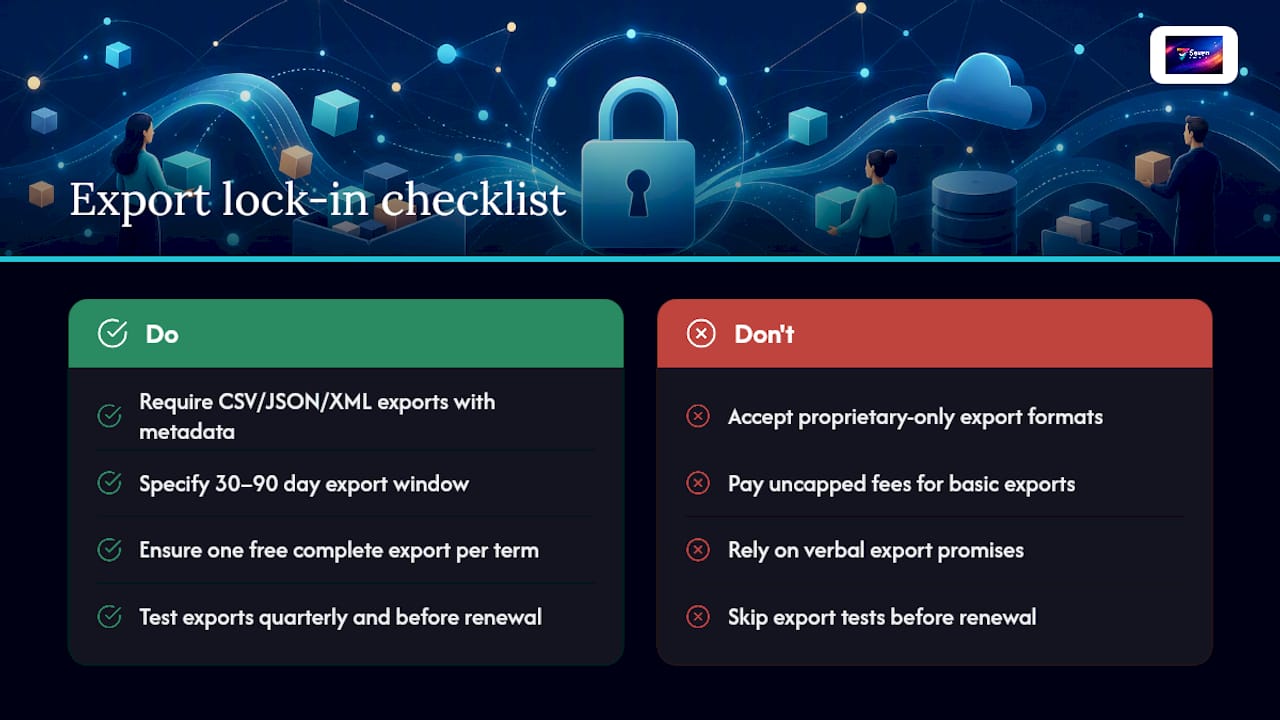
How often should we test our export process? Quarterly, at minimum, and always before a contract renewal. A platform’s export quality can change after an update, and the only way to know is to actually run the test again.
Sources
- contract-saas-vendor-lock-in-legal-strategies-to-maintain-data-portability-and-exit-rights — Genie AI
- Vendor lock‑in: What it is, why it matters, and how to avoid it — Penpot
- No-Code Vendor Lock-In: Keep Your SaaS Portable | Volanea
- Mastering Jira File Management: The Complete Guide | ikuTeam