Kanban Board Examples: Ready-to-Copy Templates and WIP Rules

Choose a Kanban board layout by the type of flow you need. Simple three-column boards work for personal tasks and solo projects. Swimlane boards handle mixed work classes where different request types need separate tracking. Per-person WIP columns make ownership visible and cut implicit multitasking. Staged pipelines fit multi-step processes like software delivery or content production. According to Wikipedia’s overview of Kanban, every board that qualifies as Kanban shares four core elements: cards (individual work items), columns (workflow stages), WIP limits (caps on concurrent work), and a pull policy (work moves only when capacity opens, never pushed by a schedule).
Here are the five board patterns worth knowing:
- Basic three-column (To Do / In Progress / Done): personal tasks, solo freelancers, small teams starting out
- Workflow-stage pipeline (Backlog / Ready / In Progress / Review / Done): software dev, content production, any multi-handoff process
- Swimlane / service-class board: mixed teams handling bugs, features, and urgent requests simultaneously
- Per-person WIP board: teams where individual ownership and multitasking discipline matter most
- Calendar / time-driven board: marketing sprints, editorial calendars, event planning
Key Takeaways
The most effective Kanban board is the one that matches your actual flow: pick the layout by handoff type, set WIP limits low enough to create real pull pressure, keep cards small, and use swimlanes only when you have genuinely different classes of work.
| Point | Details |
|---|---|
| Match board to flow type | Choose pipeline boards for multi-handoff work, swimlanes for mixed request types, three-column for personal tasks. |
| Set conservative WIP limits | Start at 1–2 items per person in progress; treat every breach as a signal to investigate, not to ignore. |
| Keep cards small | Cards taking more than three days should be split; smaller cards surface bottlenecks faster. |
| Use swimlanes selectively | Add swimlane rows only when two or more work classes need separate tracking on the same board. |
| Seven for import | Import CSV templates directly into Seven boards in under twenty minutes, with full data export and no analytics tracking. |
Table of Contents
- Kanban board examples you can copy right now
- How different teams set up their boards
- How to design a Kanban board that actually works
- Practical tips and common pitfalls
- Templates you can download and import
- Where to start: an editorial perspective
- Try these templates in Seven
- Sources
Kanban board examples you can copy right now
The table below covers six ready-to-use layouts. Each row gives you exact column names, a suggested WIP limit, the best-fit use case, and the card fields worth capturing.
ProductPlan recommends starting with a clear purpose and the fewest columns that represent real handoffs. If you can’t name a person or team responsible for the transition between two columns, those columns should probably be one.
For physical boards, sticky notes on a whiteboard work fine for the basic three-column and per-person layouts. Color-code by priority (red for urgent, yellow for medium, green for low) and keep cards small enough to read from two feet away. Digital boards add filtering, due date alerts, and the ability to attach files directly to cards, which matters once your team grows past four or five people.
Pro Tip: Add a “Blocked” column or a red label to your board from day one. Blocked work is invisible on most starter boards, and surfacing it is often where the biggest cycle-time gains come from.
How different teams set up their boards
Board design isn’t one-size-fits-all. The right column set depends on where work actually stalls in your team’s process, not on what looks tidy in a template gallery. Planview’s team-focused examples show how development, IT operations, and marketing teams each adapt the core structure around their specific handoffs and service-level expectations.
Software development teams typically run: Backlog / Ready / In Progress / Code Review / QA / Done. The Ready column acts as a commitment gate: a card only moves there when it meets the definition of ready (acceptance criteria written, design approved, dependencies cleared). WIP limits on In Progress and Code Review prevent the classic bottleneck where developers finish coding but reviews pile up. Track cycle time from Ready to Done, not from Backlog to Done, to get a meaningful throughput signal.
IT operations and service desks benefit most from swimlane boards. Rows separate urgent incidents from standard requests and low-priority improvements. Columns stay simple: Incoming / In Progress / Blocked / Resolved. An SLA due date on every card makes priority obvious at a glance. Iowa’s Department of Management lean guides show public-sector ops teams using explicit “blocked” signals and visual capacity indicators to balance incoming demand against daily capacity.
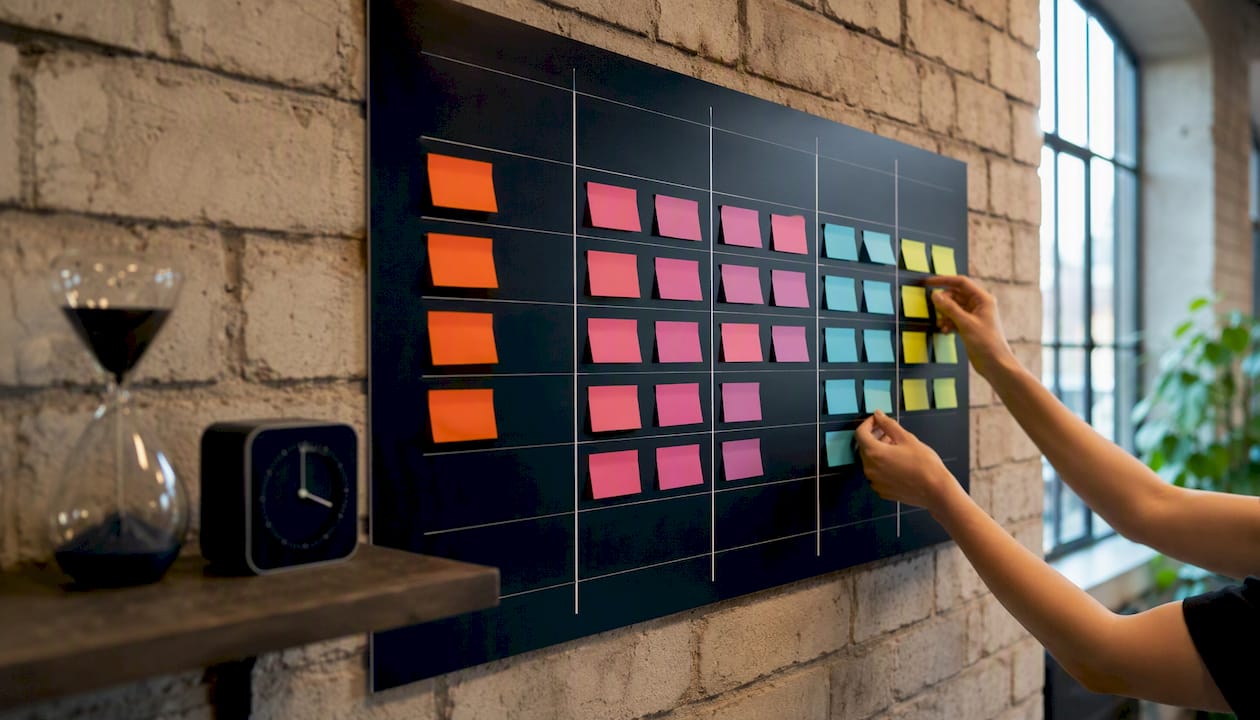
Marketing teams often run a content pipeline: Ideas / Briefed / In Production / In Review / Scheduled / Published. Swimlanes by channel (blog, social, email) keep the board readable when multiple content types move simultaneously. A weekly planner variant, where columns represent days or weeks rather than stages, works well for campaign sprints. Miro’s collection of Kanban board examples includes calendar-style and Eisenhower-integrated variants that marketing teams can adapt for editorial planning.
Sales teams use pipeline boards differently from production boards. The goal isn’t throughput; it’s deal velocity and conversion. Columns map to sales stages. The key policy: flag any card that hasn’t moved in seven days with a “stale” label, and review those cards in the weekly pipeline meeting rather than the daily standup.

Product teams often combine a roadmap board (Now / Next / Later) with a delivery board (Backlog / Ready / In Progress / Review / Done). The roadmap board is strategic; the delivery board is operational. Keep them separate. Mixing strategic items and sprint tasks on one board creates noise that makes both harder to manage.
Personal Kanban is the simplest case: three columns, no swimlanes, WIP limit of two or three items in progress at once. The discipline of the WIP limit is what separates personal Kanban from a plain to-do list. When your In Progress column hits its limit, you finish something before starting anything new.
- For document-heavy workflows, a team document approval workflow adds a structured review stage that maps directly onto a Kanban Review column.
- Use swimlanes when one board serves multiple work classes (features, bugs, support tickets). Use separate boards when two teams have completely different cadences or audiences.
- Per-person In Progress columns, as shown in Whimsical’s worked Kanban template, make individual ownership explicit and reduce the implicit multitasking that happens when a shared In Progress column has no names attached.
How to design a Kanban board that actually works
Most boards fail not because the columns are wrong but because the setup skips two things: real WIP limits and a pull policy. Here’s a practical sequence to get a working board in place.
Start from today, not from theory. Walk your current workflow and list every stage where work actually waits. Those waiting stages are your columns. If work never waits at a stage, it doesn’t need its own column. Aim for five to seven columns maximum on your first board.
Set WIP limits conservatively. Magnatag’s WIP guidance recommends starting with 1–2 items per person in In Progress and 3–5 per active column for team boards. Most teams set limits too high on the first attempt. A limit that never gets breached isn’t doing anything. Start lower than feels comfortable, then adjust after two weeks of data.
Define your pull policy in one sentence. Something like: “A card moves to In Progress only when a team member has capacity and the card meets the definition of ready.” Write it on the board or pin it in your digital tool. Without a written policy, pull discipline erodes within a week.
Run a daily standup around the board, not around people. Walk the board right to left, from Done toward Backlog. Ask: what’s blocked, what’s close to done, what’s at risk of breaching WIP? This takes ten minutes and surfaces problems before they compound.
Weekly cleanup ritual: archive cards in Done that are older than two weeks, review the Backlog for items that have been there longer than a month, and check whether any column’s WIP limit needs adjusting. A board that never gets pruned becomes a noise source rather than a signal source.
Policy template examples:
- Definition of ready: “Acceptance criteria written, design mockup attached, no open dependencies.”
- Pull rule: “Only pull from Ready when your In Progress count is below your WIP limit.”
- Blocked flag: “Add a red label and a one-line blocker note. Escalate if blocked more than one business day.”
Practical tips and common pitfalls
Getting a board running is the easy part. Keeping it useful after the first two weeks is where most teams struggle.
Tips that hold up in practice:
- Keep cards small. A card that takes more than three days to complete is probably two or three cards. Smaller cards move faster and make bottlenecks visible sooner.
- Prune Done regularly. A Done column with 60 cards from three months ago isn’t a record; it’s clutter. Archive weekly.
- Make blocking visible. A card sitting in In Progress with no movement for two days should have a blocked label. Invisible blocking is the most common reason cycle times balloon.
- Review WIP breaches daily, not weekly. A breach is a signal, not a failure. The question is: why is this column over its limit, and what needs to happen to clear it?
- Right-size your swimlanes. Two or three rows is usually enough. More than four swimlanes on one board and the visual benefit disappears.
Red flags and what to do:
- Overfull In Progress column: Your WIP limit is too high or being ignored. Drop the limit by one and enforce it for one week. See what surfaces.
- Too many columns: If you have more than eight columns, merge any two where the same person owns both stages. Columns should represent handoffs between people or teams, not micro-steps one person does alone.
- Huge cards that never move: Break them down. A card titled “Redesign the website” belongs in a roadmap, not a delivery board.
- WIP limits ignored entirely: This is a team culture issue, not a board design issue. Run a 15-minute retrospective focused only on one question: “What would have to be true for us to respect the WIP limit this week?”
15-minute fix when a column keeps piling up: Pull the team together, point at the column, and ask three questions: What’s blocking cards from moving out? Is the WIP limit realistic? Is there a skill or capacity gap we’re not talking about? Don’t leave without one concrete action.
Pro Tip: If your board looks the same at the end of the week as it did at the start, the problem isn’t the board. It’s either the WIP limit (too high to create pressure) or the pull policy (not enforced). Fix one at a time.
Templates you can download and import
Having a template to import cuts setup time from an hour to under twenty minutes. The following CSV/Excel templates cover the most common board types and include sample rows so you can see how real cards should look before you add your own.
| CSV Template Name | Columns Included | Sample Rows | Best For |
|---|---|---|---|
| Basic Kanban Starter | Title, Status, Owner, Priority, Due Date | 5 sample tasks | Personal use, solo freelancers |
| Dev Team Pipeline | Title, Status, Owner, Sprint, Priority, Checklist, Due Date, Tags | sample dev tasks | Software development teams |
| Marketing Content Board | Title, Status, Author, Channel, Publish Date, Priority, Tags | sample content pieces | Editorial and marketing teams |
| IT Service Desk | Title, Status, Owner, SLA Due Date, Priority, Blocked Reason, Tags | 5 sample tickets | IT ops, support teams |
| Sales Pipeline | Title, Stage, Contact, Deal Value, Next Action, Close Date | sample deals | Sales teams |
Field mapping for import (CSV column → board field):
| CSV Column | Board Field | Notes |
|---|---|---|
| Title | Card title | Required; keep under 60 characters |
| Status | Column / stage | Must match your board’s column names exactly |
| Owner | Assignee | Use the team member’s display name |
| Priority | Label or tag | High / Medium / Low |
| Due Date | Due date | Format: MM/DD/YYYY |
| Tags | Tags | Comma-separated; use for swimlane routing |
| Checklist | Checklist items | Pipe-separated list of subtasks |
Generic import steps: Export your template CSV, open your board tool’s import function, map each CSV column to the corresponding board field using the table above, review the preview for five cards before confirming, then archive or delete the sample rows.
Whimsical’s worked Kanban template is worth reviewing before you build your own CSV: it shows per-person In Progress columns and realistic card content that makes the abstract column structure concrete. Agency Supply’s template library is a good source for agency-style layouts if your team runs client projects across multiple accounts.
Seven import note: Seven accepts CSV and Excel imports directly. Map your Status column to the board column name, and the platform places each card in the correct stage automatically. Your data stays on your terms: Seven doesn’t mine it, sell analytics on it, or use it for AI training.
Where to start: an editorial perspective
Start with the workflow-stage pipeline board. Most teams, regardless of industry, have a process that moves through at least four meaningful stages, and the pipeline board makes those stages explicit without adding complexity. The three-column board is fine for personal use, but it hides the handoffs where work actually stalls. Adding a Ready column and a Review column forces the conversations that improve flow: “Is this card actually ready to start?” and “Who owns the review, and when?”
WIP limits are where most teams underinvest. Setting a limit of ten on a five-person team’s In Progress column is not a WIP limit; it’s a decoration. The discipline of a real limit, one that occasionally creates a moment of “I can’t start this until I finish that,” is what makes Kanban a pull system rather than a prettier to-do list. Start lower than feels comfortable. You can always raise a limit; the insight comes from the friction of a low one.
Try these templates in Seven
Seven gives you flexible boards, swimlanes, and built-in import from spreadsheets, so you can go from a CSV template to a working board in ten to twenty minutes. Your data is yours: no analytics sold, no AI trained on your tasks, and full export whenever you want it, with no vendor lock-in.

Import the Dev Team Pipeline or Marketing Content Board CSV first, map your columns, and you’ll have a live board with real cards before your next standup. Pricing starts at $5/month for individuals and $9/user/month for teams. Start a 7-day free trial and bring your first template in today.
Sources
- How to Create a Kanban Board | ProductPlan
- 15 Kanban board examples for getting things done | Miro
- Kanban examples - Planview
- Kanban - Wikipedia