How to Manage Distributed Teams Across Time Zones

Run one unified team with async-first processes, clear outcome-based goals, and protected overlap hours. That’s the whole operating model in one sentence. Managers who split local staff from remote staff into two de facto teams, or who measure logged-in hours instead of finished work, are the ones who watch distributed setups fail. The fix isn’t more meetings. It’s fewer, better-designed ones, backed by written artifacts everyone can check without waiting for a reply.
Here’s what to change this week:
- Pick and publish your team’s core overlap hours (aim for a limited daily window sufficient for effective collaboration, per Timeeting’s distributed team research).
- Move status updates from verbal standups to a shared written template.
- Replace “hours online” with two or three sprint-level output metrics.
- Write a one-page channel charter: what goes where, and expected response times.
Pro Tip: *Don’t try to fix everything in week one.
Key Takeaways
Managing distributed teams well comes down to replacing presence-based habits with written, outcome-based systems that don’t depend on everyone sharing a room.
| Point | Details |
|---|---|
| Run one unified team | Use the same board, standup process, and review standards for local and remote staff alike. |
| Protect overlap hours | Lock in a limited shared window rather than chasing maximum overlap across time zones. |
| Shift to async artifacts | Written standups, RFCs, and ADRs replace verbal context that distributed teams never get for free. |
| Measure output, not login time | Sprint completion and on-time milestones expose problems faster than presence tracking does. |
| Centralize work in one workspace | Seven’s boards, messaging, and file attachments keep task ownership and status visible without vendor lock-in. |
Table of Contents
- What Is a Distributed Team, and How Does It Differ From Remote or Hybrid?
- Why Does Deliberate Distributed-Team Management Change Outcomes?
- Your One-Week Setup Checklist
- Nine Tactics for Running Distributed Teams Day to Day
- What Tools Actually Belong in a Distributed Team’s Stack?
- How Does Distributed Project Management Change Status Reporting?
- How Do You Coordinate Schedules Across Time Zones?
- How Do You Measure Delivery Without Micromanaging?
- How Does Seven Support These Distributed Team Practices?
- A Manager’s Early Take on Making This Work
- Run Your Distributed Team From One Workspace, Not Five
- Frequently Asked Questions
- Sources
What Is a Distributed Team, and How Does It Differ From Remote or Hybrid?
A distributed team has no central office. Every person, whether in Lisbon, Austin, or Manila, is a full node in the org chart, not a satellite of headquarters. That’s the practical difference from “remote,” which usually still implies a home office that most people report into, and from “hybrid,” where some staff share a physical room and others don’t.
The distinction matters for how you run rituals. A hybrid team can get away with a whiteboard meeting because most decision-makers are in the building. A distributed team can’t; if a decision only exists in a room half the team never entered, it didn’t really happen. That’s why distributed team practices lean so heavily on written records:
- Remote: individuals work from home, but the company still centers on an HQ culture and timezone.
- Hybrid: some team members co-locate; documentation is often an afterthought because verbal context still flows in the office.
- Distributed: no headquarters exists in practice; every decision has to survive in writing or it’s lost to half the team.
Why Does Deliberate Distributed-Team Management Change Outcomes?
Done well, distributed management gives you a larger hiring pool, near-continuous coverage across time zones, and long stretches of focused work when async norms are actually respected. Done poorly, it quietly becomes two teams wearing one name.
The common failure modes show up fast:
- Running a “core” team and a “remote” team with different standards, tools, or code review bars.
- Measuring who’s online instead of what shipped.
- Treating onboarding as an afterthought, so new hires spend weeks guessing at context.
- Losing decisions in DMs or meetings that never got written down, forcing the same debate twice.
Fullscale’s guidance on managing distributed developers is blunt about the first pitfall: run one team, with the same board, the same standup process, and the same review standards for everyone, local or offshore. Anything else creates drift, and drift is expensive. Teams that keep measuring presence over output also tend to catch delivery problems later, according to Timeeting’s analysis of what actually works, because a busy calendar looks fine right up until the sprint review reveals nothing shipped.
Your One-Week Setup Checklist
Before you touch tools or org design, lock in four things:
- Overlap hours. Pick a window (roughly four hours works for most global spreads) and protect it from internal meetings that don’t need everyone.
- A channel charter. One page: which channel is for what, and what response time is reasonable for each.
- A single source of truth. One workspace where project status lives, not five threads across three apps.
- Outcome-based metrics for this sprint. Pick two or three deliverables you can point to on Friday, not a list of who logged hours.
“Done” for the week looks like a published charter, a locked overlap window on shared calendars, and a workspace where anyone can find current task status without pinging you.
Pro Tip: Turn off non-essential notifications for anything outside your core hours. Async-first only works if people trust they can go quiet without missing something urgent, and that trust dies the moment a Slack ping trains people to check constantly.
Nine Tactics for Running Distributed Teams Day to Day
These are the mechanics that make the philosophy real. Implement them roughly in this order, since each one makes the next easier.
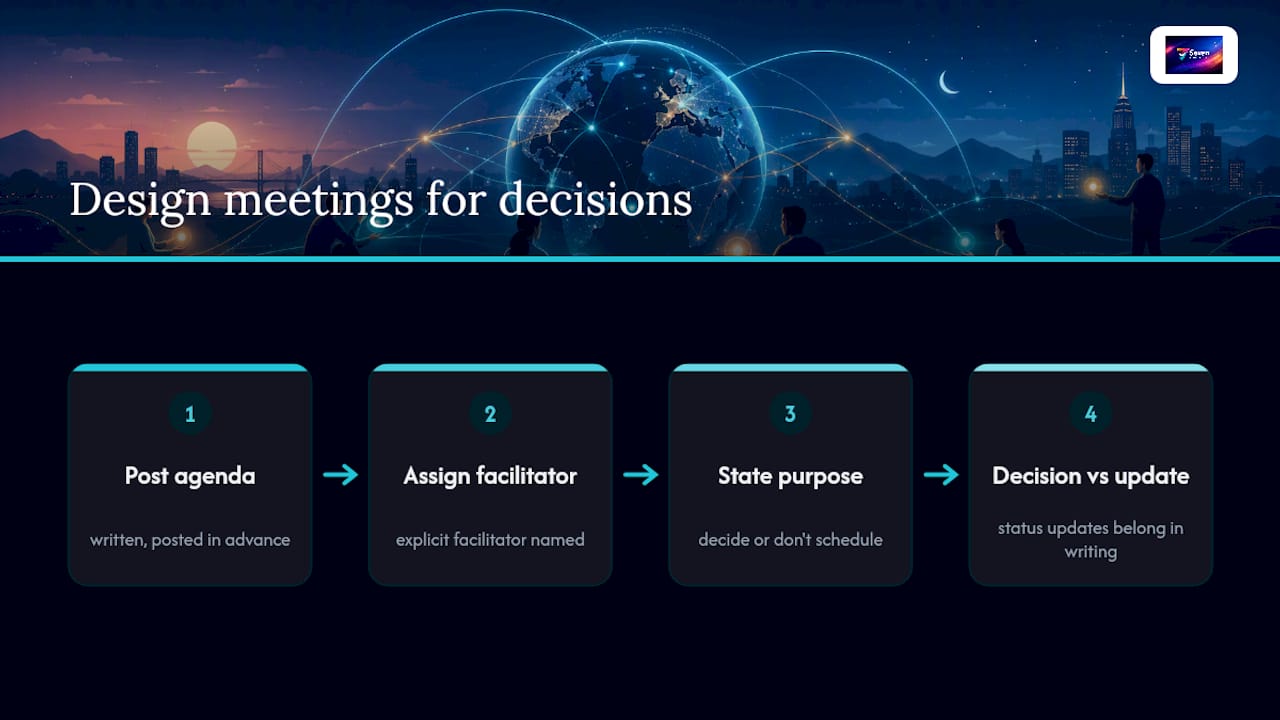
1. Design meetings around decisions, not updates. Every sync needs a written agenda posted in advance, an explicit facilitator, and a stated purpose: decide something, or don’t schedule it. Status updates belong in writing.
2. Standardize a written standup. A three-line format works for most teams: what I finished, what I’m doing next, what’s blocking me. Post it in a shared channel by a fixed time; sync live only when someone flags a blocker that needs real-time discussion.
3. Make async artifacts the default record. RFCs for proposals, ADRs (architecture decision records) for anything that will confuse a future hire, and written standups for daily status. Set a clear feedback deadline on each, like 48 hours, so async doesn’t quietly become “never.”
4. Build a real onboarding micro-workflow. Pair every new hire with a buddy on day one, run a 30-60-90 day plan with specific milestones, and target a concrete time-to-first-meaningful-contribution, not just “settling in.” Boundev’s guide to leading distributed teams treats this structure as the difference between a hire who’s productive in two weeks and one who’s still guessing at month two.
5. Set one definition of done, reviewed across locations. Code review or work review shouldn’t default to whoever’s awake first. Rotate reviewers across time zones against a shared rubric, so quality bar doesn’t quietly shift by geography.
6. Build a handoff template. At the end of a shift, post: what’s finished, what’s in progress, open blockers, and who owns the next step. State an expected reply window for the next person picking it up, typically by their next morning.

7. Protect cross-team collaboration deliberately. Silos form fast when teams never overlap. Guard shared overlap hours for cross-team syncs specifically, and track a simple signal like how often people from different squads actually talk in a given month.
8. Resolve conflict in writing first. Distributed conflict escalates fast in text because tone gets lost. Default to a written account of the disagreement from each side, then schedule a short private video call for anything sensitive rather than litigating it in a group channel.
9. Build culture on purpose, not by accident. Structured social rituals (a rotating “show and tell,” a recognition digest each Friday) replace the hallway chatter a co-located office gets for free. One well-planned in-person gathering a year does more for trust than a dozen forced virtual happy hours.
Where teams get this wrong most often is skipping straight to tools before fixing rituals. A great app on top of a broken meeting culture just gives you a faster way to be disorganized. Research on virtual brainstorming backs this up in a specific way: structured async idea generation, where people submit thoughts before a call rather than freeforming in real time, tends to outperform loose synchronous brainstorming. The pattern holds across most of these nine tactics: structure beats spontaneity when nobody’s in the same room to read the energy.
Pro Tip: If you can only do three of these nine, do the written standup, the handoff template, and the definition of done. Those three alone eliminate most of the “wait, what’s the status?” pings that eat a manager’s day.
What Tools Actually Belong in a Distributed Team’s Stack?
Don’t shop by brand. Shop by capability, because a stack built from five overlapping apps is worse than one built from three that actually cover your gaps. The Digital Project Manager’s review of remote collaboration tools narrows the essentials down to five categories: async messaging, task ownership and tracking, threaded discussion, recorded video walkthroughs, and a durable knowledge base that survives after the conversation ends.
Before adding any tool, check it against this list:
- Can someone document a decision here that a colleague finds without asking?
- Does every task have one clear owner, visible without a status meeting?
- Can a person record a five-minute walkthrough instead of scheduling a call?
- Is there one place, not four, that counts as the source of truth for project status?
Governance matters as much as capability. Pick one tool per job and enforce it, build new-hire access into onboarding day one, and confirm you can export your own data before you commit. Vendor lock-in is a real tax on switching later, and tool selection guidance for remote teams treats durable, exportable context as a requirement, not a nice-to-have.
Pro Tip: Build lightweight, role-specific dashboards instead of one giant board everyone scrolls through. A developer doesn’t need to see marketing’s task list, and hiding irrelevant noise is often more valuable than adding another feature.
How Does Distributed Project Management Change Status Reporting?
Distributed project management (DPM) moves status ownership off the manager’s desk and onto the team itself. Instead of you chasing five people for an update before a stakeholder call, each person updates their own task against a required template, and the current state is always visible without a meeting. PMI’s research on distributed project management frames this as addressing the core complexity of managing work across locations: centralized templates plus local ownership, coordinated through something like a Center of Excellence that maintains standards without micromanaging execution.
The mechanism is a required task-feedback template. At minimum, each task update should include:
- Percent complete
- Effort remaining
- Current blockers, named specifically
- A short QA checklist for anything shipping
Foundational research on DPM found that pushing these fields down to the individual contributor level improves timeliness and cuts the “catch-up” work managers otherwise absorb chasing updates, according to WCU’s work on managing the process of managing projects. The manager’s job shifts from status collector to exception handler, which is a better use of anyone’s time.
How Do You Coordinate Schedules Across Time Zones?
The goal isn’t maximizing shared hours. It’s protecting the smallest window that still lets the team make real decisions together. Boundev’s guide to leading distributed teams frames this as an “hours of overlap” principle: pick your minimum viable window, defend it fiercely, and stop trying to squeeze more shared time out of people whose evenings are someone else’s mornings.
Practical rules that hold up:
- Batch meetings into that protected window instead of scattering them across the day.
- Rotate meeting times across weeks so the same time zone doesn’t always take the 11 p.m. slot.
- Set at least one meeting-free day per week for deep work.
- Require an end-of-shift handoff note: what’s done, what’s next, and a reply SLA (typically by the next person’s morning).
Pro Tip: Record short walkthroughs for anything that would normally need a live screen share. A two-minute recording lets the next time zone start work immediately instead of waiting for a call that won’t happen for eight hours.
How Do You Measure Delivery Without Micromanaging?
Track outcomes, not activity. Sprint completion rate, on-time milestone delivery, and time-to-resolution on blockers tell you far more than login timestamps ever will. For new hires, track time-to-first-meaningful-contribution as a leading indicator that onboarding is actually working.
Watch these engagement signals for early warning of trouble:
- A drop in cross-team collaboration mentions or channel activity.
- Fewer recognition mentions in team digests.
- Rising 90-day attrition among recent hires, which usually points back to onboarding gaps.
Teams that default to presence metrics tend to catch problems later than teams tracking output, since a full calendar can mask a stalled deliverable for weeks, per Timeeting’s findings on distributed team management. A simple weekly delivery snapshot, one line on what shipped and one line on blockers or morale, gives you most of the signal without a single tracking tool.
Pro Tip: Use 1:1s for growth conversations, not surveillance. If you need a status update, get it from the async template; use the live conversation for the things a document can’t tell you.
How Does Seven Support These Distributed Team Practices?
The practices above need a workspace that can actually hold them without turning into five disconnected tools. Seven gives you flexible workspaces and boards for task and subtask tracking, built-in messaging so context stays attached to the work instead of scattered across apps, and file attachments so decisions and their supporting documents live in one place.
For teams applying DPM specifically, Seven’s task ownership structure supports the kind of delegated status fields (percent complete, blockers, due dates) that keep managers out of the catch-up business. Excel import means you’re not stuck manually rebuilding a backlog to switch over, and open data export means your team’s history stays yours if you ever move on. On the security side, Seven doesn’t mine your data or sell analytics, which matters more than most vendors admit when your team’s roadmap and internal decisions live in one workspace.
Pricing starts at $5 for individuals and $9/user for teams, with a 7-day free trial to test the workflow against your own sprint before committing.
A Manager’s Early Take on Making This Work
The first real win isn’t a big one. It’s fewer “quick questions” landing in your DMs because the answer already lives in a written status update. Priorities get clearer once outcomes replace activity as the thing everyone’s accountable for. None of this works as a finished system on day one. You iterate the rituals sprint by sprint, and that’s fine.
Run Your Distributed Team From One Workspace, Not Five
Most of the friction in distributed work doesn’t come from time zones. It comes from status living in four different tools while nobody, including the manager, has a clear picture of what’s actually done. Seven fixes that by giving you one workspace for boards, messaging, file attachments, and task ownership, so the async-first artifacts this guide covers, written standups, decision records, handoff notes, actually stay findable instead of buried in a chat history.

You can bring an existing backlog in through Excel import rather than rebuilding it by hand, and because Seven doesn’t lock your data into a proprietary format, you can export everything if your needs change later. That data portability matters more once a distributed team’s entire institutional memory lives in one tool. Seven also skips the analytics-selling model some platforms run on, which is worth checking against your own security requirements before you commit to any workspace.
Start a 7-day free trial and test the DPM task-feedback template from this guide against your current sprint. Individual plans run $5, and team plans run $9 per user, with no hidden add-ons.
Frequently Asked Questions
What does it actually mean to manage distributed teams well? It means running one team with shared standards, not two teams split by location, and grading people on what they deliver instead of when they’re online.
How many overlap hours does a distributed team need? Around four hours of protected shared time works for most globally spread teams, according to Timeeting’s distributed team analysis. What happens during that window matters more than stretching it longer.
What’s the difference between remote, hybrid, and distributed teams? Remote implies a company still centers on one office culture even if some people work from home. Hybrid mixes co-located and remote staff. Distributed has no central hub at all, so every decision has to survive in writing.
How does distributed project management reduce a manager’s workload? DPM pushes status fields like percent complete, blockers, and QA checklists down to individual contributors, so managers spend less time chasing updates and more time solving actual blockers.
What tools do distributed teams really need? A minimal stack covers async messaging, task tracking with clear ownership, recorded video walkthroughs, file sharing, and a durable knowledge base, per guidance on remote collaboration tools.
Sources
- Managing Distributed Teams: How to Lead Local and Offshore Developers as One Team
- Distributed Project Management addresses the complexity of managing teams and projects across different locations
- Distributed Team Guide (2026): What Actually Works
- Collaboration tools for remote teams
- Why virtual brainstorming is better for innovation