When $8,000 Beats $6,000: Project Management Pricing Models for PMs

Most project costs fall into two buckets: what you pay for the software, and what you pay for the people doing the work. Software pricing runs on subscription, tiered, or per-user licences; project delivery runs on fixed fee, hourly (T&M), retainer, or value-based pricing. The rule that cuts through the noise: if scope is clear and outcomes are measurable, go fixed or value-based; if scope is genuinely unknown, go hourly or retainer. The traps that catch everyone are the same. Setup fees, onboarding, and integration add-ons.
TL;DR:
- Fixed pricing or value-based models are best when project scope is clear and outcomes are measurable, reducing risk of budget overruns.
- Most software costs come from subscription or per-user fees, often with hidden charges for onboarding, integrations, or premium support, which can significantly increase total costs.
- Hourly or retainer pricing suits projects with undefined scope or ongoing support, but they shift risk to the buyer for scope creep or longer durations.
- Incorporating a risk and complexity buffer into project fees helps prevent underestimating costs and ensures more accurate, defensible quotes.
- Clear contract protections, like change-order processes and milestone payments, are essential to avoid disputes and manage risk effectively.
Table of Contents
- What are the main project management pricing models?
- Which project pricing model fits which engagement?
- How do you calculate a defensible project fee?
- What hidden fees actually blow out project budgets?
- How do you choose the right pricing model for your project?
- Why most pricing disputes come from the wrong model, not the wrong rate
- Why transparent, privacy-first pricing matters when choosing project software
- Sources
What are the main project management pricing models?
Software vendors and delivery teams price things differently, and mixing the two up is where a lot of budget confusion starts. On the software side, you’re buying access to a tool. On the delivery side, you’re buying someone’s time, expertise, or a defined outcome. Both carry the label “project pricing,” but they behave in completely different ways.
Subscription and per-user licensing dominate the software market. You pay a recurring fee per seat, usually monthly or annually, and the vendor handles hosting, updates, and support. It’s predictable, but it scales linearly. Add ten people to a team and your bill jumps by ten seats’ worth, no matter how lightly some of them use the tool.
Tiered pricing stacks features into packages, Basic, Pro, Enterprise, so you pay more as you need more functionality, not just more seats. Freemium models let you trial core features free, with paid upgrades unlocking automation, reporting, or storage. Perpetual licences, less common in SaaS but still around in some enterprise software, ask for a large upfront payment in exchange for permanent access, often with a separate annual maintenance fee.
Here’s how these hold up in practice:
- Subscription/per-user: predictable monthly cost, but scales with headcount, not usage.
- Tiered plans: matches spend to feature need, but upgrading mid-contract can be clunky.
- Freemium: zero-risk trial, but paid tiers often gate the features you actually need.
- Perpetual licence: no recurring fee, but you carry upgrade and maintenance costs yourself.
- Enterprise contracts: custom terms and volume discounts, but negotiation takes time and often locks you into multi-year commitments.
Most vendors, according to Capterra’s breakdown of software pricing models, lean on subscription or per-user tiers and quietly add onboarding or integration charges on top of the sticker price. That’s the number to watch, not the headline monthly fee, but what gets bolted onto it once you’re locked in.
Which project pricing model fits which engagement?
Delivery-side pricing is where most of the negotiation friction actually happens, because it determines who carries the risk if a project runs long. There are five models worth knowing cold.
- Fixed fee. One agreed price for a defined scope. The buyer gets budget certainty; the seller carries the risk if the work balloons. Works best when requirements are locked before the contract is signed.
- Hourly / time and materials (T&M). You pay for actual hours logged. The seller is protected from scope creep; the buyer carries the risk of an open-ended bill. Best suited to discovery phases or genuinely undefined work.
- Retainer. A recurring fee for ongoing access to a set capacity, say, 20 hours a month. Good for continuous support relationships rather than one-off deliverables.
- Value-based pricing. The fee is tied to the outcome’s measurable value to the client, not the hours spent producing it. This only works when you can quantify the value, a percentage of cost savings, a share of revenue lift, something concrete.
- Hybrid. A fixed core scope with hourly billing for anything outside it, or a capped-hours arrangement. This is the pragmatic middle ground most consulting pricing guides land on, because it protects the seller from scope creep without leaving the buyer with an open cheque.
A worked comparison: A consultant charging $150/hour who quotes 40 hours for a project earns $6,000 under hourly billing. If that same project is fixed-priced at $8,000 because the deliverable is clearly scoped and time-boxed, the effective rate jumps to $200/hour, without changing a single hour of actual work. Value-based pricing can push that further still. If the deliverable saves a client $100,000 a year and you price at 10% of that value, you’re billing $10,000 for the same 40 hours, an effective rate of $250/hour.
The pattern holds across most comparisons of hourly versus fixed versus value-based pricing: tighter scope and clearer outcomes push effective rates up, because you’re no longer being paid for time, you’re being paid for certainty and result.
How do you calculate a defensible project fee?
The formula sounds simple, and it is, once you know what each variable actually represents:
Project price = estimated hours × hourly rate × complexity multiplier × (1 + risk buffer)
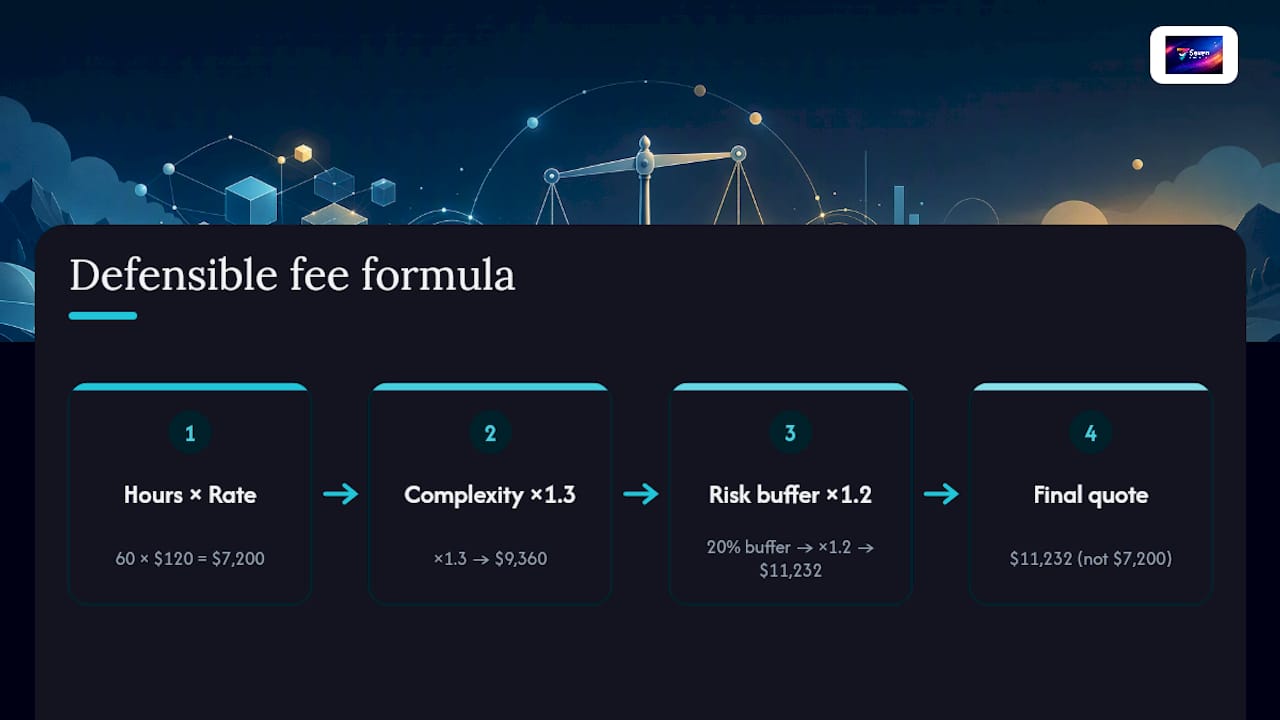
Estimated hours is your honest time estimate for the scoped work. Hourly rate is your baseline rate, whatever you’d charge on a T&M basis. The complexity multiplier and risk buffer are where most quotes go wrong, because people either skip them or guess at random numbers.
Consulting pricing resources generally recommend a 15% to 25% buffer for new clients, scaling up as unknowns increase. A worked example: 60 estimated hours at $120/hour, moderate complexity (1.3 multiplier), and a 20% risk buffer gives you $60 × 120 × 1.3 × 1.2, wait, that’s hours times rate times multiplier times buffer factor: 60 × 120 = $7,200, × 1.3 = $9,360, × 1.2 = $11,232. That’s your quote, not $7,200.
For clients nervous about fixed pricing, a not-to-exceed (NTE) cap works well: bill hourly but guarantee the client won’t pay more than the capped figure, giving you flexibility if the work finishes early and them certainty if it doesn’t.
Pro Tip: Never quote a fixed fee using your raw hourly rate with no multiplier. That number only covers the work going exactly to plan, and work almost never goes exactly to plan.
What hidden fees actually blow out project budgets?
Total cost of ownership rarely matches the number on the pricing page, and the gap is almost always in the fine print, not the headline rate.
- Setup and onboarding fees are often charged once, upfront, and can equal a month or more of subscription cost.
- Training for larger teams sometimes carries a per-session or per-seat charge separate from the licence.
- Integration and API/connector fees apply when connecting the tool to your existing stack, accounting software, CRMs, or communication platforms.
- Customisation costs appear when you need workflows or fields beyond the standard configuration.
- Premium support tiers (faster response times, dedicated account managers) often sit above the base plan.
- Extra storage or export fees can bite later, particularly if you ever want to leave and take your data with you.
The fix is amortisation. Take any one-off setup cost and divide it across your expected usage lifetime, say, 24 or 36 months, to get a true monthly figure you can compare against a rival’s all-in pricing. The APM’s guidance on cost planning and control makes the same point about project budgets generally: map fixed and variable costs properly, and track actuals against the plan, or you lose the ability to spot where money is actually leaking. A quick red flag check before signing anything: ask explicitly whether integrations, exports, and support tiers are bundled or billed separately, because vendors rarely volunteer that detail unprompted.
How do you choose the right pricing model for your project?
Run through four questions before you commit to a pricing structure, because the wrong choice here creates friction that no contract clause fully fixes later.
- How clear is the scope? Locked requirements point to fixed fee or value-based pricing. Fuzzy or evolving requirements point to hourly or retainer.
- How long will the engagement run? Short, defined sprints suit fixed pricing. Ongoing relationships suit retainers.
- Can you measure the outcome? If you can put a number on the value delivered, cost savings, revenue, time saved, value-based pricing becomes viable. If not, stick to time or fixed-scope pricing.
- What’s the client’s risk tolerance? Risk-averse clients often prefer fixed pricing even at a premium, because budget certainty matters more to them than paying the lowest possible rate.
As a rule of thumb: unclear scope plus a nervous client usually means hybrid, fixed core plus hourly overflow. Clear scope plus a confident client usually means fixed or value-based. Ongoing, low-intensity support usually means retainer.
Whatever model you land on, build in contract protections: a defined change-order process for anything outside scope, milestone payments tied to deliverables rather than dates, and a cap on revision rounds so “just one more tweak” doesn’t quietly become a fourth unpaid draft.
Why most pricing disputes come from the wrong model, not the wrong rate
Most disputes over project cost aren’t really about the number. They’re about which party absorbed a risk nobody discussed upfront. I’ve seen fixed-fee projects sour not because the fee was wrong, but because the scope was never actually fixed, someone just assumed it was.
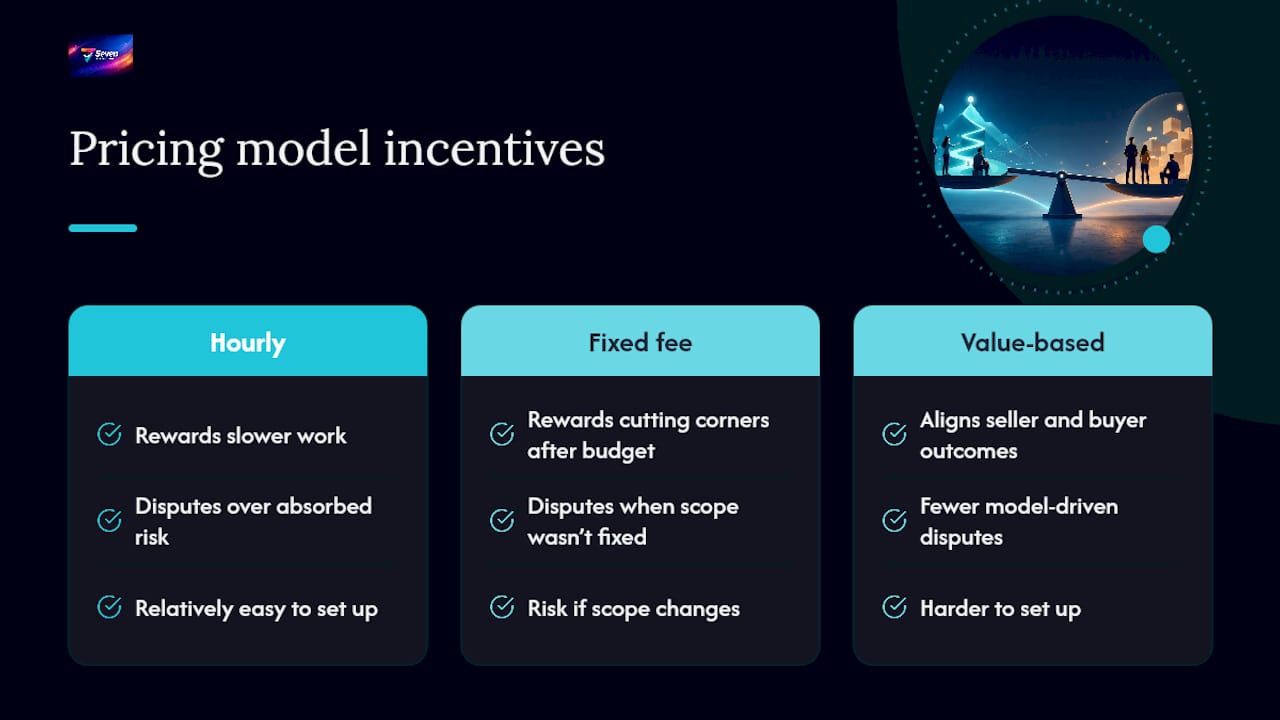
The pricing model itself shapes behaviour more than most project managers give it credit for. Hourly billing can quietly reward slower work. Fixed fees can quietly reward cutting corners once the budget’s spent. Value-based pricing is the only model that reliably points seller incentives and buyer outcomes in the same direction, and that’s exactly why it’s harder to set up.
Seven’s own approach reflects this thinking: transparent pricing at $5 for individuals and $9 per user for teams, no hidden setup or add-on charges, and no vendor lock-in on your data. Full detail sits on Seven’s security and compliance page.
— Greg
Why transparent, privacy-first pricing matters when choosing project software
Every vendor comparison you’ll do eventually comes back to one question: what’s the real monthly cost once onboarding, add-ons, and integrations are counted? Seven skips that guessing game. Pricing sits at $5 for individuals and $9 per user for teams, with flexible workspaces, built-in messaging, file attachments, and Excel import baked in from the start, not upsold later as a premium add-on.

Small teams and privacy-conscious organisations get the most out of this setup, because Seven doesn’t mine your data for analytics or feed it into any model, and open data export means you’re never stuck if you decide to move on. If you’re comparing quotes and licence pages right now, spend seven days finding out what “no hidden costs” actually looks like. Start a free trial today and see the full feature set at Seven.
Sources
For deeper detail on the models covered here, Capterra’s software pricing guide breaks down subscription and tiered structures across the vendor market. The APM’s cost planning and control resource covers budgeting fundamentals in more depth. For pricing project work specifically, alfred_'s guide to pricing projects and the hourly versus project fee comparison both walk through worked scenarios worth bookmarking.
- Guide to Project Management Software Pricing Models
- How to Price Projects (Not Just Hourly) | alfred_
- Consulting Pricing Strategy: Models, Rates & How to Choose
- What is project cost planning and control?