Team Leaders: Six Quick Checks for Team Task Assignment

Assign one primary owner to every task, add collaborators if the work needs more hands, then lock in a due date and a one-line definition of “done” before you save it. That’s the whole rule. Skip any of those four fields and you’ve created a task nobody actually owns, which is how deadlines quietly slip.
TL;DR:
- Assign a single primary owner to each task, and include collaborators only when multiple people are genuinely responsible to prevent diffusion of responsibility.
- Always create tasks with clear titles, specific success criteria, due dates, and references, and verify the assignment landed with the intended person before moving on.
- Use task-level assignment when work requires a specific individual’s skills and role-based assignment for recurring, role-specific tasks to streamline routing.
- Remote teams require detailed written context, explicit success criteria, and timezone-specific deadlines to prevent stalls and miscommunication.
- Regularly review and correct task assignments to prevent drift, overload, and vague ownership, especially as roles and priorities change.
Table of Contents
- What good team task assignment looks like
- How do you assign a task step by step?
- Assigning by role, team or resource: when to use each
- Why every task still needs one named owner
- How do you check and fix task assignments?
- Tooling and workflow tips that speed things up
- How do you match tasks to the right person’s skills?
- How do you stop overloading your best people?
- What goes wrong most often with team task assignment?
- Does remote work change how you assign tasks?
- Greg’s perspective: common mistakes and practical shortcuts
- How Seven supports reliable task assignment
- Key documentation and help pages
- Sources
- FAQ
What good team task assignment looks like
A well-assigned task passes a simple test: anyone on the team can open it and know exactly who is on the hook and what “finished” means. That test fails more often than leaders realise, usually because the basics get skipped when work is created in a hurry.
Run through this before you hit save:
- Title with a prefix: something like “Design: homepage banner” beats “Banner thing” for findability in list and board views.
- Primary assignee named: one person, always. Add collaborators separately if others are contributing.
- Multiple people only when justified: reserve it for genuinely shared work, not as a hedge against deciding who’s responsible.
- Due date, priority, and effort estimate: even a rough estimate helps with project task distribution later.
- Success criteria in one line: “Approved by marketing lead” is a criterion; “finish the banner” is not.
- Watchers and attachments: add anyone who needs visibility and any file or link the assignee will need on day one.
Get these six right consistently and you eliminate most of the back-and-forth that turns a five-minute task into a week-long thread.
How do you assign a task step by step?
Creating and assigning a task properly takes under a minute once it’s a habit. Here’s the sequence that avoids the most common failure points.
- Name the task clearly. Use a consistent pattern, like a category prefix followed by a specific action, so it’s identifiable in naming conventions that most tools use for quick scanning.
- Set the primary assignee at creation. Microsoft’s Planner documentation confirms that assigning at the point of creation, rather than after the fact, keeps tasks moving straight into the right person’s queue instead of sitting in an unowned backlog.
- Add collaborators if needed. Most platforms allow multiple assignees, but adding many people rarely means faster work.
- Set the due date and acceptance criteria. Attach any reference files or links now, while the context is fresh in your mind.
- Turn on notifications for the assignee and any watchers. This is what actually gets the task noticed rather than buried.
- Save, then verify. Check the assignee’s “assigned to me” or workload view to confirm the task landed where you expected.
When more than one person is assigned, decide upfront how completion works. Does one person marking it done close it for everyone, or does each assignee need to check off their own portion? Microsoft’s own guidance flags this as a common source of confusion, particularly when a task gets marked complete by someone who only finished their slice of it.
Pro Tip: Before assigning to a group, write one sentence naming who does what. “Sam drafts, Priya reviews, Tom publishes” takes ten seconds and prevents the classic problem of three people assuming someone else has it covered.
Assigning by role, team or resource: when to use each
Task-level assignment names a specific person. Resource or role-level assignment names a function, like “Developer” or “QA reviewer,” and lets the system route work to whoever fills that role. Both have their place, and mixing them up is where a lot of project task distribution breaks down.
Use task-level assignment when the work genuinely needs a specific person’s skills or context, like a client-facing deliverable only one person has the relationship for. Use role or team assignment for recurring, repeatable work, such as routing every design request to “Design Team” rather than manually picking a name each time. According to guidance on resource and role assignment, resource-level assignment works best when a role has to cover a high volume of similar tasks.
A few things trip people up here:
- Some tools need separate role instances if you want the same role assigned twice to one task, like two “Developer” slots on a build.
- Role assignment only works if someone active actually holds that role. An empty or vacant role produces an orphaned task nobody sees.
- Teams and roles can be tagged on a task, but only a named person or job role can usually be the primary assignee.
Why every task still needs one named owner
Assign a task to five people and there’s a real risk none of them treat it as theirs. This is diffusion of responsibility, and it’s the single biggest reason group-assigned tasks stall. Adobe Workfront’s guidance is blunt about it: designate one primary assignee, even when several people are contributing, because a group can share the work but only an individual can be held accountable for it.
The fix is layered, not complicated. Keep one primary assignee, add collaborators for anyone else touching the task, and write acceptance criteria specific enough that “done” isn’t a matter of opinion. On top of that, set an acknowledgement expectation (assignees confirm they’ve seen a new task within a set window), run short regular check-ins on anything overdue, and agree on an escalation path before work starts, not after it’s late.
How do you check and fix task assignments?
Assignments drift. People change roles, priorities shift, someone goes on leave mid-project. Checking and correcting them needs to be a routine, not a one-off cleanup.
Most platforms let you view assignments three ways: by person (a workload or “my tasks” view), by task (open the task and see who’s attached), or by role (a report filtered to a job function). Clarity PPM’s documentation on verifying task assignments treats this cross-checking as standard practice, not an edge case.
When you reassign a task, keep these in mind:
- Reassigning notifies the new assignee and usually removes the old one from active notifications, though not always from the task’s history.
- If multiple assignees exist, removing one doesn’t close the task. Check whether it affects the completion logic first.
- Note why you reassigned it. “Reassigned: original assignee on leave” takes five seconds and saves confusion in a later audit.
- Periodically expand tasks flagged as unassigned or role-only to confirm someone active is actually attached.
Tooling and workflow tips that speed things up
Bulk operations save the most time on repetitive work. Import a spreadsheet of tasks with assignee columns already filled in, and most platforms will map them straight into the right queues rather than making you assign each one by hand. This is where a tool with genuine Excel import functionality earns its keep on a large backlog.
Automation rules that route tasks by tag (say, everything tagged “billing” goes to Finance) work well once tested, but test them on a small batch first. Misassignment rules that fire silently in the background are worse than no automation at all, because nobody notices until the deadline’s already gone. On more of this, automated task routing has clear efficiency gains, provided the rules are reviewed regularly rather than set once and forgotten.
Attach acceptance criteria and reference files directly to the task, and use in-task messaging for handoff questions instead of scheduling a call. It cuts meeting load and keeps the decision trail attached to the work itself, which matters later when someone asks why a task was done a certain way.
How do you match tasks to the right person’s skills?
Task assignment done well isn’t just about clearing a queue. It’s about matching the work to whoever will do it fastest and best, which means knowing your team beyond their job title.
Start with a simple skills inventory, even an informal one. Note who’s fast at first drafts versus who’s strong at review and polish, who understands the client’s history, and who’s still building confidence in a particular skill and would benefit from a stretch assignment rather than repeating what they already know. This doesn’t need a formal system. A shared note updated after every project retrospective works fine for most teams.
When you’re assigning, weigh three things against each other: who’s genuinely best suited, who has capacity, and who would benefit from the growth. Defaulting to your strongest performer every time builds a bottleneck and burns them out. Occasionally assigning a task slightly outside someone’s comfort zone, with a bit more oversight, builds capability across the team instead of concentrating it in one or two people.
Pay attention to what happens after assignment, not just at the moment of it. If the same person keeps needing rework on a certain task type, that’s a skills gap worth addressing directly, not a reason to quietly route around them forever. Conversely, if someone consistently finishes a task type well ahead of schedule, that’s a signal they’ve outgrown it and might be ready for something harder. Skills-based assignment isn’t a one-time decision made when you first learn someone’s strengths. It’s an ongoing read of who’s improving, who’s stretched thin, and who’s coasting on work that no longer challenges them.
How do you stop overloading your best people?
Workload imbalance creeps up quietly. The most capable or most agreeable person on the team ends up with the biggest queue, simply because they’re reliable and rarely push back, and nobody notices until they’re burnt out or missing deadlines they’d normally hit easily.
The fix starts with visibility. Most task management software includes a workload or capacity view that shows task count or estimated hours per person, not just per project. Check it weekly, not just when someone complains. If one person’s queue is visibly longer than everyone else’s, that’s a signal to redistribute before it becomes a bottleneck, not after.
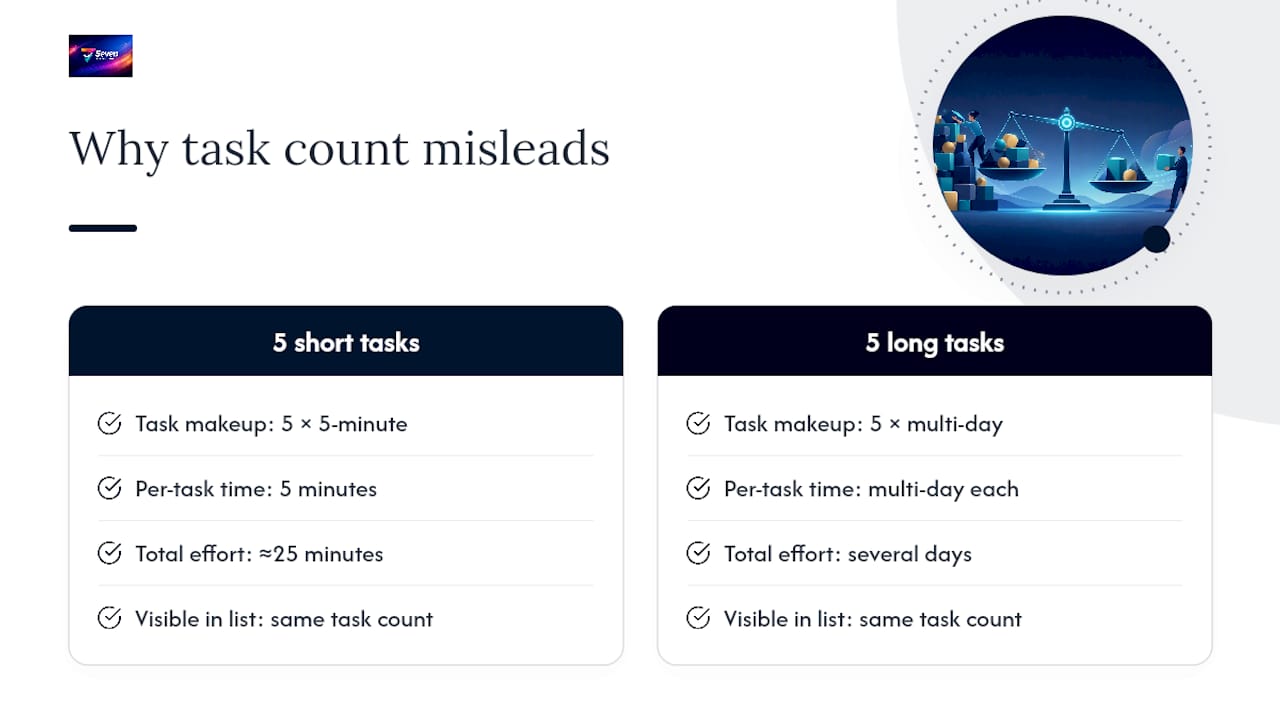
Effort estimates matter more here than most leaders give them credit for. A task count alone is misleading. Five quick five-minute tasks look identical to five multi-day tasks on a simple list view, and if the person with five long tasks is compared to the person with five short ones, the imbalance is invisible until deadlines start slipping. Rough time estimates, added at creation, fix that at a glance.
Build in a regular rebalancing habit, ideally weekly, where you scan open assignments across the team before new work gets handed out rather than after. Ask people directly what their capacity looks like this week rather than assuming last week’s workload still applies. And when someone’s overloaded, don’t just add more people to the task. Move some of it to someone with spare capacity, even if that means a short handover conversation. That handover cost is almost always smaller than the cost of the original person missing the deadline entirely.
Rotate the unglamorous, low-visibility tasks too. If the same person always ends up doing the tedious admin work because they’ve never complained about it, that’s not workload balance, it’s a pattern that will eventually cost you that person’s goodwill.
What goes wrong most often with team task assignment?
The most common failure isn’t a tooling problem, it’s a clarity problem. Tasks get created with vague titles, no due date, and no defined “done,” then sit half-finished because nobody’s entirely sure what finishing looks like.
Vague ownership is the biggest offender. A task assigned to a team channel or a group chat rather than a named person almost always takes longer to start, because everyone assumes someone else picked it up. The fix is the primary-assignee rule covered earlier: one name, always, even inside a shared task.
Missing context is close behind. A task titled “Fix the report” with no link to which report, no acceptance criteria, and no attached file forces the assignee to chase down basic information before they can even start. That chasing is invisible lost time that never shows up in any project report.
Silent reassignment causes real damage too. When a task changes hands without a note explaining why, the new assignee has to reconstruct history that the previous person already had in their head. A one-line reassignment reason, logged at the time it happens, avoids that entirely.
Assignment without capacity checking rounds out the list. Assigning good work to the most available slot on a calendar, without checking whether that person’s queue is already full, is how deadlines quietly compound. It looks fine task by task and turns into a crisis at the project level.
None of these require new software to fix. They require a five-minute habit change at the point of assignment: name one owner, write the context down, log why something changed hands, and check capacity before adding to someone’s plate.
Does remote work change how you assign tasks?
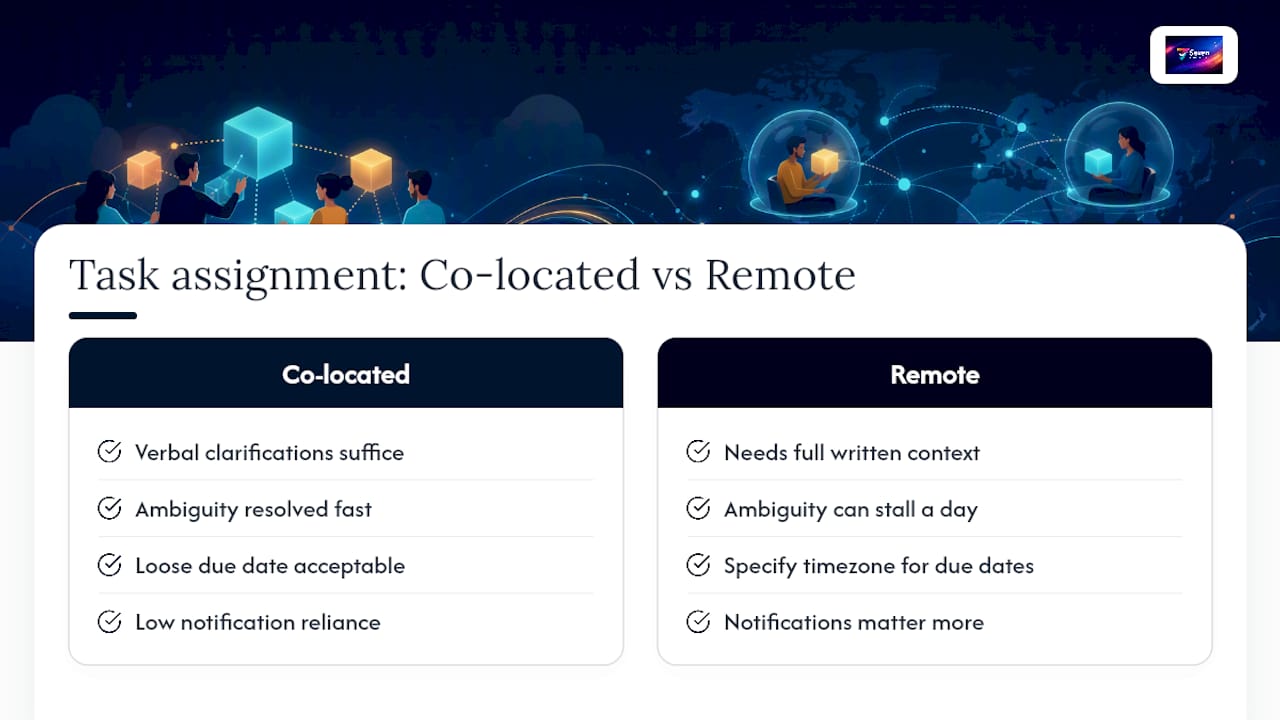
Remote teams need more written context than co-located ones, because the hallway conversation that used to fill in the gaps doesn’t happen anymore. A task assignment that would be fine with a verbal “you know what I mean” in an office needs to be fully spelled out when the assignee is in a different timezone and won’t see you until tomorrow.
In a co-located team, ambiguity gets resolved fast. Someone leans over a desk, asks a quick question, and the task moves forward within minutes. That safety net doesn’t exist remotely, so vague acceptance criteria or an unclear due date can stall a task for a full working day, sometimes longer if timezones barely overlap.
The practical adjustments are small but non-negotiable for distributed teams. Every task needs a written success criterion, because there’s no quick verbal check-in to clarify it. Due dates should specify a timezone or a shared reference point, not just “Friday,” since “Friday” means something different depending on where someone’s sitting. Notifications matter more too, since a remote assignee might not see a new task for hours if they’re not actively watching a dashboard.
Async-friendly habits fill the gap that physical proximity used to cover. Recording a short explanation alongside a complex task, or writing slightly more detail than feels necessary, saves the back-and-forth that a quick chat would otherwise handle. Building this into your asynchronous collaboration practices pays off well beyond task assignment, but assignment is where the habit should start, because it’s the first point of contact a remote team member has with any piece of work.
Co-located teams can get away with looser assignment discipline precisely because informal correction is cheap. Remote teams can’t, and pretending otherwise is one of the more common causes of distributed project drift.
Greg’s perspective: common mistakes and practical shortcuts
Three mistakes show up constantly: vague titles, no primary assignee, and missing acceptance criteria. All three take under a minute to fix at creation and cost hours to fix later. When speed matters more than polish, assign fast but never skip the primary assignee. That one field is the cheapest insurance you’ll ever buy on a project.
— Greg
How Seven supports reliable task assignment
Everything in this guide, a single primary assignee, collaborators for shared work, clear due dates and acceptance criteria, works best when the platform doesn’t get in the way of it. Seven builds around exactly that: flexible workspaces, task import straight from a spreadsheet so you’re not rebuilding a backlog by hand, built-in messaging for handoff questions, and a straightforward primary-assignee-plus-collaborators structure baked into how tasks work.
Some platforms operate without vendor lock-in or data mining behind the scenes, which matters if your team handles anything sensitive. Pricing transparency with individual and team plans and no hidden extras is also a feature of some offerings. If your current setup makes it harder than it should be to see who owns what, start a trial with Seven and see whether the basics finally stick.
Key documentation and help pages
For tool-specific steps beyond this guide, Microsoft’s Planner assignment page covers creating and reassigning tasks, Clarity PPM’s resource assignment docs explain role and team assignment, and ProjectManager’s guide walks through bulk assignment patterns.
Sources
- Assign people to tasks | Microsoft Support
- Assign Project Tasks to Resources, Roles, and Teams — Clarity PPM tech docs
- Assign Tasks | Adobe Workfront
FAQ
Is there a way to assign tasks in teams?
Yes. Most task management software lets you assign a task to a named person at the point of creation, and to reassign it later without losing the task’s history. Some modern tools build this in as a standard primary-assignee-plus-collaborators structure.
What is a team assignment?
A team assignment is work distributed to a group rather than a single named person, often used for repeatable tasks like “all design requests.” It works best paired with a primary assignee so accountability doesn’t get lost across the group.
What is a task assignment?
A task assignment is the act of designating who is responsible for completing a specific piece of work, including setting the due date, priority, and success criteria at the same time. Assigning at creation, rather than afterward, keeps the task moving straight into the right person’s queue.
What is the 1/3/5 rule for tasks?
Definitions of this rule vary depending on the source, so treat any specific version cautiously. Most commonly it refers to planning a daily workload around one big task, three medium tasks, and five small tasks, rather than a rule specific to team assignment mechanics.