File attachments security: what to check before you trust a platform
Expect AES-256 encryption at rest and TLS 1.2 or 1.3 in transit as the baseline for any project management platform handling your files. That’s the industry benchmark, not a premium feature. The single check that matters more than any marketing claim is this: who holds the encryption keys, the provider or you?
Run these checks before you commit to a platform:
- Does it offer customer-managed encryption keys (CMEK) or only a vague “your data is encrypted” statement?
- Can admins see role-based access controls, SSO and MFA in the settings, not just in the sales deck?
- Can you export your files and audit logs on demand, without opening a support ticket?
If a vendor can’t answer these plainly, that’s your answer.
Key Takeaways
Attachment security comes down to three checks: verified encryption standards, clear control over encryption keys, and audit logs you can actually export on demand.
| Point | Details |
|---|---|
| Encryption baseline | Confirm AES-256 at rest and TLS 1.2/1.3 in transit before evaluating anything else. |
| Key control decision | Choose CMEK only for sensitive IP or regulatory needs, and test recovery before committing. |
| Access controls | Require RBAC at project and file level, plus enforced SSO and MFA org-wide. |
| Sharing defaults | Default to authenticated, expiring links rather than open “anyone with the link” access. |
| Seven’s approach | Seven pairs attachment storage with no data mining, full export rights, and a 7-day trial to verify controls firsthand. |
Table of Contents
- Encryption for attachments: what happens under the hood
- Provider-managed keys or customer-managed keys: which do you need?
- What access controls actually stop unauthorised viewing?
- How do you share attachments without leaking them?
- Retention, export and who really owns your data
- What logs prove a platform takes security seriously?
- What should you ask vendors before signing a contract?
- How do platforms scan attachments for malware?
- What happens to a file flagged as suspicious?
- How do you build good file-handling habits across a team?
- Does the platform work with your existing DLP tools?
- What should happen after a breach involving attachments?
- How does Seven approach attachment security in practice?
- Ready to check these controls in your own workspace?
- Frequently asked questions
- Sources
Encryption for attachments: what happens under the hood
Two encryption layers work together, and both matter. AES-256 protects files sitting in storage. TLS 1.2 or 1.3 protects files moving between your device and the server. Skip either one and you’ve left a gap, whether that’s a stolen hard drive or a snooped network connection.
Most platforms don’t encrypt a whole file as one block. They chunk it, encrypting each piece with its own data encryption key, then wrap those keys under a master key managed through a key management service. This is standard practice, described in Google Workspace’s own encryption documentation, and it means a single compromised key doesn’t unlock your entire file history.
Integrity checks matter too. A hash like SHA-256 confirms the file you downloaded is bit-for-bit identical to what you uploaded, and resumable uploads (so a dropped connection doesn’t corrupt a large attachment) are a good sign of engineering maturity.
Client-side encryption sits at the far end of this spectrum: your browser encrypts the file before it ever reaches the provider’s servers, so the provider genuinely cannot read your content. The trade-off is real. Search, previews, and some collaboration features get harder because the platform can’t peek inside the file to index it.
- AES-256 at rest, TLS 1.2/1.3 in transit: the non-negotiable pair
- Chunking with wrapped keys: limits blast radius if one key leaks
- SHA-256 integrity checks: confirms your file wasn’t altered in transit
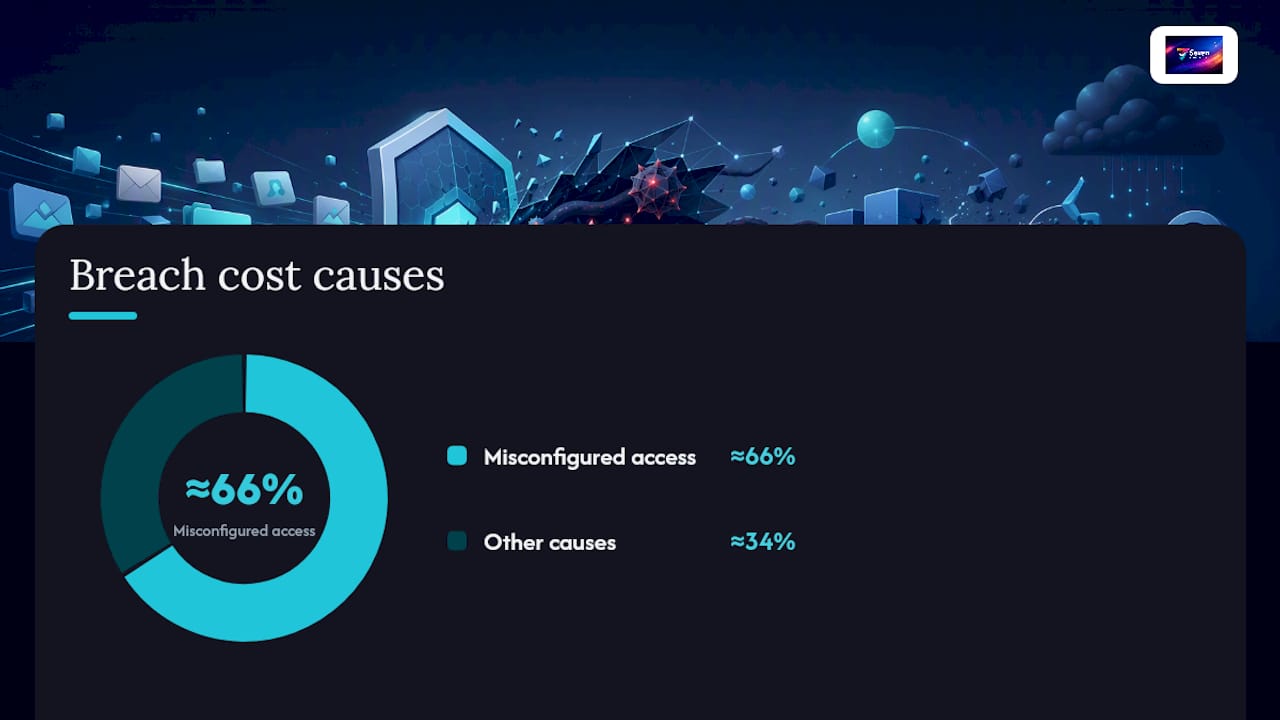
Roughly two-thirds of breach costs in cloud environments trace back to misconfigured access rather than broken encryption itself, which is why the next layer, who controls the keys, matters as much as the algorithm.
Provider-managed keys or customer-managed keys: which do you need?
Most platforms manage encryption keys for you by default. The provider generates them, rotates them, and holds the ability to decrypt your data if support needs to troubleshoot an issue. That’s fine for most teams. It’s convenient, and it’s still backed by AES-256.
Customer-managed encryption keys (CMEK) flip that arrangement. You generate and control the master key, and the provider can’t decrypt your attachments without it. This matters if you’re handling sensitive intellectual property, operating under a regulatory regime that demands data sovereignty, or simply don’t want a third party holding the keys to your business.
CMEK comes with sharp edges you need to know about upfront. Coverage usually applies only to data written after the key takes effect, so switching to CMEK doesn’t retroactively protect your existing files. Worse, revoking or disabling a CMEK key can make that data permanently inaccessible, because there’s no backdoor. Attaching a key to a workspace can be an irreversible decision without a fresh migration.
- CMEK gives you control over rotation, revocation and audit trails
- Coverage is typically forward-looking, not retroactive
- Revoking the key can permanently lock you out of your own attachments
Pro Tip: Before enabling CMEK on a live workspace, test the full export and restore cycle in a sandbox first. If you can’t recover a file after revoking a test key, you’ve learned something important before it costs you real data.
CMEK earns its complexity when the stakes are high: regulated industries, sensitive client IP, or contractual data residency requirements. For most small teams, provider-managed keys with strong audit logging cover the real-world risk.
What access controls actually stop unauthorised viewing?
Encryption protects a file sitting still. Access controls decide who’s allowed to open it in the first place, and this is where most real-world data exposure happens.
- Role-based access control (RBAC) should apply at multiple levels, not just “member” or “admin.” Look for permissions scoped to workspace, project and individual file, so a contractor added to one board can’t browse attachments in another.
- Single sign-on (SSO) ties file access to your organisation’s identity provider, so leaving the company (or getting locked out of it) instantly cuts off attachment access everywhere.
- Multi-factor authentication (MFA) should be enforceable for the whole team, not optional per user, and session tokens should expire rather than stay valid indefinitely.
- Automated revocation matters more than most teams realise. When someone changes roles or leaves, access to shared attachments should drop immediately, not whenever an admin remembers to update a permissions sheet.
During a demo, don’t just ask if these exist. Open the admin console and check: can you scope a role to a single project’s files? Can you force MFA org-wide? Can you see a live list of who currently has access to a specific attachment? ServiceNow’s module access policy model is a useful reference point here, restricting decrypted attachment visibility to specific roles even within an authenticated system.
How do you share attachments without leaking them?
The riskiest moment for any attachment isn’t storage, it’s the share. Most exposure happens through “anyone with the link” settings, not sophisticated attacks. Default to authenticated access, where a named recipient has to log in, rather than a link that works for whoever holds it.
For sensitive files, layer in expiring links and password protection, and send that password through a separate channel entirely, never in the same email or message as the link itself. Guest account models help here too: they let external collaborators see the one project they’re invited to without a backdoor into your wider workspace.
Watch for the quieter pitfalls. File previews sometimes render content search engines can index. Photos carry EXIF metadata that can reveal location or device details. And passphrases typed into the same chat thread as the shared link defeat the entire point of having one.
- Default to authenticated, named access over open links
- Set expiry dates and send passwords out of band
- Scope guest accounts to the specific project, nothing wider
Pro Tip: If your platform’s default share setting is “anyone with the link,” change the workspace default before your first external share, not after.
Retention, export and who really owns your data
Retention policy decides how long deleted files linger before they’re gone for good, and encryption choices directly affect whether “deleted” actually means deleted. If a provider controls the keys, a deletion request is straightforward. If you’re on CMEK, revoking your own key achieves the same result, permanently.
Export matters just as much as storage. You should be able to pull every attachment out in a usable format, along with the audit trail showing who touched what and when, not just the files stripped of their history. That’s the difference between owning your data and merely renting access to it.
Backups and immutable (WORM) logs protect against accidental deletion and tampering, but they inherit the same key-dependency problem: if the encryption key is gone, the backup is just as unreadable as the original.
- Confirm deletion is genuinely permanent, not just hidden from the interface
- Request export formats that include audit metadata, not just raw files
- Ask what happens to backups if a customer-managed key is revoked
Before signing, get retention periods, export guarantees and backup recovery windows written into the contract, not just described in a sales call.
What logs prove a platform takes security seriously?
Marketing copy says “secure.” Logs prove it. A platform worth trusting should record upload, download, share, revoke and admin-level changes, each stamped with a timestamp and an IP address, and let you export that history as a report rather than scrolling through a live feed.
Retention windows for those logs matter for anyone facing an audit later. Ask how long log history is kept and whether it survives a plan downgrade.
Independent verification carries more weight than a vendor’s own claims. Look for evidence of penetration testing, SOC 2 attestation, or a public bug bounty programme. Files is a good example of what defence-in-depth actually looks like in practice: encryption, RBAC, MFA, audit logging and third-party attestation working together rather than any single control doing all the work.
- Require upload, download, share and admin logs with timestamp and IP
- Ask for exportable audit reports, not just an on-screen history
- Treat independent audits as more reliable than vendor self-description
Automated policy enforcement, blocking a risky share before it happens rather than flagging it afterward, cuts down on the human error that causes most real incidents.
What should you ask vendors before signing a contract?
Turn everything above into a short list you actually use in a demo call. Vague answers here are the real warning sign, not any single missing feature.
- What encryption standard do you use, and do you support CMEK? A confident, specific answer beats a reassuring but vague one.
- Can I export audit logs, and how far back do they go? If the answer is “contact support,” treat that as a soft no.
- What SSO and MFA options exist, and can I enforce them org-wide? Optional MFA is effectively no MFA for a determined attacker.
- What’s your incident response SLA, and can I see a recent audit report? A provider unwilling to share a summary audit result is telling you something.
- Where is data stored, and does that meet our residency requirements? This matters more the moment you have EU, UK or sector-specific clients.
Pro Tip: Score each vendor against these five questions on a simple scale, one point per clear, specific answer. A platform scoring three or below deserves a legal and security review before you sign anything, not after.
Red flags worth walking away from: no audit logs at all, a key policy nobody can explain in plain language, or “anyone with the link” set as the unchangeable default.
How do platforms scan attachments for malware?
Most project management platforms run uploaded files through automated scanning before they’re stored or shared with teammates. This typically checks file signatures against known malware databases and flags anomalies in file structure that suggest a disguised payload, a document pretending to be a PDF that’s actually an executable, for instance.
The scanning happens at upload, not on a schedule, so a malicious file gets caught before it ever reaches a colleague’s download folder. Some platforms rescan files periodically as threat databases update, catching files that looked clean at upload but match a newly identified threat signature weeks later.
This matters more for project teams than it might seem. Attachments move between freelancers, contractors and internal staff constantly, often from devices outside your organisation’s own security controls. A single infected attachment from an external collaborator can spread through a shared workspace faster than through email, because everyone with project access sees the file.
The practical question to ask a vendor isn’t “do you scan for malware,” it’s “what happens when a scan flags something.” A platform that silently blocks the upload and notifies the uploader is doing the job properly. One that uploads first and scans later has already let the risk into your workspace, even briefly.
What happens to a file flagged as suspicious?
A file that fails a malware scan shouldn’t just get deleted quietly. It should move into an isolated holding area, quarantine, where it sits separately from the rest of your project data and can’t be opened, previewed or downloaded by anyone until reviewed.
Sandboxing takes this a step further for platforms that support it: a suspicious file gets opened and analysed in an isolated environment that mimics real usage, catching malware that only activates when a document is opened or a macro runs, rather than malware detectable from the file signature alone.
For a project management context, the practical detail that matters is visibility. The person who uploaded the file should get a clear notification explaining why it was blocked, and project admins should see it in an audit log, not have it disappear without a trace. Silent deletion looks like data loss to a confused teammate; a visible quarantine flag looks like a system doing its job.
Ask vendors directly what their quarantine window looks like and whether a false positive can be reviewed and released by an admin, rather than requiring a support ticket that takes days to resolve. A three-person freelance team can’t afford a legitimate contract sitting in limbo for a week because an automated scanner got twitchy about an unusual file format.
How do you build good file-handling habits across a team?
Technology catches a lot, but the biggest attachment risk in most teams is still human: someone uploads the wrong version, shares a link more broadly than intended, or downloads a file onto a personal device that has no security controls at all.
A short, specific policy beats a long, ignored one. Cover naming conventions so sensitive files are obvious at a glance, a rule against downloading client attachments to personal devices, and a clear instruction to report anything that looks off rather than quietly deleting it and hoping nobody noticed.
New team members and contractors need this spelled out on day one, not buried in an onboarding document nobody reads. A five-minute walkthrough of “here’s how we share files, here’s what we never do” prevents more incidents than any single technical control.
- Label sensitive attachments clearly so handling rules are obvious at a glance
- Ban downloading client files to unmanaged personal devices
- Make reporting a suspected mistake blame-free, so people actually do it
Revisit the policy when your team grows or takes on a new type of client work, government contracts and healthcare clients often carry file-handling obligations a five-person creative studio never had to think about.
Does the platform work with your existing DLP tools?
Larger teams often run separate Data Loss Prevention (DLP) tooling that scans for sensitive patterns, credit card numbers, health records, source code, before they leave the organisation’s control. If your project management platform operates in a sealed silo, your DLP system can’t see what’s happening inside it.
The integrations that matter most are API-level hooks that let a DLP system inspect files as they’re uploaded or shared, and webhook alerts that notify your security tooling the moment a flagged pattern appears in an attachment. Without this, a project manager could upload a spreadsheet full of customer PII to a board, and your organisation’s DLP investment would never know it happened.
For small teams without dedicated DLP infrastructure, this subtopic matters less directly, but it’s worth asking during procurement anyway. A platform’s willingness to expose activity through an API or support standard integration patterns is a decent proxy for how seriously it treats attachment visibility generally. Platforms that refuse to expose any activity data, even to your own tooling, tend to be the same platforms with weak audit logging elsewhere.
If your organisation is growing toward a size where DLP becomes relevant, ask vendors now whether their API supports the kind of programmatic file inspection a DLP system needs, rather than discovering the gap after you’ve already built workflows around a platform that can’t support it.
What should happen after a breach involving attachments?
A platform’s incident response plan matters more once something has gone wrong than any control that failed to prevent it. The first hour after a suspected breach should trigger a predefined sequence, not improvisation: isolate the affected accounts or files, preserve logs before anything gets overwritten, and notify affected customers within a stated timeframe.
Ask vendors for their incident response SLA in writing, specifically how quickly they commit to notifying you if your attachments were involved in an incident. A vague “we take security seriously” answer here is the same red flag it is everywhere else in procurement. You want a number: hours, not “as soon as possible.”
Your own team needs a parallel internal response, not just reliance on the vendor’s process. That means knowing who has authority to revoke access immediately, having an up to date list of which projects contain genuinely sensitive attachments, and having a contact path to the vendor’s security team that doesn’t route through a general support queue.
Post-incident, insist on a written summary: what happened, what data was affected, and what changed to prevent a repeat. A vendor that treats this as confidential rather than owed to affected customers is telling you how the next incident will be handled too.
How does Seven approach attachment security in practice?
Seven treats attachment security as a design constraint, not a feature to bolt on later. There’s no data mining, no selling of your files or metadata to third parties, and no AI training running quietly against your uploads. File attachments sit alongside boards, tasks and messaging as part of the same privacy commitment, and you can export everything, attachments included, without vendor lock-in if you ever decide to leave.
For the technical detail behind these claims, Seven’s security page covers the specifics worth checking against the procurement questions above.
Ready to check these controls in your own workspace?
Reading a security checklist is one thing. Watching the settings actually behave the way a vendor claims is another, and that’s the gap Seven’s 7 day free trial is built to close. Spin up a test workspace, upload a real attachment, and check the access controls, export options and sharing defaults yourself rather than taking a sales deck’s word for it.

Seven runs at $5 for individuals and $9 per user for teams, with no hidden tiers hiding the controls that matter, RBAC, export and attachment handling are part of the core product, not an enterprise add-on you have to negotiate for. If you’re weighing Seven against a heavier enterprise platform, start with the product overview to see how the workspace, task and file structure fits your team before you commit to anything. Teams with specific compliance or CMEK questions can raise them directly with support during the trial period, before a single file gets migrated for real.
Frequently asked questions
Is file attachments security the same as email attachment safety? No. Email attachment safety focuses on scanning inbound messages for phishing and malware from unknown senders. Attachment security inside a project management platform is about how files already inside your workspace are encrypted, who can access them, and how they’re shared and exported, a different set of controls entirely.
Do I need customer-managed encryption keys for a small team? Usually not. CMEK adds real operational complexity, including the risk of permanently losing access if a key is revoked. Most small teams are better served by provider-managed keys paired with strong RBAC, MFA and exportable audit logs.
What’s the biggest attachment risk most teams overlook? Sharing settings, not encryption. A file encrypted with AES-256 offers no protection once it’s shared via an open link anyone can access. Default to authenticated, expiring shares for anything sensitive.
Can I get my attachments out if I switch platforms? Check this before signing up, not after. A platform without vendor lock-in should let you export every attachment alongside its metadata and audit trail, in a usable format, at any time.
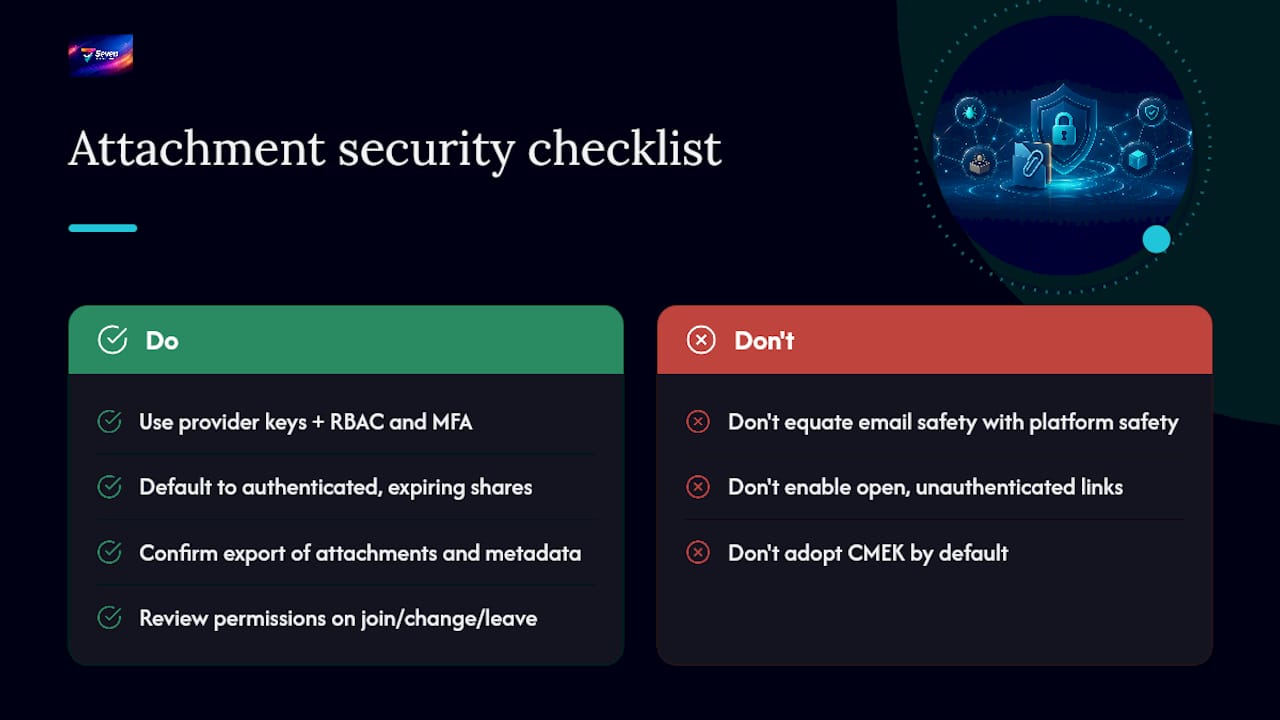
How often should we review our attachment access permissions? Review permissions whenever someone joins, changes role, or leaves, and do a full audit at least quarterly. Automated revocation on role change reduces how much of this depends on someone remembering to act.
Sources
- Google Cloud KMS / CMEK documentation
- Google Workspace encryption whitepaper
- ServiceNow attachment encryption walkthrough