Run the Export Test: Flexible Workspaces for Project Managers

Flexible workspaces are configurable virtual work areas inside project management software, boards, views and permission sets you shape around how your team actually works rather than how the vendor built it. The right choice comes down to one rule: pick a platform with genuine view flexibility, role-based permissions and documented export access, then test the export and privacy claims yourself before you commit past the trial.
TL;DR:
- Flexible workspaces require detailed permission controls, including task-level access, to prevent unintended data leaks among contractors and clients.
- Vendors should provide documented bulk export options covering messages, files, and attachments, with APIs and audit logs clearly disclosed.
- Small teams benefit from quick setup with minimal permission complexity, while larger or regulated organizations need robust privacy features and ongoing review protocols.
- Configurable views such as boards, timelines, and calendars are essential for aligning with diverse workflows and avoiding the limitations of traditional, rigid platforms.
- Platforms like Seven offer transparent pricing, native data export, and privacy-focused features, making them suitable choices for teams prioritizing data control and flexibility.
Table of Contents
- What flexible workspaces are and when your team needs them
- Core features to expect from privacy-focused flexible workspaces
- Privacy and data-control checklist: vendor lock-in, exports and governance
- How to set up flexible workspaces that scale and get adopted
- Pricing and scale: what to budget and hidden limits to watch for
- Benefits and challenges of flexible workspaces for different industries or team sizes
- Comparison of flexible workspaces versus traditional workspaces
- Examples of popular flexible workspace platforms and their unique features
- Future trends and innovations in flexible workspace solutions
- Author perspective: a pragmatic privacy-first adoption plan
- Seven: an option for privacy-first flexible workspaces
- Sources
What flexible workspaces are and when your team needs them
A flexible workspace is a configurable container inside project management software, not a physical desk you book. It holds boards, tasks, files and conversations, and you shape its structure, views and access rules around a specific team, client or department rather than accepting one rigid layout for everything.
Most solo freelancers can run everything from a single workspace. The moment you add contractors, client-facing delivery, or a confidential internal project sitting next to public marketing work, one workspace starts leaking context it shouldn’t. That’s the trigger point for splitting things up.
A few patterns signal you need more than one workspace:
- Mixed-method teams running agile sprints for product and waterfall phases for compliance work in parallel.
- Agencies or freelancers juggling multiple clients who should never see each other’s boards.
- Businesses with a confidential project (finance, legal, HR) that needs tighter permissions than everyday marketing tasks.
- Remote teams onboarding contractors who need guest-level access without full visibility into the company’s roadmap.
Mapping your team’s actual workflow before choosing a structure matters more than most people assume. Whether you run kanban sprints, Gantt-based phases, or a hybrid determines which view types you’ll lean on daily. At minimum, expect board, list, timeline (or Gantt) and calendar views as standard, not paid add-ons.
Core features to expect from privacy-focused flexible workspaces
Feature checklists for project management tools tend to read the same everywhere. What matters for a privacy-conscious buyer is less “does it have messaging” and more “what happens to that message once it’s sent.”
Look for these, with the privacy angle attached to each:
- Granular permissions. Project-level, board-level and task-level access, so a contractor can see their task list without seeing the client’s budget notes.
- Built-in messaging and comments. Threaded discussion tied to the task itself, so context doesn’t scatter across email chains that live outside your control.
- File attachments with versioning. Native storage beats ad-hoc links to a separate cloud drive you don’t manage, as explained in How Smart Storage Can Transform Your Workspace.
- Multiple view types without upgrade gates. Board, list, calendar and timeline views should exist on the plan you’re already paying for.
- Native automation. Rules built into the platform reduce your dependence on third-party plugins, which is where a lot of security gaps actually open up.
- APIs, bulk export and audit logs. If you can’t pull your own data out in a readable format, you don’t really own it.
- Clear sub-processor disclosure. You should be able to find, in writing, which third parties touch your data.
Pro Tip: Ask a vendor’s support team directly whether comments and attachments are included in a bulk export, before you sign anything. Some platforms export tasks cleanly but leave messaging history behind, which is exactly the data most teams assume is safe.
Privacy and data-control checklist: vendor lock-in, exports and governance
Vendor selection for a project management tool is usually treated as a features exercise. It should be treated as a procurement exercise, with privacy questions given the same weight as pricing.
- Request documented bulk export. Ask specifically for machine-readable formats (CSV, JSON) covering tasks, comments and attachments, not just a screenshot-friendly PDF.
- Confirm API access exists and is documented. A vendor that can’t point you to API docs is telling you something about how seriously they take portability.
- Read the DPA before you read the pricing page. Check explicitly whether customer data is used for analytics, model training or sold to third parties. Embedding this into procurement rather than treating it as an afterthought catches problems before they become contractual headaches.
- Verify encryption at rest and in transit. This should be stated plainly on a security page, not buried in a generic trust badge.
- Check the sub-processor list. Every third party with data access should be named, not implied.
- Confirm audit logs exist for sensitive projects. For Tier 1 or confidential work, require tamper-evident audit trails and check the vendor’s stated retention and deletion behaviour.
- Build privacy checks into your kickoff checklist. Treat it as a standing risk item, not a one-off vendor evaluation.
- Schedule quarterly vendor reviews. Re-run your export test every few months, because plans and terms change quietly.
How to set up flexible workspaces that scale and get adopted
A workspace that nobody uses is a wasted subscription, regardless of how well it’s configured. Adoption is a design problem as much as a technical one.
- Map your workflows first. Identify power users who’ll live in the tool daily versus occasional viewers who just need status updates.
- Build starter templates. Set up standard boards for your common project types (client delivery, internal ops, product sprints) with permission presets already applied.
- Run a short, real onboarding. A 30 minute walkthrough using an actual current project beats a generic demo project every time.
- Test the export before you scale up. Pull a bulk export during the trial and confirm you can open it in a spreadsheet without missing fields.
- Tune notifications conservatively. Default settings that ping every comment on every task will get muted within a week, taking real alerts with them.
Pro Tip: Use kanban column and WIP-limit conventions as your starter template rather than designing from scratch. A sensible default structure gets a new team working inside the first session instead of arguing over board layout.
Design choices around zoning, giving teams a “quiet” project space separate from a busy shared one, aren’t just aesthetic. Research into virtual workplace design links tailored zones and customisable spaces to better collaboration and wellbeing outcomes, which is a useful frame when you’re deciding how many workspaces to create versus how many boards to nest inside one.

Pricing and scale: what to budget and hidden limits to watch for
Free tiers work fine for a solo trial run. They get restrictive fast once you add automation, storage needs or more than a couple of collaborators. A usable paid tier for a small team typically sits between $5 and $15 per user per month, and budgeting inside that range gives you a realistic starting point.
Watch for these hidden cost triggers before you commit annually:
- Guest or contractor pricing. Some platforms charge full seat price for a client who only needs to view one board.
- Automation run limits. Cheaper plans often cap monthly automation executions, which bites teams that lean on rules heavily.
- Locked reports and dashboards. Reporting sometimes sits behind a higher tier than the one you signed up for.
Estimate your first year cost using seats, storage and automation needs together, then run an export test during the trial. If the export is incomplete, that’s a cost you’ll pay later in migration effort.
Benefits and challenges of flexible workspaces for different industries or team sizes
A five-person creative studio and a fifty-person logistics operation need fundamentally different things from the same feature set. Flexible workspaces earn their name by bending to both, but the bending isn’t free.
For small teams and freelancers, the benefit is speed: one workspace, a handful of boards, minimal permission complexity. The challenge is discipline, it’s tempting to dump everything into one board because setup feels like overhead you don’t have time for. That habit gets expensive once a client project and an internal task list start sharing the same view.
Agencies and client-services businesses get the clearest win from workspace separation, keeping each client’s board, files and messages walled off, with contractors granted narrow guest access rather than full visibility. The challenge here is permission maintenance. Someone has to own the job of removing access when a contract ends, and that’s a manual step teams routinely forget.
Larger teams and regulated industries (finance, healthcare-adjacent services, legal) benefit most from audit logs, granular role permissions and sub-processor transparency, because a data incident carries real regulatory weight. The challenge scales with headcount: more workspaces, more permission tiers, more onboarding overhead, and a genuine risk of tool sprawl if departments start creating shadow structures the admin team never sees.
Comparison of flexible workspaces versus traditional workspaces
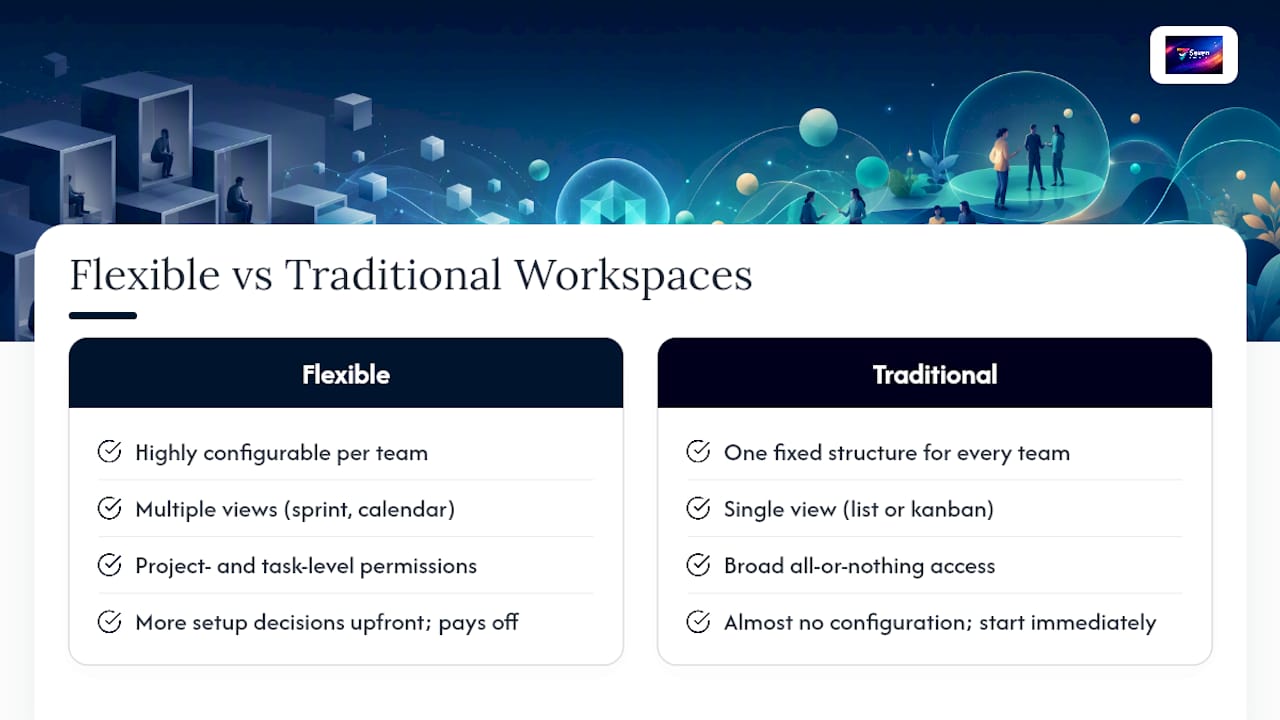
A traditional project management setup, one fixed board structure applied to every team, worked fine when most companies ran a single project type through a single department. It doesn’t hold up once you’re running client work, product sprints and internal operations through the same tool.
The core difference is configurability. Traditional workspaces impose one view, usually a list or a single kanban board, on every team regardless of how they actually work. Flexible workspaces let a product team run sprint boards while finance runs a calendar view of deadlines, inside the same platform, without either team compromising on how they think about their own work.
Permissions tell a similar story. Traditional tools often default to broad, all-or-nothing access, everyone sees everything, or nobody sees anything beyond their own tasks. Flexible workspaces support project-level and task-level permission layers, which matters enormously once contractors, clients or confidential projects enter the picture.
The trade-off is setup time. A traditional, rigid tool needs almost no configuration decisions upfront, you just start typing tasks into the one board that exists. A flexible workspace demands you actually think about structure: how many workspaces, which templates, which permission presets. That upfront cost pays off within a few weeks for any team past three or four people, but it’s a real cost, not a hidden bonus.
Examples of popular flexible workspace platforms and their unique features
The market for configurable project workspaces spans everything from lightweight task apps to enterprise-heavy platforms with a hundred integrations. A few patterns are worth knowing before you shortlist anything.
Enterprise-oriented platforms tend to lead with integration depth, dozens of connectors, extensive automation builders, and reporting dashboards aimed at operations leaders tracking multiple departments. That depth is genuinely useful at scale, but it often comes with steep per-seat pricing once you need more than basic views, and automation run limits that bite teams relying heavily on rules.
Lightweight, task-first tools sit at the other end. They prioritise speed of setup and a clean board view over feature breadth, which suits freelancers and very small teams well, though they can feel thin once you need timeline dependencies or client-facing permission tiers.
Seven occupies a distinct spot in that spectrum: flexible workspaces and boards paired with built-in messaging, file attachments and Excel import, priced transparently for individuals and teams, with no vendor lock-in and no analytics or AI training on customer data. That combination, configurable structure plus a documented privacy stance plus flat pricing, is rarer than it should be in a market where many platforms treat privacy as an enterprise-tier upsell rather than a baseline.
Whichever category you’re drawn to, the unique feature worth interrogating isn’t the flashiest one. It’s whichever feature determines whether your data stays portable once you decide to leave.
Future trends and innovations in flexible workspace solutions
Workspace design is shifting from “one interface for everyone” toward zones tailored to how a specific task gets done, quiet focus areas separate from busy collaborative boards, echoing the zoning principles researchers apply to virtual workplace design more broadly. Expect more platforms to let teams define distinct visual and notification profiles per workspace rather than applying one global setting.
Automation is getting more native and less plugin-dependent, which cuts both ways: it reduces the security surface area that comes from stitching together third-party tools, but it raises the bar for what a platform’s built-in automation builder actually needs to handle.
Data portability is becoming a genuine selling point rather than an afterthought. As more teams get burned by lock-in with tools that make export deliberately clunky, expect documented bulk export and open API access to shift from a nice-to-have into a baseline procurement requirement, the same way encryption at rest already has.
Privacy is also moving earlier in the buying process. Instead of checking a DPA after signing a contract, more procurement teams are asking about data use, sub-processors and AI training policies during the trial itself. Platforms that treat privacy as a documented, checkable feature rather than a marketing claim are better positioned for that shift than ones still relying on vague trust language.
Author perspective: a pragmatic privacy-first adoption plan
Start small. One workspace, one template, real work, not a demo project. Trial it properly and demand an export test before you extend the subscription past thirty days. If the export is clean, you’ve learned something real about the vendor.
Keep one source of truth inside that authorised workspace. Every spreadsheet copy floating on someone’s laptop is a privacy failure waiting to happen, and it usually happens quietly.
Then put a recurring date in the calendar: quarterly vendor review, DPA location confirmed, export process re-tested. Privacy isn’t a decision you make once.
— Greg
Seven: an option for privacy-first flexible workspaces
If you’ve read this far weighing configurable views against documented exports and wondering whether one platform actually delivers both without hidden costs, Seven is built around exactly that combination. It gives you flexible workspaces and boards, built-in messaging, and file attachments, all inside one platform designed by an independent team with no analytics or AI training running on your project data.

Setup is straightforward if you’re migrating from spreadsheets: Seven’s Excel import brings existing task lists across without manual re-entry, and open data export means you’re never stuck if you decide to move on later, a direct answer to the vendor lock-in concern raised throughout this guide. Pricing stays transparent at $5 for individuals and $9 per user for teams, with no hidden tiers gating basic views or automation.
Start a free trial, load in a real project, and run the export test yourself. Check the security and data-handling details while you’re at it, then decide with actual evidence rather than a sales page.
Sources
For a deeper look at matching software structure to your team’s actual workflow, rework.com’s guide to choosing project management software is a solid starting point. On the privacy side, Project Management Formula’s breakdown of data privacy in AI-powered PM tools covers DPA and governance questions in more detail than most procurement checklists.
Inside Seven’s own resources, the kanban board setup guide and the file storage lock-in checklist both work well as practical next steps once you’ve picked a platform.
- How to choose project management software
- Ecology of Work and virtual workplace design — Applied Sciences
- Data privacy in AI-powered PM tools – Project Management Formula
- Ones