IT Teams: RTO/RPO Aligned Offline Backups for Project Data in 90 Days

Use a 3-2-1 backup baseline that includes an offline immutable copy, either air‑gapped or logically isolated, plus documented restore testing on a fixed schedule. That single offline copy is what stops ransomware from reaching every version of your project data at once. Rotate removable drives, tape, or immutable cloud snapshots as your offline media, and verify restores regularly against a documented RTO and RPO.
TL;DR:
- Offline or immutable backups protect project data from ransomware that targets network-connected storage by staying physically or logically separated.
- The traditional 3-2-1 backup rule now expands to 3-2-1-1-0, adding an offline or immutable layer with verified restore testing to ensure data recoverability.
- Rotating encrypted removable drives, tape, or immutable cloud snapshots are common offline media options, each with strengths suited to different data criticality and recovery times.
- Regularly verifying export integrity and periodically testing full restores are essential practices to confirm offline backups function as intended.
- Secure key management, physical access controls, and documented procedures are critical to maintaining the integrity and availability of offline backup copies.
Table of Contents
- Why offline backups of project data matter more than ever
- The 3-2-1 rule and why it now needs a fourth number
- Choosing the right offline media for project data
- How to set up offline backups for project data step by step
- Proving your offline backups actually work
- Security and compliance controls for sensitive project data
- What actually goes wrong with offline backups in practice
- Getting the balance right between speed, cost and assurance
- How Seven keeps your project data ready for offline backup
- Sources
Why offline backups of project data matter more than ever
Ransomware operators target backup infrastructure first, not last. Once attackers get domain admin credentials, they typically delete or encrypt every backup they can reach on the network before touching production files, because a live, connected backup is just another folder to them. An offline copy, one that sits outside the network path an attacker can traverse, is the only version of your project data that survives that scenario intact.
This is the core distinction IT teams often miss: syncing is not backup. Tools like Dropbox, OneDrive, or Google Drive mirror changes in near real time, which means a corrupted file, a ransomware payload, or an accidental mass deletion propagates to every synced copy within seconds. A true backup is versioned, time-delayed, and ideally cannot be altered once written. Confusing the two is one of the most common and costly mistakes project teams make.
Two terms get used loosely in this space, and the difference matters operationally:
- Air‑gap: a backup copy with no live network connection at all, such as a removable drive stored in a safe or a tape sitting in a vault.
- Logical isolation: a copy that stays network-reachable but is protected by separate credentials, immutability locks, or retention rules that prevent modification or deletion, even by someone with admin rights on the primary system.
The NCSC’s guidance on offline backups makes the point directly: an offline copy must be physically or logically separated so that ransomware sitting on your network simply cannot reach it. You don’t strictly need to unplug a drive and lock it in a drawer if you can achieve the same independence through retention locks and credentials that are never used for day-to-day production access.
Statistic callout: Cyber.gov.au’s guidance for individuals and businesses recommends keeping multiple storage devices and rotating them offline as a practical, low-cost way to guarantee at least one copy is never exposed to an active compromise.
One more caution worth flagging: browser-based storage mechanisms like localStorage or sessionStorage are sometimes mistaken for backup by teams relying on lightweight web tools. They’re not. MDN’s documentation on localStorage notes that this storage is scoped to the browser origin and can be cleared or behave inconsistently across contexts. It was never designed to persist critical project data, and treating it as a backup layer is a mistake that surfaces only when you actually need to recover something.
The 3-2-1 rule and why it now needs a fourth number
The 3-2-1 backup strategy has been the industry baseline for decades: keep three copies of your data, on two different types of media, with one copy stored offsite. It works because it removes single points of failure. A fire that destroys your office doesn’t touch the offsite copy. A failed drive doesn’t take down the tape backup sitting in a different building.
But 3-2-1 was designed before ransomware routinely hunted for backup infrastructure specifically. That’s why many teams now run 3-2-1-1-0, adding one immutable or air‑gapped copy and a target of zero errors on restore verification. The extra “1” is the offline or immutable layer discussed above. The “0” forces the discipline of actually testing restores rather than assuming they’ll work.
Here’s how the numbers break down for a typical project team:
- 3 copies: production data, a local backup, and an offsite or cloud backup.
- 2 media types: for example, NAS storage plus removable drives, or cloud storage plus tape.
- 1 offsite copy: physically or geographically separated from your primary site.
- 1 offline/immutable copy: air‑gapped or protected by retention locks and independent credentials.
- 0 verification errors: restores are tested and confirmed to actually work, not assumed to.
Adding that fourth layer isn’t free. Rotating physical media takes staff time, tape libraries cost money upfront, and immutable cloud storage usually carries a premium over standard object storage. The trade-off is speed versus assurance, and it maps directly onto your recovery objectives.
If your Recovery Time Objective (RTO) is measured in hours and your Recovery Point Objective (RPO) tolerates losing a day of work, a nightly incremental backup to a local NAS with weekly offsite replication might be enough. If losing even a few hours of project data would be catastrophic, and downtime needs to be measured in minutes, you need faster restore paths, which usually means on-site immutable snapshots paired with an offsite copy rather than tape alone.
TechTarget’s analysis of backup strategies points out that block-level incremental backups combined with rapid recovery techniques can shrink restore windows to minutes for many workloads, which changes the calculus for teams that previously assumed fast recovery meant expensive infrastructure.
A hybrid model tends to suit most mid-sized project teams best: fast, on-site restores for day-to-day incidents, paired with an offsite immutable copy reserved for the worst-case scenario. That structure keeps routine recovery quick without leaving you exposed if the primary site itself is compromised.
Choosing the right offline media for project data
Every offline storage option trades cost, speed, and durability differently. None of them is universally correct. What matters is matching the medium to how critical the data is and how fast you’d need it back.
Removable HDD or SSD rotation is the most common starting point for small and mid-sized teams. You buy two or three drives, encrypt each one with full-disk encryption, and rotate them so only one is ever connected at a time. This is the exact pattern the NCSC describes: one drive online for the current write cycle, every other drive physically disconnected and stored elsewhere, guaranteeing that at least one copy is never exposed to a live compromise.
The practical checklist for drive rotation looks like this:
- Encrypt every drive with a strong, documented passphrase or key, stored separately from the drives themselves.
- Label drives clearly with rotation dates, not just generic names, so nobody accidentally overwrites the wrong one.
- Store offline drives in a climate-controlled environment, away from direct sunlight, humidity, and magnetic sources.
- Keep a simple rotation log, even a spreadsheet, tracking which drive was last written and when it was last verified.
- Physically inspect drives annually for signs of wear, especially if they’re older than three years.
Tape and WORM (Write Once, Read Many) media still earns its place for organisations with large archival datasets and long retention requirements. Tape is slower to write and read than disk, but it’s cheap per terabyte at scale, extremely stable in storage, and inherently resistant to modification once written. It suits project archives you need to keep for years but rarely touch, such as completed project records held for compliance. It’s a poor fit if you need to restore quickly, because seek times on tape are measured in minutes, not seconds.
NAS rotation sits between drive rotation and full offsite replication. Some teams run two NAS units, keeping one powered on for active backups and the second physically disconnected from the network until its turn in the rotation. This gives you the convenience of network storage with a genuine offline gap built into the schedule. If your NAS ever needs professional recovery after a failure, specialist NAS data recovery guidance is worth having bookmarked before an incident happens, not during one.
Immutable cloud snapshots are the modern answer for teams that want offline-equivalent protection without physical media. The trick is making a cloud copy behave like a true offline backup: use credentials that are entirely separate from your production admin accounts, enable retention locks that prevent deletion even by account owners for a set period, and store those credentials somewhere your primary environment can’t reach. Cloud providers also support genuinely offline seeding for large datasets. Azure Backup’s offline backup option and the Azure Data Box appliance let you physically ship an initial full backup to a data centre rather than transferring it over a network connection, which matters when you’re dealing with terabytes of project archives and limited bandwidth.
Pro Tip: Whatever medium you choose, treat chain of custody as seriously as encryption. A backup drive left in an unlocked drawer or a courier bag with no tracking number defeats the point of air‑gapping it in the first place. Document who has physical access to offline media at every stage, from creation to storage to disposal.
Environmental protection matters just as much as security controls. Fire-rated safes, humidity control, and physical access logs are boring, unglamorous investments that only prove their worth the one time you actually need them.
How to set up offline backups for project data step by step
Building an offline backup process from scratch is a sequence of decisions, not a single tool purchase. Work through it in this order.
-
Inventory and classify your project data. List every repository: project management platforms, file shares, code repositories, design assets. Assign each one a criticality tier, and map each tier to a target RTO and RPO. A client-facing deliverable folder might need a four-hour RTO; an archived project from two years ago might tolerate a week.
-
Choose media and a rotation schedule that actually meets those targets. High-criticality data with tight RTOs needs fast-access storage like NAS snapshots or immutable cloud copies. Lower-criticality archives can move to tape or rotated drives on a monthly cycle.
-
Enable encryption and separate key custody from the start. Encrypt every offline copy, and store the decryption keys somewhere other than with the backup media or the production environment. If the same person or system controls both the backup and the keys, you don’t have real separation.
-
Segregate backup credentials and networks. Backup service accounts should never share credentials with production admin accounts. Where possible, put backup infrastructure on a separate network segment or VLAN, so a compromise of production systems doesn’t automatically hand attackers a path to your backups.
-
Document runbooks and store them offline too. Write down exactly how to restore each system, including where credentials, encryption keys, and configuration files live. Then keep a printed or offline-stored copy of that runbook. Incidents that take down your network often take down your wiki at the same time.
-
Automate verification where you can, and schedule manual restores where you can’t. Automated checksum validation and boot tests catch a large share of failures without staff intervention. Full manual restores still need to happen on a schedule, because automated checks don’t catch every failure mode.
Pro Tip: When documenting a runbook for a SaaS project tool, don’t just note where the export file lives. Record the account credentials, API keys, and any configuration or access-list details needed to actually restore into a working system. A backup that’s missing its credentials and network configuration is effectively useless when you need it most.
The order matters here. Teams that skip straight to buying hardware before classifying their data end up with expensive infrastructure protecting the wrong things, and thin coverage on the project data that actually mattered.
Proving your offline backups actually work
A backup nobody has restored is a hypothesis, not a safety net. The gap between “we have backups” and “we know our backups work” is where most recovery failures actually happen, usually discovered at the worst possible moment.
There’s a meaningful difference between automated verification and a full restore test. Automated verification checks that a backup file is readable, that its checksum matches, and sometimes that a snapshot can boot. It’s fast, cheap, and catches obvious corruption. A full restore test actually recovers the data into a working environment and confirms someone can use it, which is the only test that catches configuration drift, missing dependencies, or credentials that expired without anyone noticing.
TechTarget notes that automated recoverability checks, such as booting a snapshot in an isolated environment, can deliver ongoing confidence without the overhead of running a full manual restore every time.
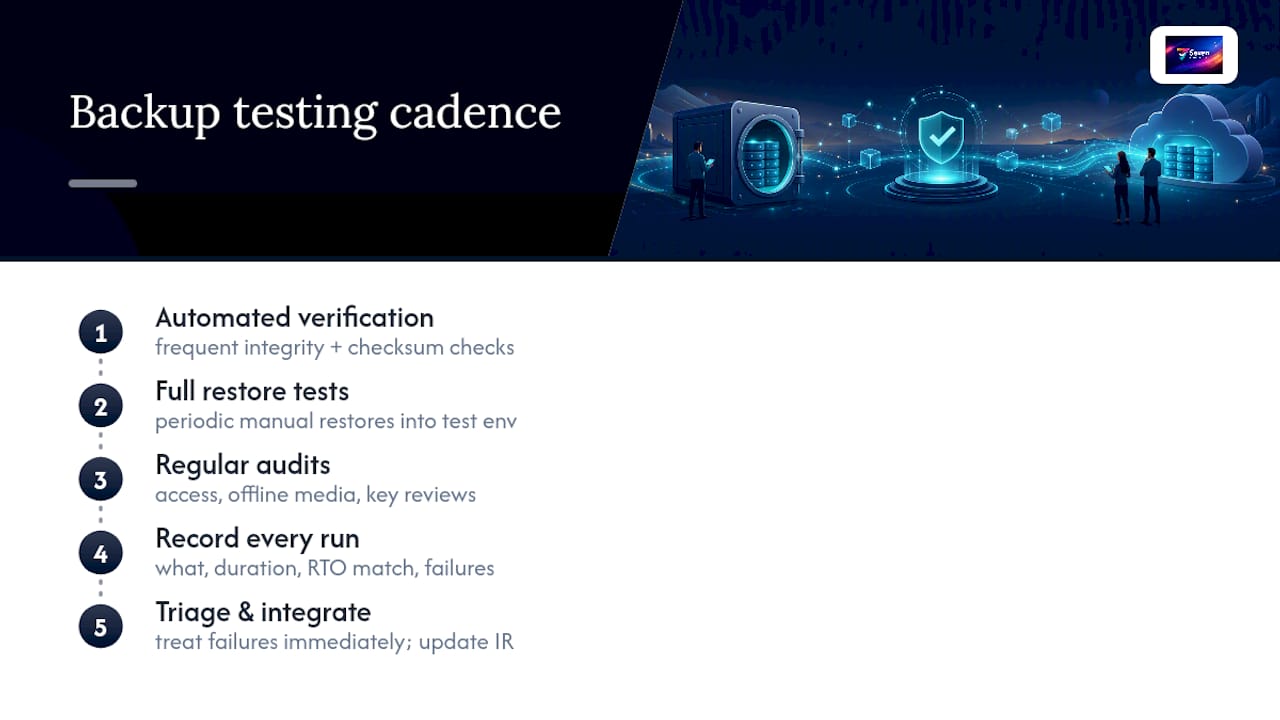
A workable testing cadence for most project teams follows a regular schedule: frequent automated verification of backup integrity and checksum validation across all offline copies, periodic full manual restores of critical datasets into a test environment, and regular audits covering all backup tiers including access reviews for offline media and encryption keys.
Statistic callout: Government cyber-security guidance specifically calls out rotating offline storage devices as a core practice, not an optional extra, precisely because untested rotation is where offline strategies quietly fail.
Every test, pass or fail, should generate a written record: what was restored, how long it took, whether it matched the documented RTO, and what broke if anything did. When something fails, treat it as a finding to triage immediately, not a footnote for next quarter’s review. Fold your restore process into your incident response plan directly, and keep a copy of every runbook offline, because the incident that takes down your primary systems is exactly the incident that might take your documentation with it.
Security and compliance controls for sensitive project data
Encryption is only half the job. Where you store the keys matters just as much as the algorithm you use. Keep encryption keys physically or logically separate from the backup hosts themselves, ideally in a dedicated key management system or a hardware security module that isn’t reachable from the same credentials that manage your backup infrastructure.
Access separation deserves the same rigour. A handful of practical controls cover most of the risk:
- Limit backup administration to a small, named group, using role-based access rather than shared admin accounts.
- Store recovery credentials offline, separate from both production systems and the backup media they unlock.
- Encrypt recovery documentation itself, not just the backup files, since a readable runbook in the wrong hands is a roadmap for an attacker.
- Apply physical access controls, locked cabinets or safes, to any location holding offline media or printed credentials.
- Review access lists quarterly, removing anyone who’s changed roles or left the team.
Compliance obligations around backup retention vary significantly by jurisdiction and industry, covering everything from financial record-keeping periods to data residency requirements for personal information. Retention rules that apply to a healthcare provider in one country look nothing like those for a construction firm in another. Rather than assuming a single retention period fits every situation, treat your legal or compliance team as a required stop before finalising retention schedules, particularly for project data that includes personal information, financial records, or contractual documentation.
What actually goes wrong with offline backups in practice
The failures I see repeated across project teams are rarely about the technology. They’re about the gaps between what a backup policy says on paper and what actually happens when someone’s under deadline pressure.
The most common mistake is treating an export as a backup without checking it. A team runs a manual export of their project workspace, saves it to a drive, and assumes it’s done. Nobody opens the file again until six months later during an actual emergency, at which point they discover it’s corrupted, incomplete, or missing the configuration data needed to rebuild anything useful. The fix is simple in principle and hard in practice: verify every export immediately with a checksum, and test a sample restore before you trust the routine.
The second recurring gap is credential sprawl. Backup accounts accumulate access over time, get shared between team members, and eventually end up with permissions nobody remembers granting. When those credentials live on the same network as production systems, they become the exact bridge ransomware uses to reach your backups.
Platforms that give you genuine control over your own exports make this whole process easier to get right. Seven’s approach to project data leans on user-controlled exports rather than locking your workspace behind a proprietary format, which matters when the goal is producing a clean, verifiable offline archive rather than a vendor-specific dump you can’t fully audit.
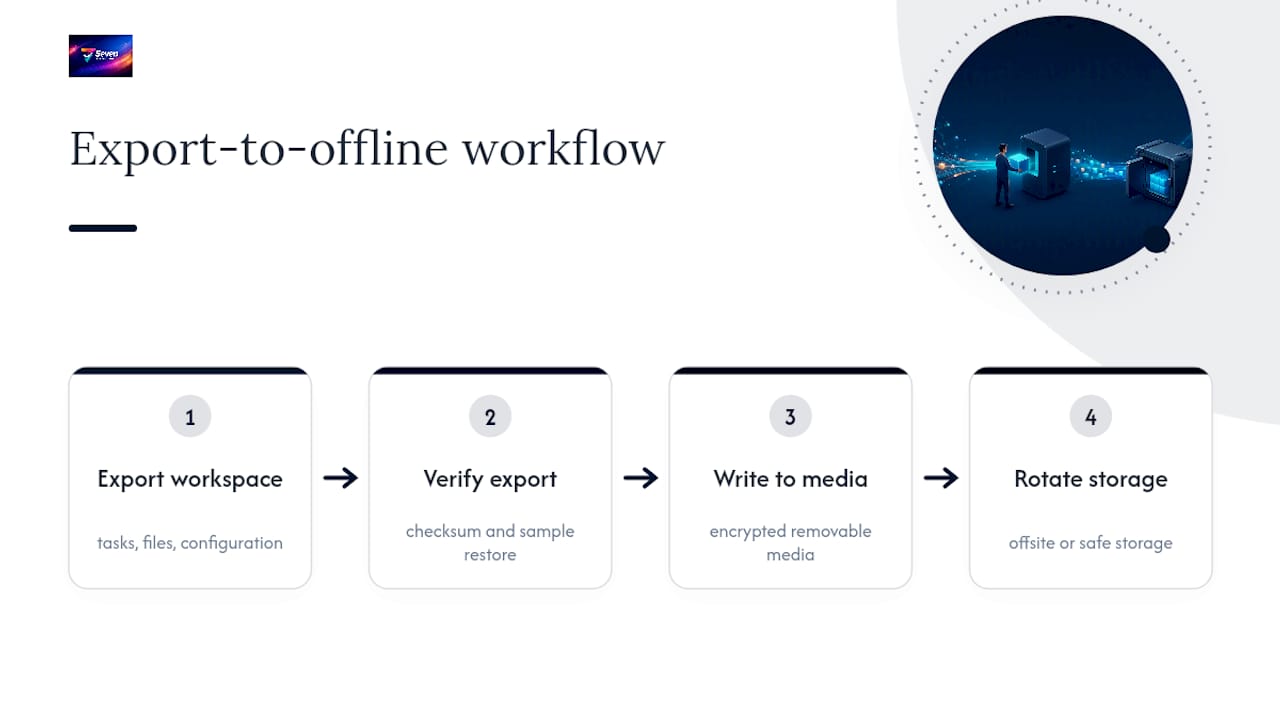
A workable export-to-offline workflow for a SaaS project tool runs in four steps: export the full workspace including tasks, files, and configuration, verify the export against a checksum, write it to encrypted removable media, and rotate that media into offsite or safe storage. Seven’s own SaaS data backup guidance walks through the export side of that process in more detail, and the project tool data retention guide covers how retention and export controls work once the data’s out of the platform.
Getting the balance right between speed, cost and assurance
Most small teams overbuild or underbuild their backup strategy, rarely landing in the middle on the first attempt. Overbuilding looks like a five-figure tape library for a ten-person team with no compliance mandate. Underbuilding looks like a single external drive nobody’s checked since it was plugged in eighteen months ago.
Start simple if you’re a small team: two or three rotated encrypted drives, a monthly restore test, and a documented runbook stored offline. That covers the overwhelming majority of realistic failure scenarios, ransomware, hardware failure, accidental deletion, at a cost most teams can absorb without a budget request.
Scale up when the data justifies it. If you’re managing regulated data, running continuous operations where hours of downtime cost real money, or holding archives you’re legally required to keep for years, that’s when immutable cloud storage, offsite tape, or a dedicated backup appliance earns its cost.
A 90-day action list for teams starting from scratch: in the first thirty days, inventory your data and classify it by criticality. In the next thirty, set up rotated media and encryption, and write your first runbook. In the final thirty, run your first full restore test and fix whatever it reveals, because it will reveal something.
— Greg
How Seven keeps your project data ready for offline backup
Vendor lock-in is the quiet threat that undermines a lot of backup planning: a platform that makes it hard to get your data out defeats the purpose of building an offline archive in the first place. The platform provides user-controlled exports so your workspace, tasks, and files come out in a form you can verify, encrypt, and rotate into offline storage on your own schedule.

It avoids data mining, analytics resale, and proprietary formats that restrict access to your project history. That independence matters just as much day-to-day as it does during a disaster. Exports are designed to be real, usable copies of your work, not partial dumps that create platform dependence. Seven’s security and compliance page lays out exactly how data handling and export controls work, which is worth reading before you build your export routine around it. Plans start at $5 for individuals and $9 per user for teams, with a 7-day free trial. Head to Seven and start your trial, export a sample workspace, and see how it fits into the offline backup routine you’re building.
Sources
- Offline backups in an online world — NCSC
- Cyber
- Offline backup overview — Azure Backup
- What is the 3-2-1 backup strategy? — SentinelOne