Project Tool Data Retention: Control, Export, and Verify

Project tool data retention determines exactly how long your tasks, comments, attachments, and exports live inside your project-management platform before they get archived, purged, or permanently destroyed. If you’re a paying user of a tool like Seven, the operational answer is this: retention settings control the lifecycle of every record you create, but the system only protects you if you configure it deliberately and verify it works. Three frameworks anchor this decision for most teams: the storage limitation principle common to data protection law, contractual document-retention windows your clients or accountants require, and a written retention schedule that assigns an owner to every category of data you hold.
Acting now matters for a simple reason. If you plan to delete anything, whether it’s a completed project or a former contractor’s account, export first. If you want retention to run itself going forward, set your windows today rather than after a compliance request lands in your inbox.
Here’s what to do in the next twenty minutes:
- Export key metadata for any project you might archive or close, including task history, comment threads, and file lists (not just the files themselves).
- Set or confirm your retention window at the workspace or project level so records don’t sit indefinitely by default.
- Request a purge receipt from your vendor’s support team if you need documented proof that a deletion reached backups, not just the user interface.
Key Takeaways
Project tool data retention works only when export, deletion windows, and backup purges are configured and verified together, not treated as separate afterthoughts.
| Point | Details |
|---|---|
| Export metadata first | Pull JSON or NDJSON metadata before attachments so relationships and timestamps survive. |
| Map retention windows by category | Use tiered windows like 90 days for drafts and 3–7 years for contracts, each with a named owner. |
| Verify purge receipts | Request item_id, timestamp, and backup_snapshot_ids as proof deletion reached backups. |
| Include third-party copies in scope | Integrations and webhooks retain their own copies outside your platform’s rules. |
| Seven supports auditable retention | Workspace and project-level windows, metadata-rich exports, and purge receipts on request. |
Table of Contents
- Which Project Records Actually Fall Under Retention Rules
- How Retention Controls Actually Behave Inside a PM Tool
- Exporting Project Data Before You Delete Anything
- Why Deletion Has to Reach Backups, Not Just the Interface
- A Practical Retention Schedule You Can Actually Use
- Setting This Up Inside Your Project Tool
- Testing Whether Your Retention Rules Actually Work
- Handling Third-Party Integrations and Their Retention Implications
- Retention in Shared Projects With External Collaborators
- Why Seven Builds Retention Controls This Way
- How Seven Helps You Control Project Data Retention
- Frequently Asked Questions
- Sources
Which Project Records Actually Fall Under Retention Rules
Retention policy language often stays abstract. In practice, a project-management tool stores at least eight distinct record types, and each one behaves differently when a retention rule fires.
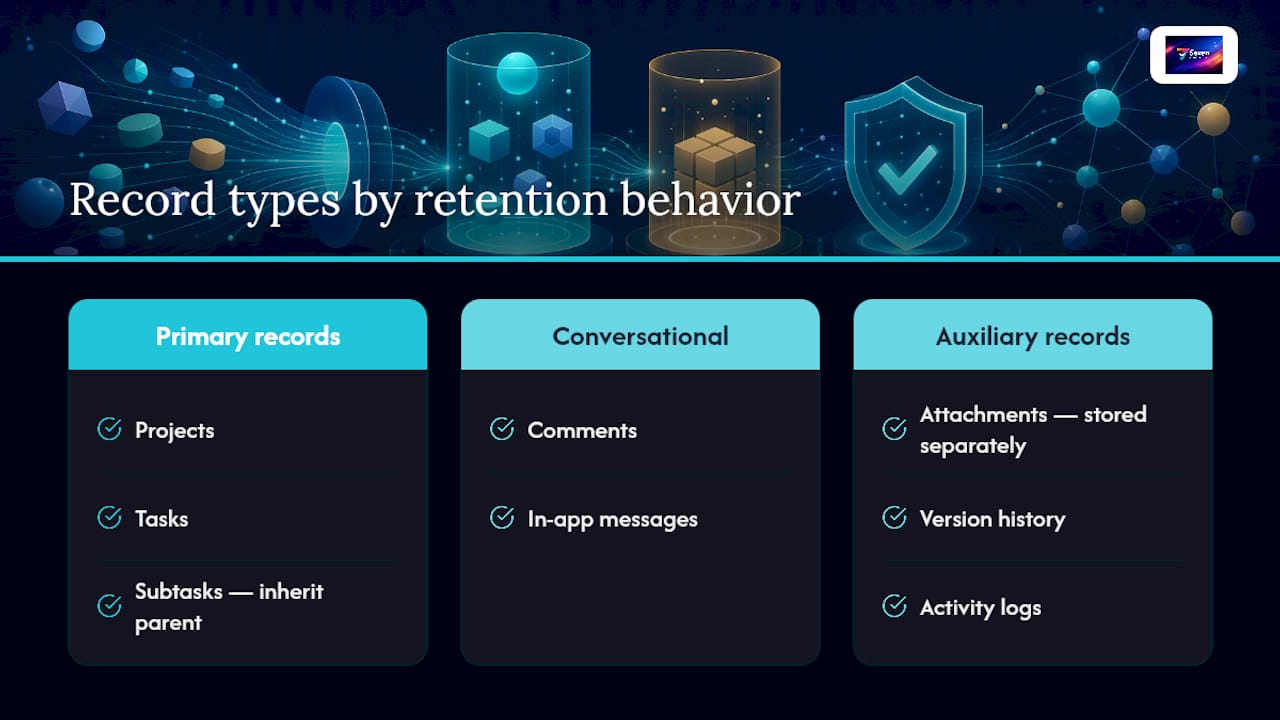
Projects and tasks are the obvious ones: the containers and action items you create daily. Subtasks inherit whatever rule applies to their parent task in most systems, though some platforms let you override that. Comments and in-app messages are their own category, frequently overlooked because they feel ephemeral but often carry more legal weight than the task itself, especially in disputes over scope or deadlines. Attachments are typically stored separately from the task record that references them, which matters enormously for deletion, since removing a task doesn’t always remove the file it points to.
Version history and activity logs track changes over time. Exports (the CSV or JSON files you download) are a separate copy the moment they leave the platform. Webhooks and integration-sent copies push data into Slack, Zapier, or a CRM, creating a copy your retention policy no longer controls once it lands elsewhere.
Pro Tip: The riskiest copies are the ones you forget exist: a spreadsheet export sitting in someone’s Downloads folder, a support-case attachment a vendor kept on file, or a browser cache holding a page you thought you deleted. Before you finalize any deletion, ask where the last three exports of that project went.
How Retention Controls Actually Behave Inside a PM Tool
Retention isn’t a single switch. It’s a stack of behaviors that interact, and misunderstanding any one of them is how teams end up thinking data is gone when it isn’t.
- TTL (time-to-live) is the countdown clock attached to a record or category. When it expires, the platform either archives, flags, or deletes the item automatically.
- Soft delete (tombstone) happens first in most systems. The record disappears from your view but remains recoverable in a trash state, often for 30 days, sometimes longer.
- Hard purge is the actual, irreversible destruction. This is the step that must reach every replica, not just the primary database.
- Archive moves a record to cheaper, slower storage for long-term reference. It is not the same as a backup, and treating the two interchangeably is one of the most common retention mistakes small teams make.
- Legal hold suspends every other rule. If a project is flagged for hold, no TTL, soft delete, or scheduled purge should touch it until the hold lifts.
Control layers stack on top of these mechanics: some settings apply globally across your account, others apply per workspace, and the most granular controls live at the project level, which typically overrides whatever the workspace default says. Storage tiers (hot, active data versus cold, archival data) determine cost and retrieval speed, while backup replicas and third-party exports sit outside the platform’s own retention logic entirely.
Platforms commonly implement soft-delete patterns and purge cycles behind the scenes, meaning a record can vanish from your screen while still existing in a backend copy until the scheduled purge actually runs.
Exporting Project Data Before You Delete Anything
Export order matters more than most guides admit. Pull metadata before attachments, not the other way around, because file exports alone strip out the relationships that make a project record useful later.
JSON or NDJSON formats preserve nested relationships: which comment belongs to which task, which user made which edit, and when. CSV flattens all of that into rows and columns, which is fine for a simple task list but breaks down the moment you need to reconstruct a comment thread or trace an approval chain. Attachments should always export as a separate batch, referenced by file ID or path rather than embedded, since embedding often corrupts formatting or strips version history.
Run this sequence before any deletion:
- Export metadata first (tasks, comments, timestamps, user IDs, and their relationships to each other).
- Export attachments separately, verifying file counts match what the metadata export references.
- Spot-check a sample of exported files to confirm they open correctly and aren’t corrupted or truncated.
- Capture the relevant audit log entries showing who exported what and when.
A three-stage archiving workflow works well for freelancers and small teams closing out a project: triage which records are permanent versus working files, tag everything with consistent metadata, and route final records to genuine archive storage rather than a personal hard drive that nobody backs up.
Pro Tip: Export metadata before attachments, every time. If you grab the files first and the metadata export fails or times out, you’re left with a folder of documents and no record of who wrote what, when, or in response to which comment. That context is often what a client or auditor actually needs.
Why Deletion Has to Reach Backups, Not Just the Interface
Clicking delete removes the record from your view. It does not necessarily remove it from the snapshot your vendor took last night, the replica syncing across their infrastructure, or the analytics pipeline a third-party integration fed six months ago. This is the single most misunderstood part of project tool data retention, and it’s where most “we deleted it” claims fall apart under scrutiny.

A written retention policy alone doesn’t prove deletion happened across every copy of that data. You need auditability that spans backups, snapshots, object storage lifecycle rules, and any downstream system that ingested the record before you hit delete.
| Evidence Field | What It Confirms |
|---|---|
| item_id | Which specific record was targeted for deletion |
| delete_action | Whether it was soft delete, hard purge, or archive |
| timestamp | Exactly when the action occurred |
| actor | Which user or system process triggered the deletion |
| purge_receipt_id | A unique reference proving the purge completed |
| storage_tier | Which storage layer (hot, archive, backup) was affected |
| backup_snapshot_ids | Which specific backup snapshots the purge reached |
Ask your vendor for these fields whenever you need documented proof, not just a confirmation email saying “it’s been handled.”
A Practical Retention Schedule You Can Actually Use
Retention schedules fail when they’re too generic to apply or too complex to maintain. The fix is a short table with a handful of categories, each mapped to a window, an owner, and a deletion method.
| Record Category | Retention Window | Owner | Deletion Method |
|---|---|---|---|
| Chat and comments | A few months to a year | Project manager | Soft delete, then scheduled purge |
| Draft files and working documents | A few months | Individual contributor | Soft delete, then purge |
| Final deliverables and contracts | 3–7 years | Team lead or business owner | Archive, then crypto-shred at expiry |
| Invoices and tax documents | 5–7 years | Finance or owner | Archive per local tax rules |
These ranges reflect common defaults that small teams and freelancers use, though local tax and contract law should always take precedence over any generic template. When a legal hold applies to a project, it overrides every window in this table until the hold is formally lifted. A single project caught in a client dispute doesn’t just pause its own deletion; you need a process for flagging it so automated rules don’t purge it by accident.
Setting This Up Inside Your Project Tool
Implementing retention isn’t a one-time settings change. It’s a short workflow you repeat every time a new project type enters your account.
- Map your project types (client work, internal projects, one-off tasks) and decide which retention category each belongs to.
- Tag each project accordingly, ideally at creation, not months later when you’ve forgotten the original scope.
- Set the retention window at the project level if it needs to differ from your workspace default.
- Configure workspace-level settings for anything that should follow a standard rule across your account.
- Verify your backup provider’s purge cycle aligns with whatever window you just set.
- Export any records that need to survive past the deletion date before the window closes.
A few sample mappings to copy directly:
- Client project, closed and paid: tag “closed-client,” 3-year retention, archive then crypto-shred.
- Internal brainstorm board: tag “internal-draft,” 90-day retention, soft delete then purge.
- Contractor collaboration space: tag “external-collab,” 180-day retention, export before purge.
Assign one person, usually whoever owns operations or compliance in a small team, to review these rules quarterly. Notify that person automatically when a retention rule is about to trigger on a project still marked active, since automation without a review cadence eventually deletes something someone still needed.
Testing Whether Your Retention Rules Actually Work
Trusting a setting you’ve never tested is how teams discover, usually at the worst moment, that “deleted” didn’t mean deleted. Run this test script once a quarter:
- Create a disposable test object (a dummy task with a comment and an attachment).
- Set a short TTL or trigger manual deletion.
- Confirm it disappears from the user interface immediately.
- Wait through the stated soft-delete grace period, then request a purge receipt.
- Attempt to restore it from a backup snapshot to confirm the purge actually reached that layer.
When you contact support, ask specifically: how long do soft-deleted items persist before permanent purge? Which backup cycles might still contain this object after purge? Can you provide a purge receipt with a timestamp and storage tier reference? A runtime control with clear ownership and destruction triggers only counts as effective if you can audit it. A policy nobody can verify is functionally the same as no policy at all.
Handling Third-Party Integrations and Their Retention Implications
Every integration you connect, Slack, a CRM, a billing tool, a Zapier automation, creates a copy of your data the moment it fires. That copy lives under the third-party’s retention rules, not your project tool’s, and your deletion inside Seven or any similar platform has zero effect on it.
Before connecting an integration, check its own data retention documentation, not just its permissions screen. When you delete a project that fed data into five different tools over its lifetime, plan on manually auditing each of those destinations, or accept that some trace of the project will outlive the record in your PM tool. Webhooks are the quietest offender here: they fire once, deliver the payload, and that payload sits wherever it landed, indefinitely, unless the receiving system has its own purge schedule.
Retention in Shared Projects With External Collaborators
Shared projects complicate retention because ownership gets murky the moment an external client or freelancer joins. If a client has edit access to a project and leaves the company mid-engagement, their downloaded exports and local copies are entirely outside your control, no matter what your platform’s retention window says.
Set a rule before onboarding any external collaborator: define what happens to their access and any local copies at project close, and put it in the contract, not just the platform settings. Role permissions matter more than most teams realize here. A collaborator with export rights but no admin access can pull a full copy of shared data and walk away with it long before your retention window even starts counting. Restricting export permissions for external roles, and reviewing who has access at project handoff, closes a gap that no amount of backend retention configuration can fix on its own.
Why Seven Builds Retention Controls This Way
Seven’s retention architecture starts from a simple premise: you should never have to take our word for it when we say something is deleted. That means tenant isolation between workspaces, auditable deletion receipts you can actually request and review, and retention controls set at both the workspace and project level so a single global rule never forces an awkward compromise on a client project with different requirements. Export tools carry metadata by default, not as an afterthought, because a record without its relationships and timestamps isn’t a real backup of your work. If you need a purge receipt or want to confirm how a retention rule applies to a specific project, contact our support team directly and ask.
How Seven Helps You Control Project Data Retention
Retention only works if the tool gives you real levers, not a settings page that looks configurable but hides the actual deletion logic somewhere you can’t see. Seven builds retention around user control: set windows at the workspace or project level, export full metadata alongside attachments in formats that preserve relationships, and pull audit logs whenever you need to show a client or auditor exactly what happened to a record.

Because Seven doesn’t run analytics or sell data to third parties, there’s no hidden pipeline quietly retaining a copy after you’ve purged the original. If you need documented proof a deletion reached every backup, support can generate a purge receipt showing the timestamp, storage tier, and snapshot IDs involved. Plans start at $5 a month for individuals, with a 7-day free trial, and the security details behind tenant isolation and deletion auditability are laid out on our security page. Start the trial, set your first retention window, and export a test project to see exactly what leaves with you.
Frequently Asked Questions
What does project tool data retention actually control?
It controls how long your tasks, comments, attachments, and exports stay stored before the platform archives or deletes them, and whether that deletion reaches backups and third-party copies as well as the interface you see.
Is soft delete the same as permanent deletion?
No. Soft delete moves a record into a recoverable trash state, often for 30 days, while the actual purge that removes it from backups and replicas happens later on a separate schedule.
How long should I keep project chat and comments?
Most small-team templates suggest 90 to 365 days for chat and comments, though contracts or client agreements sometimes require longer if the conversation documents scope or approvals.
What happens to data I sent to an integration before I delete a project?
Nothing automatically. Third-party tools like CRMs or automation platforms retain their own copies under their own retention rules, independent of what you do inside your project tool.
Can I prove a deletion actually happened for an audit or legal request?
Yes, if your vendor supports purge receipts. Ask for the item ID, timestamp, actor, and backup snapshot IDs affected, since these fields are what actually demonstrate the purge reached every copy.
This article provides general operational guidance and is not a substitute for legal or tax advice. Confirm retention requirements specific to your industry and jurisdiction with a qualified professional.
Sources
- Data retention policy: A practical guide | Proton
- Data Retention Policies: A Practical Guide for Modern Teams
- Data retention policy (Drata)
- Data retention policy examples