Reduce Tool Sprawl in 30 Days: Privacy First Playbook for Small Teams

Reduce tool sprawl by auditing every app your team actually uses, retiring the overlapping ones, and moving the work into a single privacy-first platform. Run the audit this week, pilot the switch for 30 days, and cancel the duplicates once the pilot proves out. The hours only come back when the old subscriptions are actually cancelled, not left running “just in case.”
TL;DR:
- Shadow tools often account for 30 to 40 percent of actual usage, despite not being officially licensed, and require confidential interviews to uncover.
- High-usage, low-criticality tools are prime candidates for consolidation, while those with reliable functions can be integrated, and critical tools should be replaced if they fail.
- Running a structured 30-day pilot with a fixed start and end date helps identify workflow issues, measure time savings, and justify licensing cancellations.
- Ensuring you can export and back up data before canceling subscriptions reduces risks of vendor lock-in and data loss during migration.
- Ongoing quarterly reviews, ownership, and clear cutover dates are essential to prevent tool sprawl from creeping back into the team’s workflow.
Table of Contents
- Quick consolidation checklist: what to do first
- How do you audit your stack and find shadow tools?
- Deciding: consolidate, integrate, or replace
- Running a 30-day pilot: step-by-step migration plan
- Protecting your data and avoiding vendor lock-in
- Common pitfalls (and how to avoid them)
- Strategies to promote adoption and manage the change
- Best practices for ongoing monitoring to stop sprawl returning
- Getting buy-in across departments and roles
- Author perspective: why privacy-first consolidation matters for small teams
- How Seven helps you actually reduce tool sprawl
- Sources
Quick consolidation checklist: what to do first
Before you touch a single subscription, get the order of operations right. Teams that jump straight to buying a new platform often end up with more tools than before.
Here’s the sequence that works:
- Inventory everything — list every app, browser extension, and shared spreadsheet your team touches this week, including the ones nobody officially approved.
- Map each tool to one job. Write down what job it does, who actually uses it, and how critical that job is to delivery.
- Pick your first cluster. Group the tools that solve the same problem (task tracking, messaging, file sharing) and choose the messiest overlap as your pilot target.
- Schedule a 30-day pilot with a fixed start date, not a vague “sometime next quarter.”
That’s the whole opening move. Everything after this is detail on how to do each step properly.
How do you audit your stack and find shadow tools?
Most audits fail for one reason: they only count what procurement approved. The real mess lives in the tools nobody bought through official channels.
Confidential interviews beat spreadsheet reviews. Ask each team member, one-on-one and off the record, what they actually open every day to get work done. Shadow tools, personal spreadsheets, private Trello boards, a Notes app someone uses instead of the shared system, commonly account for 30 to 40% of real tool usage that never shows up on a licence report. People hide these tools not out of malice but because the “official” tool was slower or missing a feature they needed.
Once you have the interview data, cross-check it against hard numbers:
- Pull licence counts and active-user logs from every paid tool.
- Compare what people say they use against what the logs show.
- Flag any tool with high licence spend but low active use, and any tool with zero licence spend but heavy mention in interviews.
Then score what you’ve found. A simple adoption-times-criticality matrix works well: rate each tool from one to five on how many people actually use it, and one to five on how badly the business needs that function. Multiply the two scores. Anything with a high adoption score but low criticality is a strong consolidation candidate. Anything with high criticality but low adoption might be a training problem, not a tool problem.
Pro Tip: Run the interviews before you announce the audit publicly. If people know a consolidation project is coming, they’ll under-report the tools they’re attached to, worried they’ll lose them.
Deciding: consolidate, integrate, or replace
Not every overlap needs the same fix. Getting this decision wrong is how teams end up adding a fifteenth tool to solve a problem caused by having fourteen.
Pick one, migrate the data, retire the rest.
Integrate when each tool has a genuinely distinct job. A time-tracking tool and a project management platform aren’t redundant if both are used daily for different reasons, they just need a reliable handoff between them so nobody re-enters the same data twice. Automation only helps here when it replaces a manual handoff; an automation with no clear job just adds another thing someone has to maintain.
Replace when the tool itself is the problem. If a tool causes recurring data quality issues, silent sync failures, or a process breakdown (missed deadlines because updates don’t land where people look), no amount of integration fixes that. Swap it out.
- Overlapping function + low adoption → consolidate
- Distinct function + reliable handoff needed → integrate
- Data quality or process failure → replace
Running a 30-day pilot: step-by-step migration plan
A pilot only works if it has a hard start date, a hard end date, and numbers attached to it. Here’s a week-by-week structure that keeps risk low while still forcing a real decision at the end.
- Week 1: Scope and safety net. Define the pilot cluster (say, task tracking and internal messaging), export a full backup from every tool involved, and confirm the export files actually open and read correctly before you touch anything live.
- Week 2: Small-team migration. Move one team or one project into the new platform. Not everyone. Not everything. A contained group surfaces problems before they hit the whole business.
- Week 3: Live use. Run real work through the new setup for a full week, no fallback to the old tool for that project.
- Week 4: Measure, cancel, optimise. Review the numbers below, cancel the licences for the tools you’re replacing, and adjust workflows based on what week three showed you.
What to actually measure:
- Daily app switches per person (count how often someone moves between tools to finish one task)
- Time spent searching for information that should have been in one place
- Reconciliation hours saved — time no longer spent copying data between systems
- Team satisfaction, via a short weekly pulse check, not a single end-of-pilot survey
Teams that carry a pilot through to full retirement, rather than just adding the new tool alongside the old ones, have reclaimed roughly 12 hours per person per week on average. That number comes specifically from accounts that cancelled the redundant subscriptions, not from ones that kept everything running “for backup.”
If week two or three surfaces a genuine blocker, missing data, a workflow that simply doesn’t translate, roll back to the old tool for that one project only, fix the gap, and restart the pilot rather than abandoning consolidation altogether.
Protecting your data and avoiding vendor lock-in
Before you cancel anything, prove you can get your data back out in a usable form. This is the step teams skip when they’re excited about the new platform, and it’s the one that causes the most regret.
- Test the export before you rely on it. Download a real export from the legacy tool and open it in a spreadsheet or the new platform. A promised export feature that produces a broken CSV is worse than no export at all.
- Keep an independent backup. Store a copy of critical project and client records somewhere outside both the old and new platform, ideally before you start the migration, not after.
- Choose platforms that state their data policy plainly. Look for explicit language on data ownership, whether the vendor mines your data for analytics or resells usage patterns, and how deletion actually works when you leave.
- Document the export and deletion process you used, in case you need to repeat it for a different tool later or prove compliance to a client.
A guide on backing up SaaS project data properly walks through the practical steps for testing an export before you trust it. The broader question of who legally owns your work inside a subscription contract is worth understanding too, since export clauses vary a lot between vendors and the fine print matters more than the marketing page.
Common pitfalls (and how to avoid them)
The single biggest failure mode isn’t picking the wrong platform. It’s not retiring the old ones. Accounts that left legacy tools running alongside the new system never reclaimed the time savings the consolidation was supposed to deliver, while accounts that retired ten or more tools saw the full benefit. Set a hard cancellation date for every tool in the pilot cluster before the pilot even starts.
Second pitfall: stopping the shadow-tool hunt after one round of interviews. New shadow tools appear the moment people feel friction in the new system, so keep asking.
Third: rolling out one generic onboarding session for everyone. A project manager, a freelancer subcontractor, and a junior team member all hit different friction points. Build role-specific onboarding, even if it’s just a fifteen-minute walkthrough per role, or people will quietly drift back to what they know.
Pro Tip: Put the old tool’s login page behind a password only you hold. It sounds heavy-handed, but it’s the single most effective way to force a clean cutover instead of a slow, half-finished migration.
Strategies to promote adoption and manage the change
Consolidation fails on people, not technology, more often than teams expect. The tool migration is the easy part; getting a freelancer’s regular collaborators or a small team’s most stubborn holdout to actually stop opening the old app is the hard part.
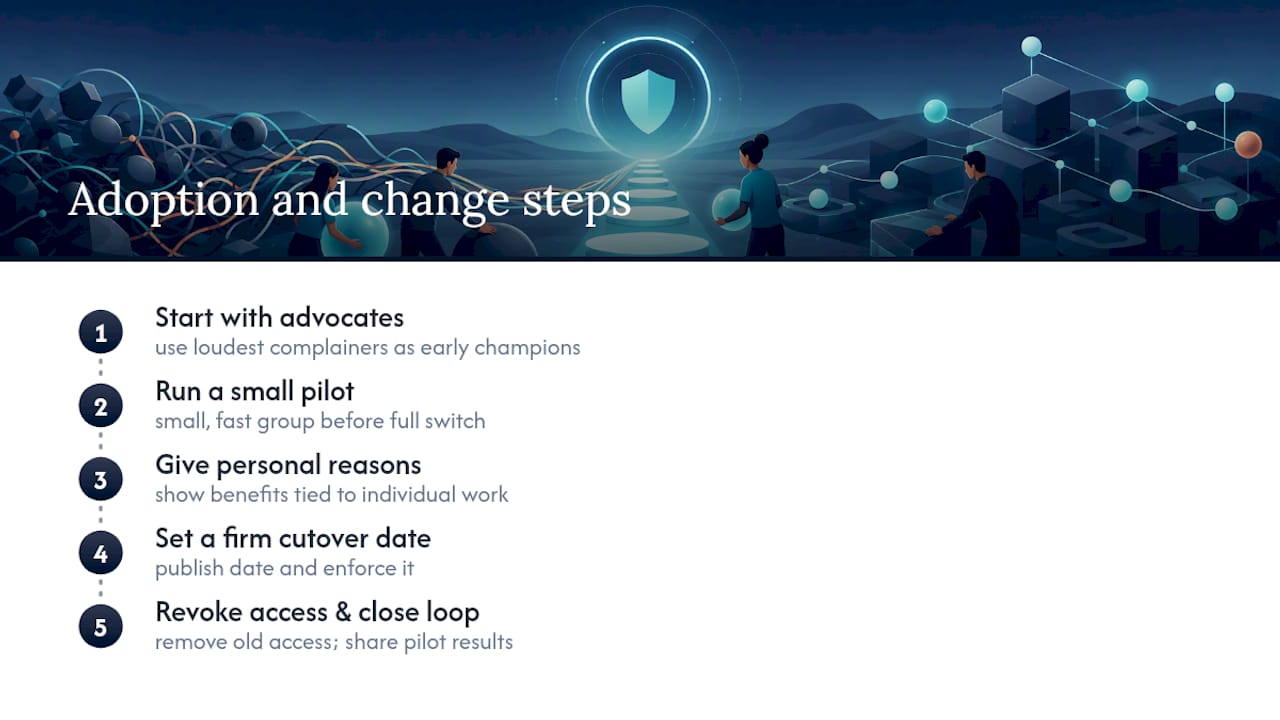
Start with the people who complained loudest about the existing mess. They become your advocates once the new setup solves the exact problem they raised, and their endorsement carries more weight with sceptical colleagues than anything a manager says.
Run the migration in the smallest viable group first. Small, fast pilots build genuine adoption; long, all-or-nothing switchover mostly generate resistance, because nobody wants to relearn their entire workflow overnight without proof it’s worth it.
Give people a genuine reason tied to their own work, not a company-wide mandate. “This replaces three logins with one” lands better than “leadership decided to standardise tools.”
Set a visible, firm cutover date and stick to it. Ambiguity about when the old tool actually disappears is what lets people quietly keep using it. Once the date passes, revoke access rather than letting the account linger unused, half-cancelled, for another month.
Finally, close the loop. Tell the team what changed because of their feedback during the pilot. People adopt tools faster when they can see their complaints actually shaped the outcome, rather than being handed a decision made without them.
Best practices for ongoing monitoring to stop sprawl returning
Sprawl doesn’t happen in one big event. It creeps back in through a dozen small, reasonable-sounding decisions, someone signs up for a free trial to solve one problem, forgets to cancel it, and six months later it’s load-bearing for a whole workflow.
Put a standing quarterly review on the calendar, not an annual one. Quarterly is frequent enough to catch a new shadow tool before it becomes entrenched, but not so frequent that it becomes a box-ticking exercise nobody takes seriously.
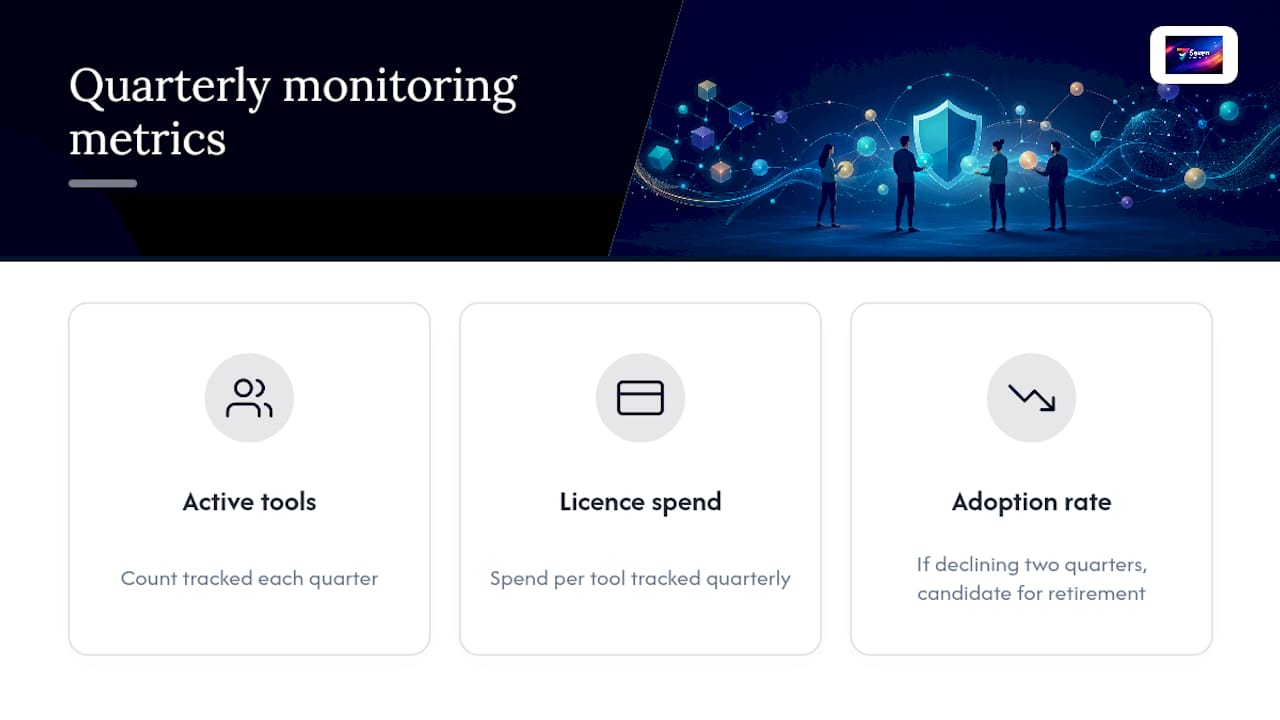
Track a small, consistent set of numbers over time rather than re-running a full audit from scratch each quarter: number of active tools, licence spend per tool, and adoption rate per tool. A tool with adoption trending downward for two quarters running is a candidate for retirement before it fully sprawls back out.
Assign ownership. One person, even in a two-person freelance partnership, should be responsible for approving any new tool before it’s adopted team-wide. Without an owner, sprawl creeps back in through individual convenience decisions that nobody coordinates.
Watch for the specific warning signs: a new spreadsheet appearing to “just track this one thing,” a team member mentioning a tool nobody else has heard of, or a sudden spike in “can someone send me that file” messages, which usually means information has drifted back into silos. The Seven blog covers practical consolidation guides if you want a running reference for spotting these patterns early.
Getting buy-in across departments and roles
A consolidation project stalls fast if it’s framed as an IT decision imposed from above. It survives when the people affected feel like they shaped it.
Bring in a representative from each function early, not after you’ve already chosen the new platform. A freelancer’s main collaborator, your bookkeeper, or whoever owns client communication will each spot a workflow dependency you’d otherwise miss until it breaks mid-pilot.
Frame the pitch around what each group loses, not what the business gains. Leadership cares about licence spend and reclaimed hours. The people doing the daily work care about fewer logins, less copy-pasting, and not losing track of a client’s file. Lead with their version of the benefit when you’re talking to them.
Bring data, not opinion, to the buy-in conversation. The adoption-times-criticality scores from your audit are far more persuasive than “I think we use too many tools,” because they show specifically which tools are costing time and which departments are affected.
Give sceptics a genuine say in the pilot scope. If someone on the team believes a particular tool is irreplaceable, let their workflow be part of the pilot rather than exempting it from the review. Either the new platform handles it and you’ve converted your loudest sceptic, or it doesn’t and you’ve learned something real about where integration, not replacement, is the right call.
Author perspective: why privacy-first consolidation matters for small teams
Most consolidation advice treats privacy as a nice-to-have. For a freelancer or a small team, it’s closer to a liability question: every extra tool holding client data is another company that could get breached, get acquired, or quietly start mining usage data you never agreed to. Minimalism isn’t tidiness here, it’s risk reduction. And none of it pays off until you actually cancel the old subscriptions.
— Greg
How Seven helps you actually reduce tool sprawl
Seven is built around the exact problem this guide walks through: one workspace for tasks, messaging, and files instead of four separate logins fighting for your attention. 
You get flexible workspaces for boards and subtasks, built-in messaging so conversations stay attached to the work instead of scattered across a separate chat app, and file attachments living next to the task they belong to. Excel import means your existing task lists don’t get abandoned during migration, and open data export means you’re never stuck if you decide to leave. Pricing is transparent and straightforward, with no hidden tiers waiting to appear after you’re locked in.
If you’re running the 30-day pilot outlined above, start a 7-day trial with Seven and use it as your consolidation cluster. Import your task list, invite the pilot team, and see how many logins disappear by week four.
Sources
The 2026 Tool Sprawl Report, Privagent’s research on shadow tools, and Coommit’s tool fatigue guide informed the framework above, alongside Seven’s own guides on SaaS data backup.