Run a SaaS security checklist across 40 tenants made for MSPs

Start by locking down identity, confirming independent backups exist, and getting written breach notification timelines from every vendor. Everything else on a proper saas security checklist builds on those three moves. Do them first, run the grouped checklist below across every tenant, and set a review cadence so posture doesn’t quietly decay between audits.
TL;DR:
- Most SaaS risks span identity, data, integrations, monitoring, and vendor contracts, requiring a comprehensive and layered security approach.
- Regularly verify that single sign-on and multi-factor authentication cover all critical apps, and audit admin accounts quarterly to prevent privilege creep.
- Establish independent backups and test recovery procedures, including with high-risk apps such as email, HR systems, and code repositories.
- Inventory OAuth grants and rotate API keys regularly to prevent shadow SaaS and forgotten integrations from becoming vulnerabilities.
- Automate low-risk checks, tier customers by sensitivity, and conduct quarterly backup drills to manage multiple tenants efficiently without burnout.
Table of Contents
- What should a SaaS security checklist cover?
- How do you actually run this checklist without stalling?
- Who owns your SaaS data, really?
- Scaling the checklist across MSP customers
- Protect project data with a platform that doesn’t lock it in
- Sources
- FAQ
What should a SaaS security checklist cover?
A working checklist has to cover more ground than most teams expect, because SaaS risk doesn’t sit in one layer. It spreads across identity, data, integrations, monitoring and the vendor contract itself. Cloud security standards from the Cloud Security Alliance treat continuous monitoring, centralised identity and independent backups as the non-negotiable core. Everything below builds outward from that base, grouped so you can hand a section to whoever owns it.
Identity and access controls
- Verify single sign-on (SSO) covers every business-critical app, not just the flagship ones.
- Enforce multi-factor authentication (MFA) for all accounts, with no legacy exceptions for service accounts.
- Audit admin and super-admin accounts quarterly; most tenants have more standing admins than anyone remembers granting.
- Run SCIM provisioning checks so deprovisioning actually removes access, not just the login screen.
- Revoke stale credentials and dormant API tokens on a rolling schedule.
Data protection and backups
- Confirm encryption at rest and in transit for every SaaS data protection tier the vendor offers.
- Set up an independent backup separate from the vendor’s own retention window, and test recovery, not just export.
- Check data residency terms against any regulatory requirement your client operates under.
- Document retention and deletion policies so “delete” actually means delete, not archive.
Integrations and API security
- Inventory every OAuth grant across the tenant. Shadow SaaS and forgotten integrations are a common failure point that manual reviews routinely miss.
- Rotate API keys on a fixed schedule, not “when someone remembers.”
- Vet third-party plugins and marketplace apps before install, and revoke ones nobody can justify.
- Verify webhook authenticity so spoofed payloads can’t trigger downstream automations.
Monitoring and detection
- Centralise logging across every SaaS app you’re responsible for.
- Forward logs to a SIEM and build alert rules for bulk exports, privilege escalations and impossible-travel logins, an approach Splunk’s SaaS security guidance treats as baseline, not advanced.
Vendor and contract review
- Confirm the data processing addendum (DPA) includes clear breach notification SLA timelines; SaaS vendors increasingly bake these into standard DPA language.
- Request SOC 2 or ISO evidence, and read the actual report, not just the badge.
- Get the subprocessors list and confirm audit rights are contractually real, not decorative.
Configuration and posture
- Document a security baseline for each app and enable drift detection against it.
- Run SSPM (SaaS Security Posture Management) checks where the vendor or your stack supports it.
Governance and cadence
- Assign named ownership for every app on the inventory, not a shared inbox.
- Set review frequencies and metrics upfront, and include SaaS-specific scenarios in tabletop exercises.
Pro Tip: Score each item as Done, In Progress, or Not Started, and re-run the same three states every quarter. A checklist that only ever gets a first pass is a report, not a control.
How do you actually run this checklist without stalling?
Running a full SaaS vulnerability checklist across dozens of tenants fails the moment you try to do everything at once. Sequence it instead.
- Prioritise crown-jewel apps first. Email, document storage, code repositories, HR systems and the CRM carry the most damage potential if compromised, so remediate there before touching lower-risk tools.
- Run an OAuth and app inventory sweep. This surfaces shadow SaaS and forgotten integrations before you spend time on access reviews for apps nobody uses anymore.
- Follow with a targeted access review for every high-privilege account uncovered in the sweep.
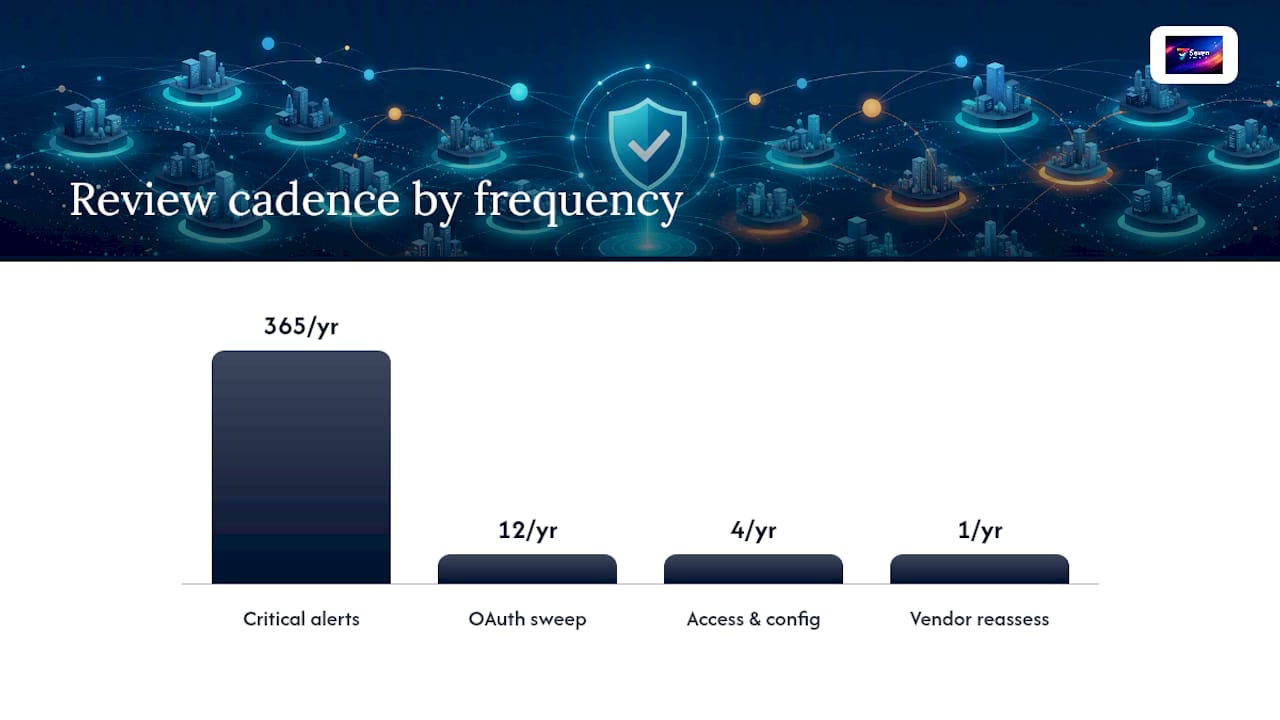
- Set a fixed cadence: critical alerts get triaged daily, OAuth sweeps run monthly, access and configuration reviews run quarterly, and full vendor reassessment happens annually.
- Test incident response with a real drill, not a tabletop that stays theoretical.
Tooling does the heavy lifting here. An identity provider (IDP) with SSO handles authentication centrally; SSPM tools catch configuration drift between manual reviews; backup tools give you a restore path independent of the vendor; a SIEM aggregates logs across apps; and SOAR can automate the predictable response steps once an alert fires. None of them replace judgement on the harder calls, and none of them substitute for someone actually owning the review.
Pro Tip: Run a backup recovery drill quarterly for high-risk apps, and test three scenarios specifically: a single-record restore, a 30-day point-in-time restore, and a full tenant failover. A backup nobody has restored from is a guess, not a control.
Who owns your SaaS data, really?
Providers secure the platform. You secure your data and who can touch it. That split is written into most data processing addenda, and it means backup and export decisions sit with you, not the vendor’s uptime team.
For project management data specifically, the checklist gets concrete fast:
- Run regular independent exports, not just reliance on vendor retention.
- Scan attachments on upload where the platform supports it.
- Set retention windows deliberately, rather than accepting whatever default ships.
- Require admin approval for bulk or destructive actions, like mass deletes or large exports.
Seven’s guidance on data ownership in SaaS contracts and its walkthrough on backing up SaaS project data both work through this in more detail, and the underlying point holds across any project tool: an untested backup isn’t a backup.
— Greg
Scaling the checklist across MSP customers
Running this checklist once is easy. Running it across forty tenants without burning your team out is the actual job.
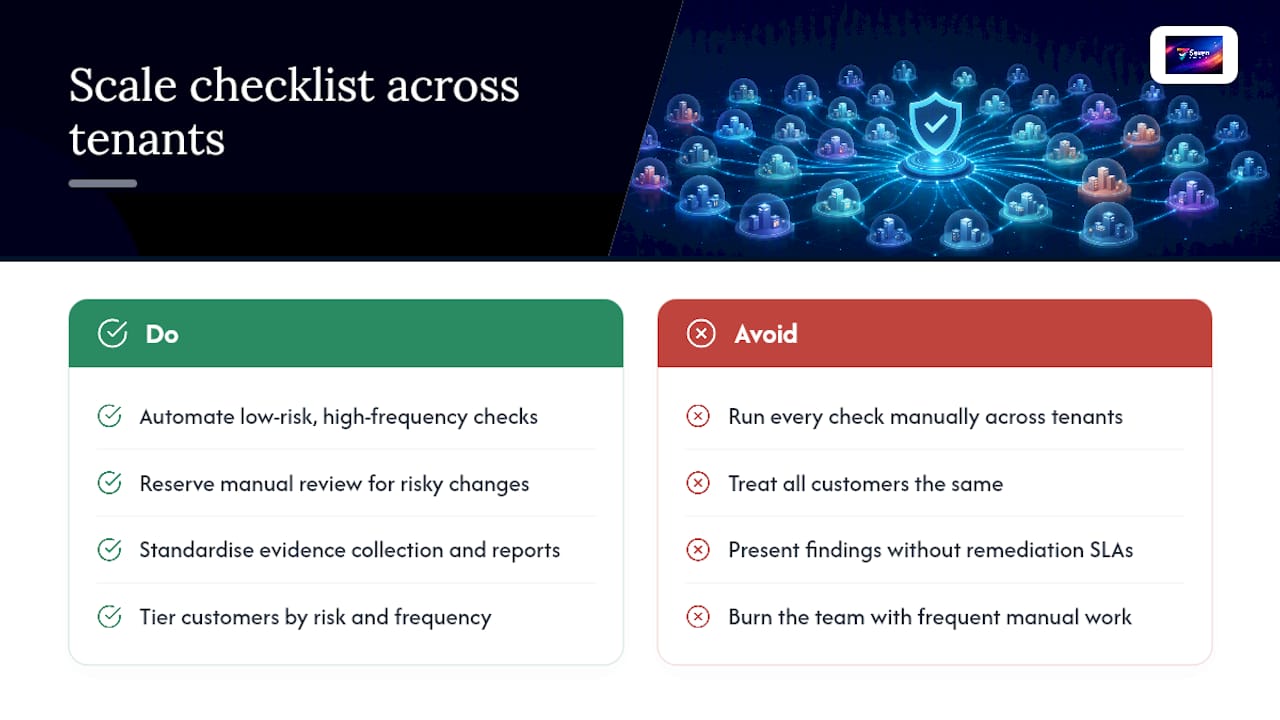
Automate the low-risk, high-frequency checks: MFA status, stale credential flags, OAuth counts. Save manual review time for genuinely risky changes, like new admin grants or unfamiliar third-party plugins. Standardise how you collect evidence so every customer report looks the same, and tier customers by risk so a healthcare client gets quarterly reviews while a low-data-sensitivity client gets an annual pass. When you present findings, attach a remediation SLA to each finding rather than a bare list of gaps.
Protect project data with a platform that doesn’t lock it in
The checklist above assumes you can actually get your data out when you need to. Not every SaaS platform makes that easy, and vendor lock-in is its own security risk, since a platform that hoards your export options also controls your recovery timeline. Some platforms are built around the idea that your project data is yours, exportable on demand, with no analytics or AI training running on it behind the scenes.

For teams building out a checklist for SaaS compliance, that matters at the practical level. Some platforms provide file attachment controls, straightforward Excel import and export, and flexible workspaces without hidden costs that show up later in enterprise contracts. Pricing details vary, so check provider sites for current information. Pair it with the audit habits above, review the Seven security and compliance page, and start a trial to see how a privacy-first setup fits your project data controls.
Sources
- Cloud Security Alliance — 7 essential SaaS security best practices
- Splunk blog — SaaS security guide
FAQ
What are the 7 layers of security relevant to SaaS?
There’s no single fixed list, but a common framing covers identity, data, endpoint, network, application, cloud infrastructure and physical security, with governance sitting across all seven. For SaaS specifically, identity, data protection and application-layer controls carry the most weight because you don’t manage the infrastructure yourself.
What is a SOC 2 compliance checklist?
A SOC 2 checklist verifies a vendor’s controls across security, availability, processing integrity, confidentiality and privacy, and mature teams treat it as an operational framework rather than a one-off certificate. Request the actual report and check for defined access policies, monitoring practices and documented incident response, not just a logo on the vendor’s website.
What is a TPRM checklist?
Third-Party Risk Management (TPRM) checklists assess vendor risk before and during a contract, covering security certifications, data handling practices, breach history, financial stability and contractual protections like breach notification SLAs. It overlaps heavily with the vendor and contract section of any SaaS risk assessment.
What are the key components of a SaaS due diligence checklist?
Due diligence for a new SaaS vendor covers certifications (SOC 2, ISO), the DPA and breach notification terms, subprocessor disclosures, data residency, encryption standards, and export or offboarding rights. Skipping the export and offboarding review is the most common gap, since it only becomes visible once you’re trying to leave.
How often should MSPs re-run the SaaS security checklist?
Critical alerts need daily attention, OAuth and permissions sweeps work well monthly, and full access and configuration reviews should run quarterly. Vendor reassessment, including fresh SOC 2 evidence and contract terms, belongs on an annual cycle unless a vendor changes ownership or has a disclosed incident.
Does using a privacy-focused tool like Seven reduce SaaS security checklist work?
It reduces the vendor-risk portion of the checklist by removing analytics-driven data use and giving you direct export access, but identity controls, backup testing and monitoring still apply to every SaaS app you run, Seven included.