4 quick checks to verify tracking-free SaaS for PMs

Tracking-free SaaS is software that runs your business without collecting behavioural analytics, building a profile of your team’s activity, or selling telemetry to third parties. For project managers and small teams, that distinction is verifiable, not just a marketing claim: you can check for it in a vendor’s policy, contract and product behaviour before you ever hand over a card number. Tools like Seven exist precisely because that verification is possible.
TL;DR:
- Verifying a tracking-free SaaS vendor involves checking for third-party trackers, explicit no-selling promises, data residency transparency, and granular access controls.
- Technical signals such as server-side metadata limits, end-to-end encryption, and monitoring network calls during demos can confirm if a vendor truly avoids tracking.
- Contracts should specify data processing purposes, deletion timelines, breach notification windows, and restrictions on AI training data, to enforce privacy commitments.
- Self-hosted options offer maximum control and compliance but require more operational effort, while privacy-focused SaaS depends on explicit disclosures and architecture.
- Testing export formats and performing small migration trials ensure you can leave a provider without losing important data or attachments.
Table of Contents
- What does “tracking-free SaaS” actually mean for a project management tool?
- Which technical signals prove a vendor isn’t tracking you?
- What contract terms stop your data from being sold or mined?
- Should you self-host, use SaaS, or go hybrid?
- How do you make sure you can leave without losing your data?
- What should you ask on a vendor demo call?
- Why does Seven treat privacy as a design choice, not a feature?
- Ready to try a project management tool that skips the tracking?
- Sources
What does “tracking-free SaaS” actually mean for a project management tool?
The phrase gets thrown around loosely, so it helps to pin down what it excludes. A genuinely tracking-free product doesn’t run third-party analytics scripts against your workspace, doesn’t sell usage data to advertisers or data brokers, and doesn’t quietly feed your task titles and comments into a model it trains for other customers. That’s different from “privacy-focused,” a term some vendors use while still shipping a session-recording tool or an ad pixel buried in their checkout flow.
For a project manager, the stakes are concrete. Task names, client details, budget figures and internal notes all live inside your PM tool. If that data gets mined for analytics or resold as telemetry, you’ve effectively handed a stranger a live feed of how your business operates. Verifying tracking-free status isn’t paranoia. It’s the same due diligence you’d apply to any vendor holding sensitive business records.
Here’s a four-step check you can run in 10 to 15 minutes on any vendor claiming to be tracking-free.
- Scan for third-party trackers and telemetry disclosures. Open the vendor’s privacy policy and search for terms like “analytics,” “advertising partners,” or “third-party services.” A tool that discloses exactly what it collects, and why, is more trustworthy than one that stays vague.
- Confirm the “no selling” promise and DPA availability. Look for an explicit statement that customer data is never sold or shared for marketing, and ask whether a data processing agreement is available on request, not buried behind a sales call.
- Verify data residency and subprocessor transparency. A vendor should be able to tell you exactly where data is stored and list every subprocessor that touches it.
- Assess access control granularity and audit logging. Check whether you can restrict visibility by role and whether admin actions leave a traceable log.
Authoritative vendor-risk frameworks recommend exactly this kind of tiered assessment covering tracking practices, no-selling commitments, residency and access granularity, rather than treating any single signal as proof on its own.
Pro Tip: Run this checklist during the vendor’s free trial, not after you’ve migrated your data. If a sales rep can’t answer the residency or subprocessor question on the spot, that’s your answer.
Which technical signals prove a vendor isn’t tracking you?
Marketing copy says “privacy-first.” Architecture either backs that up or it doesn’t. The gap between the two shows up in a handful of technical details you can actually check.
Server-side metadata is unavoidable to some degree; a PM tool needs timestamps, user IDs and workspace references to function. What’s acceptable is metadata scoped to operating the product. What’s not acceptable is metadata that tracks how long you hovered over a button or which features you clicked in what order, none of which the product needs to run.
Client-side encryption, sometimes called zero-knowledge or end-to-end encryption (E2EE), takes this further by making server-side reading impossible in the first place. A zero-knowledge Kanban implementation, for example, encrypts workspace keys per member so that even a compromised server can’t expose task content. Not every PM tool needs this level of architecture, but it’s worth knowing the option exists and asking why a vendor hasn’t adopted it if privacy is their headline claim.
During a demo, a few checks reveal a lot:
- Open your browser’s network tab and watch for calls to known analytics or advertising domains.
- Look for third-party scripts loading alongside the core app.
- Ask whether the vendor publishes a subprocessor list or a software bill of materials (SBOM) for supply-chain transparency.
- Ask if production containers are cryptographically signed to prevent tampered builds.
Security teams generally recommend confirming this kind of tracking behaviour by checking for analytics libraries and monitoring network calls during ordinary use, which is something you can do yourself in five minutes without any special tooling.
What contract terms stop your data from being sold or mined?
A clean product demo means nothing if the contract undermines it. The data processing agreement is where privacy promises either become enforceable or stay as marketing fluff.
A usable DPA should spell out:
- The exact purposes data can be processed for, with no open-ended “and other business purposes” clause.
- Deletion obligations with a defined timeframe once you cancel or offboard.
- Breach notification timelines, ideally 72 hours or less.
- An explicit exclusion barring your data from being used to train AI models, since AI features in PM tools carry their own privacy risk that a generic DPA often doesn’t cover.
Beyond the DPA, check the subprocessor list and how you’re notified when it changes. A vendor that adds a new subprocessor silently is a vendor you can’t audit. Ask about support staff access too: does anyone in customer support have standing access to your workspace content, or is access granted per-ticket and logged?
Not every team needs the same depth here. A defence-in-depth approach means classifying project data by sensitivity and matching your scrutiny to it. A freelancer managing a content calendar doesn’t need the same contractual rigour as a team handling client financial records or regulated health data.
Should you self-host, use SaaS, or go hybrid?
The hosting decision is really a trade-off between control and operational load, and it’s worth working through before you sign anything.
- Self-hosted gives you full isolation and control over where data physically lives. It suits teams with strict residency requirements or a zero-trust security posture, but it means you own patching, backups and uptime.
- Privacy-focused SaaS shifts that operational burden to the vendor. This works well for privacy goals as long as the vendor is explicit about residency and publishes its subprocessor list, rather than asking you to trust a vague “we take privacy seriously” line.
- Region-locked or private hosted instances sit in the middle: you get SaaS convenience with a contractual guarantee that data doesn’t leave a named region.
“EU hosting” claims deserve particular scrutiny. Practitioners increasingly point out that EU-only hosting claims can fall short unless the vendor’s architecture technically restricts cross-border routing, not just its marketing page. A server sitting in Frankfurt doesn’t mean much if support tooling or backup infrastructure routes through a US-based subprocessor. For a deeper look at how residency choices interact with actual architecture, see this breakdown of data residency in SaaS.
Pro Tip: Ask the vendor directly: “If I’m in the EU, does any part of my data, including backups and support logs, ever touch a non-EU server?” A confident, specific answer beats a glossy compliance badge.
If you’re weighing the full operational cost of each model, this self-hosted versus SaaS decision matrix walks through the practical trade-offs in more depth.
How do you make sure you can leave without losing your data?
Vendor lock-in is a privacy issue as much as a convenience one. A tool that makes export hard is a tool that has less incentive to earn your trust year after year.
- Check export formats before you buy, not after. CSV covers task lists, but you need CSV or JSON plus a separate attachments bundle to preserve comments, relationships and files.
- Test the API and note its rate limits. If you’ll ever need to script a bulk export, confirm the API can actually handle it.
- Read the retention and deletion policy. Ask what “deleted” means: soft-deleted and recoverable, or genuinely purged, and on what timeline.
- Run a small test migration. Move one real project in and back out before committing your whole team, and check that comments and files survive the round trip.
A practical file storage and lock-in checklist is worth running through for attachments specifically, since that’s where exports most often silently drop data.
What should you ask on a vendor demo call?
Sales calls are where vague privacy claims get made and rarely challenged. Bring a short script and note the exact wording of every answer.
- “Do you track user behaviour or session activity beyond what’s needed to run the product?”
- “Is customer data ever sold or shared for advertising or marketing purposes?”
- “Can I see your DPA and subprocessor list before signing?”
- “Where is data stored, and does any of it cross borders during backup or support?”
- “Is any customer data used to train AI models, and can that be contractually excluded?”
- “What export formats do you support, and can I test one during the trial?”
- “Who inside your company can access my workspace content, and is that access logged?”
- “What’s your breach notification timeframe?”
- “Can you provide audit evidence, or only a policy document?”
- “What happens to my data if I cancel?”
Watch for evasive phrasing: “industry-standard security,” “we take privacy seriously,” or a refusal to put anything in writing. Those are the same red flags a SaaS vendor scorecard for small teams recommends screening for before signing a recurring contract. Score each answer on a simple scale, documentation only, documentation plus DPA clause, or independently verified, and file it. You’ll want that record if anyone on your team ever asks why you chose this vendor.
Why does Seven treat privacy as a design choice, not a feature?
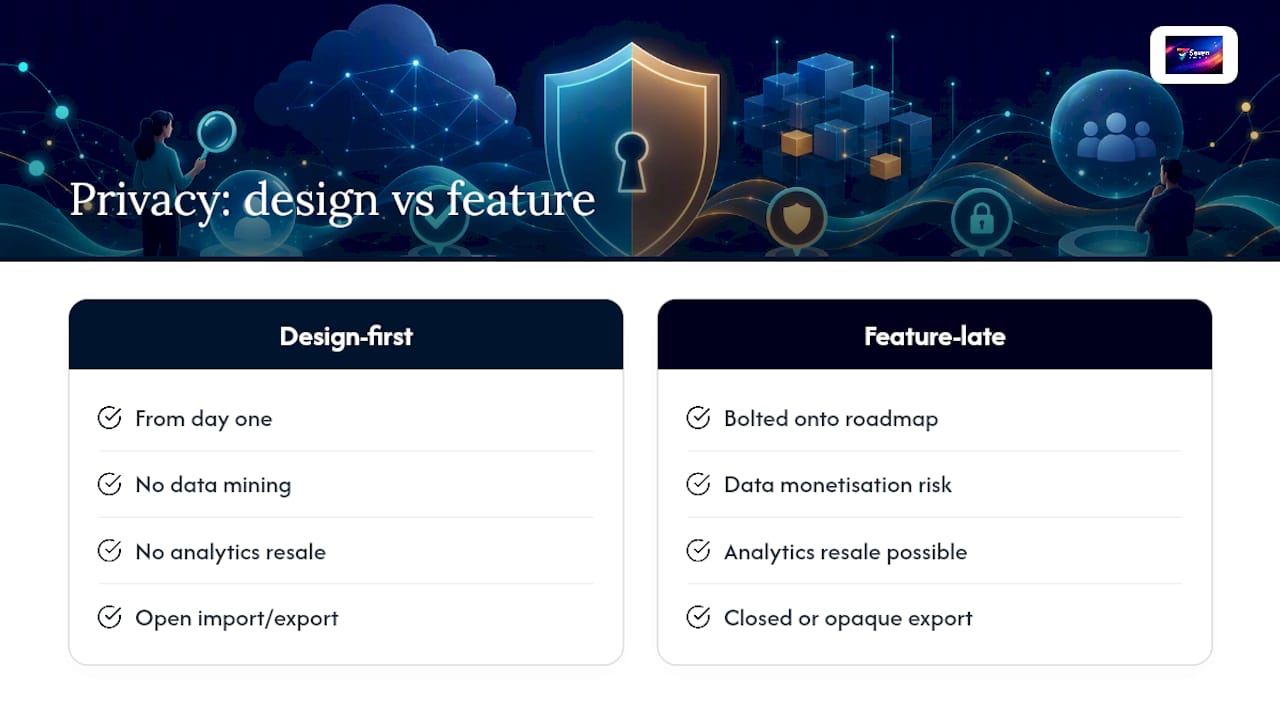
Most PM tools bolt privacy onto a roadmap once customers start asking. Seven was built the other way around: no data mining, no analytics resale, and open export from day one, because those choices are cheap to make early and expensive to retrofit later.
What matters practically for small teams is less about certification and more about whether the product gets out of your way. Flexible workspaces, built-in messaging, file attachments and straightforward import and export cover the daily mechanics without asking you to trust a black box. An independently built platform with transparent pricing has less incentive to monetise your data elsewhere, because there isn’t another revenue stream to protect.
Run the checklist above against Seven the same way you’d run it against anyone else. That’s the point.
— Greg
Ready to try a project management tool that skips the tracking?
Everything in this checklist maps cleanly onto Seven’s setup. There’s no behavioural analytics running in the background, no telemetry resale, and data residency and export formats are stated plainly rather than buried in a sales deck.

On the export side, you can pull your data out in open formats at any point, no negotiation required, and pricing is public with straightforward individual and team rates, with no hidden tiers waiting to surprise you later. If you’re comparing that against a heavier enterprise platform or a bare-bones self-hosted stack like the options covered in Minuted’s pricing, the difference is how little friction sits between you and actually using the tool.
Start the 7-day free trial on Seven’s pricing page and run your own version of the vendor checklist against it. Import a spreadsheet, invite a teammate, and see whether the product holds up under the same scrutiny you’d apply to anyone else.
Sources
- Cloud & SaaS vendor risk management (Safe Security)
- Defence in depth (Fortinet)
- EU hosting vs data sovereignty (Piwik PRO)
- Data privacy in AI-powered PM tools (Project Management Formula)